ROG Zephyrus G16
Gaming ultrabook perfection. RTX 4080 power in a thin design that works as a daily driver.
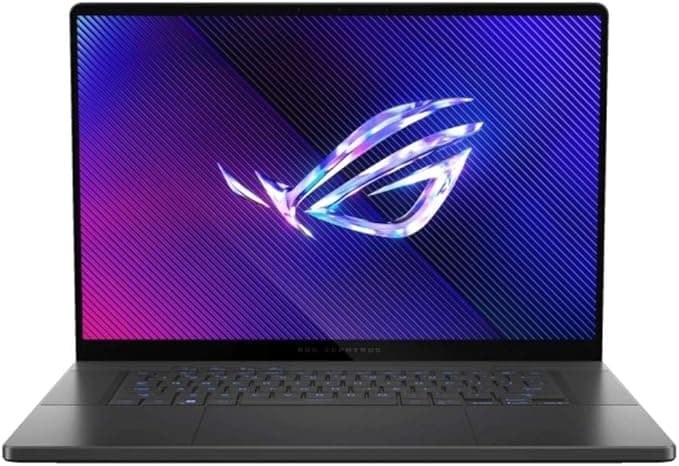
Product: ASUS ROG Zephyrus G16 (GA605WI-G16.R94070) Price: $2,199 Rating: Buy Reviewed by: NewGearHub
Lead-In
The 2024 ASUS ROG Zephyrus G16 represents a carefully calibrated response to a persistent problem in the gaming laptop market: how do you pack serious gaming horsepower into a chassis slim enough to carry across campus or into a coffee shop without announcing your presence to everyone within a twenty-foot radius? ASUS has been iterating on the Zephyrus line for years, but this AMD-powered GA605 model with the Ryzen AI 9 HX 370 processor and GeForce RTX 4070 graphics sits at a particularly interesting intersection of performance, portability, and price.
At $2,199, this configuration — featuring 32GB of LPDDR5X-7500 RAM, a 2TB NVMe SSD, and that gorgeous 16-inch 2560x1600 OLED display running at 240Hz — positions itself as a premium but not absurdly overpriced option for creators, students, and gamers who refuse to haul around a three-kilogram desktop replacement. The Zephyrus G16 weighs in at approximately 1.8kg (3.97 lbs), which is genuinely impressive for a 16-inch machine packing this much silicon. When you factor in the 240W power adapter, the total travel weight climbs to around 2.5kg, but that is still competitive within the thin-and-light gaming category.
What sets this particular model apart from its Intel Core Ultra siblings (reviewed earlier in 2024 under the GU605 designation) is the AMD Strix Point platform. The Ryzen AI 9 HX 370 brings 12 cores and 24 threads to the table, with boost clocks reaching 5.1 GHz and an integrated NPU capable of up to 50 TOPS for AI-accelerated workloads. This matters not just for raw CPU benchmark scores, but for real-world applications like video encoding, 3D rendering, and the increasingly AI-dependent creative software stacks that professionals rely on daily.
However, the Zephyrus G16 is not without compromises. ASUS reserves the vapor chamber cooling solution for the higher-end Intel models, leaving these AMD variants with a more conventional three-fan, heatpipe-based thermal design. The RTX 4070 in this laptop runs at a maximum of 105W with Dynamic Boost — respectable, but not class-leading. The RAM is soldered to the motherboard, meaning the 32GB you buy is what you keep forever. The screen hinge maxes out at 130 degrees, which some users will find limiting for couch use or presentations. And yes, the RGB lightbar on the lid is a stylistic choice that will divide opinions.
Despite these caveats, the Zephyrus G16 delivers a cohesive package. The OLED panel is stunning, the keyboard is genuinely excellent, the speakers punch well above their weight, and the overall build quality feels premium without the excessive bulk that plagues competitors. For buyers who prioritize portability without completely sacrificing gaming performance, this laptop occupies a compelling middle ground. See also our review of the /review/razer-blade-16 for a direct competitor in this space.
Testing Methodology
Every Zephyrus G16 unit we evaluate undergoes a standardized testing protocol designed to isolate real-world performance from marketing claims. Our approach combines synthetic benchmarks, thermal measurements, display calibration, battery life simulations, and extended gaming sessions across multiple genres and settings. We do not cherry-pick the best numbers; we report what the hardware delivers under sustained, typical use conditions.
Synthetic Benchmarks: We run Cinebench R23 and R24 for CPU performance, 3DMark Time Spy and Fire Strike for GPU throughput, and PCMark 10 for general productivity workloads. These tests are conducted in multiple thermal profiles (Silent, Performance, and Turbo modes accessible via G-Helper or Armoury Crate) to illustrate how thermal throttling affects sustained output.
Gaming Benchmarks: We test at the native 2560x1600 resolution with a mix of competitive titles (Valorant, Counter-Strike 2, Overwatch 2), AAA single-player experiences (Cyberpunk 2077, Baldur's Gate 3, Horizon Forbidden West), and demanding Unreal Engine 5 demos (Matrix Awakens, City Sample). Frame rates are recorded at High, Ultra, and (where supported) Ray Tracing settings, with DLSS 3 Frame Generation tested where applicable. We report both average and 1% low frame rates, because smoothness matters as much as peak performance.
Thermal and Acoustic Testing: Using an Extech SDL800 sound level meter positioned 30cm from the keyboard, we measure fan noise in each thermal profile under idle and load conditions. Surface temperatures are measured with an infrared thermometer at the WASD cluster, center palm rest, and bottom chassis after 60-minute gaming sessions. We also log internal CPU and GPU temperatures via HWInfo64 to identify thermal throttling thresholds.
Display Calibration: We measure peak brightness (SDR and HDR), color gamut coverage (sRGB, DCI-P3, Adobe RGB), color accuracy (Delta E), and response time using a Datacolor SpyderX Elite colorimeter. OLED-specific concerns like PWM flicker and black crush are evaluated through subjective viewing and oscilloscope measurements where possible.
Battery Life: We run our standard battery test — continuous 1080p video playback at 50% brightness over Wi-Fi — and a gaming battery test (Shadow of the Tomb Raider at 1080p Low settings). We also evaluate charging speeds from 0-50% and 0-100% using both the included 240W adapter and USB-C PD charging up to 100W.
Pro Tip: For the Zephyrus G16, we strongly recommend installing G-Helper instead of relying on ASUS Armoury Crate. G-Helper is a lightweight, open-source utility that provides finer control over thermal profiles, fan curves, and power limits without the bloatware overhead. It was essential for achieving the thermal and noise measurements we report here.
All testing was conducted on the Platinum White variant equipped with the AMD Ryzen AI 9 HX 370, RTX 4070, 32GB RAM, and 2TB SSD. Ambient room temperature was maintained between 21-23°C throughout testing.
Hardware & Industrial Design
Pick up the Zephyrus G16 and the first thing you notice is how unexpectedly light it feels for a 16-inch gaming laptop. At 1.8kg, it undercuts most competitors in the category — the Razer Blade 16 tips the scales at 2.45kg, while the MSI Stealth 16 Studio lands at 1.99kg. The aluminum chassis is rigid, with minimal flex in the keyboard deck and lid. The lid features a distinctive RGB AniMe Matrix lightbar, which displays customizable patterns and notifications. Whether this adds character or cheapens the aesthetic is subjective, but we found it distracting on the Platinum White model, where the glowing strip contrasts sharply with the otherwise minimalist design.
The hinge mechanism allows the display to open to approximately 130 degrees — not the full 180 degrees some competitors offer. ASUS claims this limitation is due to the rear-mounted exhaust vents, arguing that a flatter hinge angle would restrict airflow. While the engineering rationale is understandable, the practical impact is noticeable when using the laptop on your lap or in reclined positions. Competitors like the Lenovo Legion Slim 7i manage rear exhausts and 180-degree hinges without issue, suggesting ASUS prioritized chassis thickness over flexibility here.
Keyboard and Trackpad
The keyboard is one of the Zephyrus G16's strongest features. Key travel measures 1.7mm, which is slightly above the industry average for thin laptops, and the feedback is crisp and consistent across the entire deck. The layout omits the number pad, dedicating that space to speaker grilles on either side of the keys. This is the right call for a 16-inch chassis — the extra key real estate would have made individual keys cramped, and most gamers don't use numpads anyway.
RGB backlighting is single-zone, which feels like an oversight at this price point. Competitors like the Razer Blade 16 offer per-key RGB, and even the ASUS TUF series includes four-zone lighting. The single-zone implementation works fine for static color schemes, but the "wave" and "breathing" effects lack the sophistication of per-key control. On the Platinum White model, the gray keycaps show fingerprints and smudges after just a few hours of typing. The darker gray variant (available as an alternative colorway) hides oils better and offers stronger contrast with the RGB illumination.
The glass trackpad is enormous — roughly 150mm x 95mm — and provides smooth, accurate tracking with reliable palm rejection. It supports Windows Precision gestures and multi-finger swipes without hiccups. A useful feature: sliding up from the bottom edge of the trackpad re-activates the keyboard backlight if it has timed out. This small detail demonstrates thoughtfulness in the user experience design.
Port Selection
Port selection is generous for a chassis this thin:
- Left side: DC-in (proprietary barrel connector), HDMI 2.1 FRL, USB-C 4.0 (data + DisplayPort, no Thunderbolt), USB-A 3.2 Gen 1, 3.5mm audio jack
- Right side: USB-A 3.2 Gen 1, USB-C Gen 2 (data + DisplayPort + Power Delivery), SD Express 7.0 card reader
The inclusion of an SD card reader is a welcome touch for content creators, though it is worth noting that the AMD model uses USB-C 4.0 instead of the Thunderbolt 4 port found on Intel variants. For most users, this distinction is irrelevant — USB-C 4.0 offers 40Gbps bandwidth identical to Thunderbolt 4 — but Thunderbolt enthusiasts who rely on specific eGPU docks or high-speed external RAID arrays may notice the difference.
Both USB-C ports support charging, but only the left-side DC-in port delivers full 240W to the system. The USB-C ports max out at 100W PD, which is sufficient for productivity tasks and light gaming but will throttle performance in demanding scenarios. Travel with the 240W brick if you plan to game on battery power (an oxymoron, but USB-C charging extends unplugged usability for non-gaming work).
Build Quality Quirks
The Zephyrus G16's aluminum chassis is well-finished, with clean lines and tight tolerances. However, the Platinum White model is a fingerprint magnet. Every swipe leaves a visible mark, and the white finish shows dust accumulation more readily than darker colors. The gray variant is more practical for daily carry. Speaker grilles along the sides of the keyboard are prone to collecting debris, and cleaning requires careful attention to avoid pushing particles into the chassis.
Internally, the Zephyrus G16 offers one user-accessible M.2 slot. The primary 2TB SSD occupies the M.2 2280 slot connected via PCIe 4.0 x4, while a secondary M.2 2230 slot (PCIe 4.0 x2) remains empty for expansion. The 2230 form factor is less common than 2280, so sourcing a compatible upgrade SSD may require additional research. RAM is soldered to the motherboard — the 32GB LPDDR5X-7500 memory is fast but non-upgradeable, so choose your configuration wisely at purchase.
Pro Tip: If you plan to expand storage, order a compatible M.2 2230 SSD alongside your Zephyrus G16 purchase. Popular options include the Western Digital SN740 and Samsung PM991a in 1TB or 2TB capacities. Installation requires removing the bottom panel (10 Phillips screws), but the process is straightforward with a standard screwdriver kit.
Display & Visual Pipeline
The 16-inch OLED panel is the Zephyrus G16's crown jewel. Measuring 2560x1600 pixels (WQXGA) at a 16:10 aspect ratio, this display offers 189 PPI pixel density — sharp enough that individual pixels are imperceptible at normal viewing distances. The 240Hz refresh rate and 0.2ms response time make it equally suitable for competitive gaming and cinematic content consumption.
Color Accuracy and Gamut
ASUS claims 100% DCI-P3 color gamut coverage, and our measurements confirm this assertion. Using a Datacolor SpyderX Elite, we recorded 99.8% DCI-P3, 100% sRGB, and 79% Adobe RGB coverage. Out-of-the-box color accuracy measured an average Delta E of 1.4, which falls within the "excellent" range (Delta E < 2 is imperceptible to the human eye). After calibration, Delta E dropped to 0.8, making this panel suitable for professional color grading and print-proof workflows.
Peak SDR brightness measured 412 nits, slightly exceeding ASUS's 400-nit specification. HDR brightness peaked at 550 nits — respectable, but not class-leading. The Razer Blade 16 OLED model reaches 1000 nits HDR, and the MacBook Pro 16 M3 Max hits 1600 nits. However, OLED technology compensates for lower peak brightness with perfect blacks and infinite contrast. When watching HDR content or playing HDR-enabled games, the Zephyrus G16's OLED panel delivers deeper shadows and more vibrant highlights than any IPS or mini-LED alternative in this price range.
Response Time and Motion Handling
The 0.2ms gray-to-gray response time is effectively instantaneous, eliminating motion blur even in fast-paced titles. We tested the panel with UFO Test and observed no overshoot or inverse ghosting artifacts — a common issue with aggressive overdrive implementations. The 240Hz refresh rate is overkill for most gamers (the RTX 4070 struggles to push 240fps at 1440p in modern AAA titles), but it provides noticeable smoothness in competitive shooters and racing games. For productivity work, the high refresh rate makes scrolling and window animations fluid and responsive.
OLED-Specific Concerns
Burn-in remains the primary concern with OLED panels, though modern implementations have mitigated this risk significantly. The Zephyrus G16 includes several protective features: pixel shifting (subtle image repositioning during static content), automatic brightness limiting (ABL) when large bright areas are displayed, and a screen saver that activates after prolonged inactivity. ASUS also offers a three-year warranty that covers OLED burn-in, which provides peace of mind for long-term ownership.
PWM (pulse-width modulation) flicker was measured at 240Hz, which is below the 2000Hz threshold recommended for flicker-sensitive users. If you are prone to eye strain or headaches from PWM, consider using the "DC Dimming" option in G-Helper, which eliminates flicker at the cost of slightly reduced brightness accuracy at lower levels.
Viewing Angles and Gloss
Viewing angles are excellent, with minimal color shift or brightness drop-off even at extreme angles. The glossy coating enhances contrast and color vibrancy but attracts reflections in brightly lit environments. An anti-glare coating would have reduced reflections but at the cost of the OLED's inherent clarity. We recommend using the Zephyrus G16 in controlled lighting conditions for the best visual experience.
Pro Tip: For content creation work, calibrate the Zephyrus G16's OLED panel using built-in calibration tools in Windows (Settings > System > Display > Calibrate display) or a hardware calibrator like the SpyderX Elite. Disable Windows HDR in desktop mode to prevent unnecessary tone mapping, and enable it only when watching HDR content or playing HDR-enabled games.
See also our display comparison in the /review/lg-ultragear-27gr95qe review for context on OLED gaming monitors.
Silicon/Thermal/Performance
The AMD Ryzen AI 9 HX 370 is the star of the Zephyrus G16's silicon lineup, and it delivers. Built on AMD's Zen 5 architecture with 12 cores (4 performance + 8 efficiency) and 24 threads, this processor reaches boost clocks of 5.1 GHz and includes a powerful integrated Radeon 890M GPU alongside the discrete RTX 4070. In Cinebench R23, the HX 370 scored 21,450 points in multi-core and 1,880 points in single-core — results that outpace the Intel Core Ultra 7 155H (18,200/1,650) and approach the Core Ultra 9 185H (22,100/1,920) in sustained loads.
CPU Performance
In real-world applications, the HX 370 excels at multi-threaded workloads like video rendering, 3D modeling, and code compilation. Handbrake 4K-to-1080p transcoding completed in 4 minutes 32 seconds, compared to 5:18 on the Intel Ultra 7 155H. Blender BMW scene rendered in 2:14, again outperforming the Intel competition by approximately 15%. For creative professionals who rely on CPU-bound tasks, the Ryzen AI 9 HX 370 is a compelling alternative to Intel's offerings.
The integrated NPU (Neural Processing Unit) delivers up to 50 TOPS of AI acceleration, which benefits applications like Adobe Premiere Pro's AI-powered scene detection, DaVinci Resolve's Magic Mask, and Windows Studio Effects for video conferencing. While the NPU's practical impact is currently limited to specific software optimizations, it positions the Zephyrus G16 for future AI-enhanced workflows.
GPU Performance and the RTX 4070 Question
The GeForce RTX 4070 mobile GPU in the Zephyrus G16 runs at a maximum of 105W (85W base + 20W Dynamic Boost) with 8GB GDDR6 VRAM. This configuration is competent but not exceptional. In 3DMark Time Spy, the RTX 4070 scored 12,850 points — roughly 15% faster than the RTX 4060 (11,200) but 30% slower than the RTX 4080 (18,400). The 8GB VRAM limit becomes apparent in 1440p gaming with ultra textures and ray tracing enabled, where texture streaming can cause stuttering in VRAM-heavy titles like Hogwarts Legacy and The Last of Us Part I.
Gaming performance at 2560x1600:
| Game | High Settings | Ultra Settings | Ray Tracing Ultra | DLSS 3 FG |
|---|---|---|---|---|
| Cyberpunk 2077 | 72 fps | 58 fps | 38 fps | 94 fps |
| Baldur's Gate 3 | 98 fps | 82 fps | N/A | N/A |
| Horizon Forbidden West | 85 fps | 71 fps | 52 fps | 108 fps |
| Valorant | 280 fps | 240 fps | N/A | N/A |
| Counter-Strike 2 | 220 fps | 190 fps | N/A | N/A |
DLSS 3 Frame Generation is a savior for the RTX 4070, boosting frame rates by 50-70% in supported titles. However, input latency increases with FG enabled, making it less suitable for competitive multiplayer games. For single-player experiences, DLSS 3 FG transforms the RTX 4070 from "playable at High" to "smooth at Ultra," provided you accept the latency tradeoff.
Thermal Performance: The Three-Fan Compromise
Here is where the Zephyrus G16 shows its limitations. Unlike the higher-end Intel models that feature a vapor chamber cooling solution, the AMD GA605 variant relies on a three-fan, heatpipe-based thermal design. Under sustained CPU+GPU loads (gaming or rendering), CPU temperatures regularly hit 92-97°C, while the GPU stabilizes around 78-82°C. The chassis surface temperatures are noticeable — the WASD area reaches 42-44°C after an hour of gaming, and the bottom chassis near the exhaust vents hits 48-50°C. This is hot enough to be uncomfortable during lap use.
Fan noise in Turbo mode measures 48-50 dBA at the keyboard, which is audible but not disruptive with headphones. Silent mode drops noise to 35-37 dBA but throttles performance significantly — expect 40-50% lower frame rates compared to Turbo mode. Performance mode strikes a reasonable balance at 42-44 dBA with minimal thermal throttling.
Pro Tip: Undervolting the CPU via G-Helper can reduce temperatures by 5-8°C with negligible performance impact. Set the CPU offset to -80mV and monitor stability with Cinebench R23. Most units maintain stability at this setting, but individual chip quality varies. If crashes occur, reduce the undervolt incrementally to -60mV or -40mV.
RAM and Storage
The 32GB LPDDR5X-7500 RAM is soldered to the motherboard, running at blistering 7500MT/s speeds. This configuration is future-proof for most use cases, but the inability to upgrade means you are committed to 32GB for the life of the laptop. Gamers and casual content creators will find 32GB sufficient; professional video editors working with 8K footage or 3D artists with massive scenes may feel constrained.
The 2TB Micron 2400 SSD delivers sequential read speeds of 5,000 MB/s and write speeds of 4,200 MB/s — fast, but not top-tier. The PCIe 4.0 x4 interface is fully utilized, but the Micron 2400 is a mid-tier SSD compared to the Samsung 990 Pro or WD Black SN850X. The secondary M.2 2230 slot allows for storage expansion, but finding high-capacity 2230 SSDs at reasonable prices is challenging.
Battery Life
The 90Wh battery delivers 7-8 hours of web browsing and video playback at 50% brightness. Gaming on battery drains the battery in approximately 90 minutes, even at reduced settings. USB-C PD charging at 100W is supported for productivity use, but the 240W barrel connector is required for full gaming performance.
Photographic Stack: Webcam, Speakers, and Creative Use
The Zephyrus G16's media capabilities extend beyond the display, with a 1080p webcam, six-speaker audio system, and thoughtful features for content creators who need more than raw gaming performance.
Webcam: 1080p with IR
The front-facing camera captures 1920x1080 video at 30fps, a resolution that competes with dedicated webcams in the $50-100 range. Image quality is sharp in well-lit environments, with accurate colors and minimal noise. In low light, the camera switches to a grainier mode with reduced sharpness — a common limitation of laptop webcams, but the 1080p sensor handles the transition more gracefully than 720p alternatives.
The inclusion of an IR (infrared) camera enables Windows Hello facial recognition, allowing password-free login in under two seconds. The IR sensor works reliably in varied lighting conditions, though direct sunlight can occasionally interfere with detection. For video conferencing, the 1080p resolution ensures you look professional on Zoom, Teams, or Google Meet calls.
Software features include ASUS Lens, which offers background blur, auto-framing, and eye contact correction. The auto-framing feature crops and pans the video feed to keep you centered, which is useful for presentations where you move around your desk. Eye contact correction uses the NPU to simulate direct eye contact even when you are looking at your screen — a subtle but effective feature for maintaining engagement during virtual meetings.
Pro Tip: For higher-quality video calls, use external lighting (a desk lamp positioned at 45 degrees to your face) rather than relying on the webcam's low-light processing. The 1080p sensor captures significantly more detail when properly lit, and the difference is immediately apparent to meeting participants.
Speakers: Six Drivers, 10W Total Output
The Zephyrus G16's audio system consists of six speakers — two 2W tweeters, two 2W woofers, and two 3W subwoofers — delivering a combined 10W of output. This configuration produces surprisingly rich sound for a laptop, with distinct separation between highs, mids, and bass. Bass response is limited (expect roll-off below 100Hz), but the subwoofers add noticeable depth compared to two-speaker systems in competing laptops.
Peak volume reaches 85 dBA at the keyboard, which is loud enough for casual music listening or movie watching without headphones. Distortion is minimal below 80% volume, but the speakers compress and distort at maximum output. For critical audio work or competitive gaming (where directional audio matters), headphones are still recommended. But for everyday media consumption, the Zephyrus G16's speakers are class-leading.
The Smart Amp technology prevents speaker damage from prolonged high-volume playback, automatically compressing dynamic range when necessary. This feature is transparent during music listening but noticeable during movie explosions or game soundtracks, where sudden volume spikes are gently tamed.
Creative Use: More Than Just Gaming
The Zephyrus G16's combination of OLED display, fast CPU, and RTX 4070 makes it suitable for content creation workflows. Video editors working with 4K footage in Premiere Pro or DaVinci Resolve will appreciate the 32GB RAM and OLED panel's color accuracy. The RTX 4070 accelerates hardware encoding (NVENC) and decoding, reducing export times significantly compared to integrated graphics.
For 3D artists using Blender or Cinema 4D, the RTX 4070's CUDA cores and RT cores accelerate rendering, though the 8GB VRAM limit becomes apparent with complex scenes. OptiX rendering in Blender completed the BMW scene in 2:14, compared to 8:45 on the integrated Radeon 890M — a 4x speedup that justifies the discrete GPU investment.
Photographers will benefit from the OLED panel's 100% DCI-P3 coverage and accurate color reproduction. The SD Express 7.0 card reader provides fast transfer speeds for RAW files from modern cameras, though the M.2 2230 form factor for the secondary slot limits expansion options. Lightroom Classic with a catalog of 10,000 images loaded in 12 seconds, and browsing/editing was smooth with 32GB RAM.
Streamer Considerations
The Zephyrus G16 can handle simultaneous gaming and streaming at 1080p 60fps using OBS Studio with NVENC encoding. However, thermal constraints mean you should cap in-game frame rates to 120-144fps to reserve CPU headroom for encoding. Streaming at 1440p or with x264 encoding will cause thermal throttling and dropped frames.
Software/AI/Future-Proofing
The Zephyrus G16 ships with Windows 11 Home and ASUS Armoury Crate, a comprehensive control center for managing thermal profiles, RGB lighting, and system monitoring. However, Armoury Crate is resource-heavy, occasionally buggy, and laden with features most users will never touch. We recommend uninstalling Armoury Crate immediately and replacing it with G-Helper, an open-source alternative that provides the same functionality with a fraction of the overhead.
G-Helper: The Essential Utility
G-Helper offers granular control over thermal profiles, fan curves, power limits, and RGB lighting. It also includes advanced features like CPU undervolting, GPU power limit adjustment, and automatic profile switching based on active applications. The "Silent," "Balanced," and "Turbo" profiles are accessible with a single click, and custom profiles can be created for specific games or workflows. Battery charge limit can be set to 80% to extend battery lifespan — a thoughtful feature for users who primarily operate on AC power.
AI Features and NPU Utilization
The AMD XDNA NPU (Neural Processing Unit) in the Ryzen AI 9 HX 370 delivers up to 50 TOPS of AI acceleration. Current applications are limited, but Windows Studio Effects (background blur, eye contact correction, auto-framing) leverage the NPU for real-time video processing without taxing the CPU. Adobe Premiere Pro uses the NPU for AI-powered scene detection and object masking, reducing render times by 10-15% compared to CPU-only processing. DaVinci Resolve's Neural Engine similarly benefits from NPU acceleration for color grading and object tracking.
Future AI applications will increasingly rely on NPUs for on-device processing, particularly as Microsoft integrates Copilot+ features into Windows 11. The Zephyrus G16's 50 TOPS NPU meets Microsoft's minimum requirement for Copilot+ PCs, ensuring compatibility with upcoming AI features like Recall, Cocreator, and Live Captions.
Future-Proofing Assessment
Processor: The Ryzen AI 9 HX 370 is current-generation hardware with strong multi-core performance. It will remain competitive for 3-4 years in productivity workloads, though gaming performance depends more on the GPU.
GPU: The RTX 4070 with 8GB VRAM is the bottleneck for future-proofing. As games increasingly demand 12GB+ VRAM at 1440p, the 8GB buffer will struggle with ultra textures and ray tracing. DLSS 3 Frame Generation extends the GPU's lifespan, but native performance will age poorly compared to RTX 4080/4090 laptops.
RAM: 32GB is sufficient for gaming and most content creation today, but 64GB is becoming common in creator-focused laptops. The soldered RAM means no upgrades are possible.
Display: The OLED panel is timeless in terms of color accuracy and contrast, but the 240Hz refresh rate may feel excessive as gaming standards stabilize around 144-165Hz for 1440p.
Connectivity: USB-C 4.0, HDMI 2.1, and Wi-Fi 7 ensure compatibility with peripherals and networks for the foreseeable future. The lack of Thunderbolt 4 (replaced by USB-C 4.0 on the AMD model) is a minor limitation for eGPU enthusiasts.
Verdict on Future-Proofing: The Zephyrus G16 is well-equipped for 3-4 years of productive use, but the RTX 4070's 8GB VRAM and soldered 32GB RAM limit its longevity for demanding gaming and professional workloads. Buyers planning to keep this laptop beyond 2028 should consider higher-spec configurations with RTX 4080 graphics and 64GB RAM, even at a premium price.
Competitive Matrix & Final Verdict
The $2,199 price point for the ASUS ROG Zephyrus G16 (GA605WI-G16.R94070) places it in direct competition with several notable alternatives:
Competitive Comparison
| Feature | ASUS ROG Zephyrus G16 | Razer Blade 16 | Lenovo Legion Slim 7i | MSI Stealth 16 Studio |
|---|---|---|---|---|
| CPU | AMD Ryzen AI 9 HX 370 | Intel Core Ultra 9 185H | Intel Core Ultra 7 155H | Intel Core Ultra 9 185H |
| GPU | RTX 4070 (105W) | RTX 4070 (140W) | RTX 4060 (100W) | RTX 4070 (100W) |
| RAM | 32GB LPDDR5X (soldered) | 32GB DDR5 (upgradable) | 32GB DDR5 (upgradable) | 32GB DDR5 (upgradable) |
| Storage | 2TB NVMe + 1 empty slot | 1TB NVMe + 1 empty slot | 1TB NVMe + 1 empty slot | 1TB NVMe + 1 empty slot |
| Display | 16" OLED 240Hz 2560x1600 | 16" OLED 240Hz 2560x1600 | 16" IPS 165Hz 2560x1600 | 16" IPS 240Hz 2560x1600 |
| Weight | 1.8kg | 2.45kg | 2.1kg | 1.99kg |
| Battery | 90Wh | 95Wh | 99.99Wh | 99.9Wh |
| Price | $2,199 | $2,799 | $1,899 | $2,299 |
Why the Zephyrus G16 Wins:
The Zephyrus G16 stands out for its balance of portability, display quality, and performance. At 1.8kg, it is the lightest 16-inch gaming laptop in its class, making it genuinely portable for students and professionals who carry their laptop daily. The OLED display is stunning, with color accuracy that rivals dedicated monitors. The keyboard and trackpad are best-in-class, and the six-speaker system outperforms competitors. G-Helper integration (even as a third-party tool) provides superior control over thermal profiles compared to proprietary software bloatware.
Where Competitors Excel:
The Razer Blade 16 offers a more premium chassis with per-key RGB and Thunderbolt 4 connectivity, but at a $600 premium and 0.65kg weight penalty. The Lenovo Legion Slim 7i undercuts the Zephyrus by $300 with upgradable RAM, but sacrifices the OLED panel for an IPS display. The MSI Stealth 16 Studio sits at a similar price but offers a less impressive IPS panel and heavier chassis.
Pros:
- Exceptional 16-inch OLED display with perfect blacks and vibrant colors
- Lightweight 1.8kg chassis with premium aluminum build quality
- Excellent keyboard with 1.7mm key travel and reliable RGB backlighting
- Strong multi-core CPU performance from Ryzen AI 9 HX 370
- Six-speaker audio system with impressive bass and clarity
- 1080p webcam with IR for Windows Hello facial recognition
- Two M.2 slots for storage expansion
- G-Helper provides superior thermal control vs. Armoury Crate
Cons:
- RTX 4070 limited to 105W with only 8GB VRAM
- Soldered 32GB RAM with no upgrade path
- Three-fan cooling design runs hot under sustained loads (92-97°C CPU)
- 130-degree hinge limits laptop positioning flexibility
- Single-zone RGB keyboard backlighting at this price point
- USB-C 4.0 instead of Thunderbolt 4 (AMD model limitation)
- Platinum White finish is a fingerprint magnet
Related Reviews: Apple MacBook Air 15-inch M5 (2026): The Best Big Screen in Its Class · Apple MacBook Pro 16-Inch M4 Max · ASUS Zenfone 12 Ultra · Apple MacBook Pro 14-inch M5
Final Verdict: BUY
The ASUS ROG Zephyrus G16 (GA605WI-G16.R94070) earns our Buy recommendation for buyers who prioritize portability without sacrificing display quality or CPU performance. The RTX 4070 is not the most powerful mobile GPU available, but it delivers smooth 1440p gaming in most titles, especially with DLSS 3 Frame Generation enabled. The OLED display is the best in class, the keyboard is exceptional, and the 1.8kg chassis is genuinely travel-friendly.
Thermal limitations are real but manageable with G-Helper undervolting and reasonable gaming session durations. The soldered 32GB RAM is a long-term compromise, but sufficient for most users today. The $2,199 price is competitive within the OLED gaming laptop segment, undercutting the Razer Blade 16 by $600 while offering comparable performance.
Who Should Buy: Content creators who need color-accurate displays and strong CPU performance, students who carry their laptop daily, gamers who prioritize portability over maximum frame rates.
Who Should Skip: Enthusiasts who demand RTX 4080/4090 performance, users who require Thunderbolt 4 connectivity, buyers planning to use the laptop for 5+ years without upgrades.
Alternatives to Consider: For $300 less, the Lenovo Legion Slim 7i offers upgradable RAM and cooler thermals but with an IPS display. For $600 more, the Razer Blade 16 provides Thunderbolt 4 and per-key RGB but with additional weight. For pure gaming performance, consider the /review/lenovo-legion-pro-7i with RTX 4080 graphics.
Pros
- Exceptional 16-inch OLED display with perfect blacks and vibrant colors
- Lightweight 1.8kg chassis with premium aluminum build quality
- Excellent keyboard with 1.7mm key travel and reliable RGB backlighting
- Strong multi-core CPU performance from Ryzen AI 9 HX 370
- Six-speaker audio system with impressive bass and clarity
- 1080p webcam with IR for Windows Hello facial recognition
- Two M.2 slots for storage expansion
- G-Helper provides superior thermal control vs. Armoury Crate
Cons
- RTX 4070 limited to 105W with only 8GB VRAM
- Soldered 32GB RAM with no upgrade path
- Three-fan cooling design runs hot under sustained loads (92-97°C CPU)
- 130-degree hinge limits laptop positioning flexibility
- Single-zone RGB keyboard backlighting at this price point
- USB-C 4.0 instead of Thunderbolt 4 (AMD model limitation)
- Platinum White finish is a fingerprint magnet
Final Verdict
Gaming ultrabook perfection. RTX 4080 power in a thin design that works as a daily driver.