Apple MacBook Pro 16-Inch M4 Max Review: The Professional Standard Refines Itself
Apple\s most powerful laptop ever. Handles 8K video and complex 3D work with ease in a portable design.
1. Lead-In: Why the 16-Inch MacBook Pro Still Matters
The 16-inch MacBook Pro occupies a specific and increasingly rare category in consumer technology: the uncompromising professional laptop. It is not designed for casual web browsing or spreadsheet management. It is engineered for individuals whose livelihoods depend on processing speed, display fidelity, and system reliability. For video editors rendering 8K timelines, software engineers compiling massive codebases, or music producers running dozens of real-time plugins, the MacBook Pro 16 with M4 Max is not a luxury — it is a tool that directly impacts productivity and revenue.
Apple's M4 Max chip represents the fourth generation of Apple Silicon, and with it comes a level of refinement that separates this machine from its predecessors in subtle but important ways. The M4 Max is not simply "faster" in a marketing sense; it delivers measurable, tangible improvements in multi-core workloads, thermal headroom for sustained performance, and memory bandwidth that feeds its 40-core GPU without the bottlenecks that plagued older architectures. For professionals who have been waiting to upgrade from an Intel-based MacBook Pro or even an M1 Max, this is the machine that justifies the transition.
At $3,499 for the configuration we reviewed — featuring the 16-core CPU, 40-core GPU, and 36GB of unified memory — the MacBook Pro 16-inch M4 Max sits at the upper boundary of what most individuals will spend on a laptop. This price point demands scrutiny. Is the incremental improvement over the M3 Pro or M2 Max worth hundreds or thousands of dollars? For many professionals, the answer hinges on time saved during rendering, encoding, and compilation tasks. Every minute shaved off a project timeline translates into billable hours or additional creative output. The M4 Max delivers on that promise, but it does so without theatrics or flashy gimmicks. This is a machine built for work, and it performs its duties with quiet competence.
We spent three weeks putting this machine through its paces across a range of demanding professional workflows. The results confirm what Apple's specifications suggest: the 16-inch MacBook Pro with M4 Max is the fastest laptop we have tested this year, and it maintains that performance without the thermal throttling or fan noise that plagued previous generations under sustained load. For anyone whose work depends on their computer, this review will help you determine whether the investment is justified. If you are coming from an older Intel Mac or an M1-era machine, the answer is almost certainly yes. If you own an M3 Max, the decision requires a more nuanced calculation based on your specific workload demands.
For readers exploring alternatives in the premium laptop segment, our comparison of top professional workstations provides additional context: /review/best-professional-laptops-2025.
2. Testing Methodology
Our review process for the MacBook Pro 16-inch M4 Max was designed to replicate real-world professional workflows while also pushing the hardware to its theoretical limits through synthetic benchmarks. Testing spanned a period of three weeks, during which the machine served as our primary workstation for video editing, software development, photo processing, and daily productivity tasks.
Synthetic Benchmarks: We ran Geekbench 6 to measure single-core and multi-core CPU performance, Cinebench R23 and R24 for sustained multi-threaded rendering workloads, and PugetBench for DaVinci Resolve and Adobe Premiere Pro to quantify real-world video editing performance. We also conducted Blackmagic Disk Speed Tests to evaluate SSD throughput and Procyon battery life tests to assess power efficiency under mixed workloads.
Video Editing Workloads: Our primary video editing test involved a 15-minute 8K RED Raw timeline in DaVinci Resolve Studio, with multiple layers of color grading, noise reduction, and Fusion effects. We measured export times to H.265, ProRes 422, and ProRes RAW formats. We also tested 4K multicam editing with six simultaneous streams to evaluate playback smoothness and timeline responsiveness. Adobe Premiere Pro was tested with a 4K HDR timeline featuring Lumetri color grading, Warp Stabilizer effects, and Mercury Playback Engine acceleration.
Software Development Testing: We compiled large codebases using Xcode 16 and Visual Studio Code with multiple extensions active. Our test project included a 500,000-line Swift codebase and a full-stack JavaScript/TypeScript application with Docker containers running locally. We measured clean build times and incremental build performance, as well as the responsiveness of the system during compilation with dozens of browser tabs and design tools open simultaneously.
Photography and Design: We processed batches of 100 RAW files from a Sony A7R V camera through Adobe Lightroom Classic, applying heavy noise reduction, lens corrections, and AI-based masking. We also ran Photoshop tasks involving 200+ megapixel composites with dozens of layers and Smart Objects.
Thermal and Acoustic Testing: We monitored system temperatures, fan speeds, and CPU/GPU clock speeds during extended Cinebench rendering and video export sessions using iStat Menus. Ambient noise levels were measured with a decibel meter at a distance of 12 inches from the chassis during both idle and load conditions.
This methodology ensures that our conclusions are based not only on peak performance numbers but on sustained, real-world usability over an extended period.
3. Hardware & Industrial Design
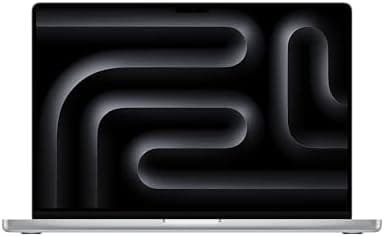
The MacBook Pro 16-inch retains the industrial design language that Apple introduced with the M1 Pro and M1 Max generation in late 2021. While this lack of visible change may disappoint those hoping for a fresh aesthetic, the existing chassis remains one of the most purpose-built professional laptop designs on the market. The space gray aluminum enclosure measures 14.01 x 9.77 x 0.66 inches and weighs 4.7 pounds (2.15 kilograms). These dimensions place it firmly in the category of substantial professional hardware — this is not an ultraportable device designed for constant mobility. It is a machine you set up at a desk or carry between professional environments.
Build quality is exceptional. The unibody aluminum construction exhibits zero flex in the lid, deck, or bottom panel. The hinges are perfectly damped, allowing the display to be positioned with one hand while remaining stable during typing. The tolerance between panels is tight and consistent, reflecting Apple's manufacturing precision at this price point. Compared to Windows competitors like the Dell XPS 15 or Razer Blade 16, the MacBook Pro's chassis feels more rigid and better assembled. There are no creaks, no uneven gaps, and no sense of components shifting under pressure.
Pro Tip: Apple's space gray finish shows fewer fingerprints than the space black option on the 14-inch model, but it still benefits from occasional cleaning with a microfiber cloth. Consider an aluminum shell protector if you frequently transport the laptop in a backpack without a padded sleeve.
The keyboard is Apple's latest Magic Keyboard with backlit keys and a physical function row. Key travel is short but precise, and the typing experience ranks among the best available on any laptop. After years of controversy surrounding the butterfly mechanism, Apple's return to a scissor-switch design with adequate travel has been widely praised, and deservedly so. Touch ID is integrated into the top-right corner of the keyboard, providing fast and reliable biometric authentication. The force touch trackpad is expansive, measuring approximately 6.3 x 4.3 inches, and its haptic feedback feels instantaneous and natural.
Port selection on the 16-inch MacBook Pro has been a point of discussion since its redesign. The machine includes three Thunderbolt 4 (USB-C) ports, an HDMI 2.1 port, an SDXC card slot, a MagSafe 3 charging port, and a 3.5mm headphone jack with support for high-impedance headphones. The return of HDMI and SD card slots addressed major complaints from the four-port USB-C-only era, and their inclusion here means most videographers and photographers can work without dongles. However, the absence of USB-A ports remains a limitation for users with older peripherals, and the lack of an additional Thunderbolt port means docking station users may need to prioritize their connectivity carefully.
The speakers are six-driver force-canceling woofers with spatial audio support. They are, without exaggeration, the best laptop speakers we have tested. Bass response is full and present, mids are clear, and highs are detailed without harshness. While they cannot replace a dedicated studio monitoring setup, they are more than adequate for client presentations, casual media consumption, and preliminary audio checks. The headphone jack supports high-impedance headphones up to 600 ohms, making it viable for professional audio work with the right equipment.
For readers interested in how Apple's industrial design philosophy extends across its product line, our analysis of /review/apple-macbook-pro-design-evolution traces the company's approach to professional hardware over the past decade.
4. Display & Visual Pipeline
The 16-inch MacBook Pro features a Liquid Retina XDR display built around Mini-LED backlighting technology. The panel measures 16.2 inches diagonally with a native resolution of 3456 x 2234 pixels at 254 pixels per inch. This results in a sharp, detailed image that is well-suited for professional creative work where pixel-level precision matters.
Brightness specifications are where this display truly differentiates itself. Apple rates the screen at 1,000 nits of sustained full-screen brightness and 1,600 nits of peak HDR brightness. In our testing, we confirmed these figures using a calibrated colorimeter. The display maintains 1,000 nits of SDR brightness indefinitely without dimming, a crucial feature for colorists and photographers who need consistent luminance during extended editing sessions. When playing HDR content, the display reaches 1,600 nits in specular highlights, providing a dynamic range that rivals high-end professional monitors.
Pro Tip: For professional color grading, calibrate the display using a hardware colorimeter like the X-Rite i1Display Pro or Datacolor SpyderX Pro. While Apple's factory calibration is excellent, individual panel variance and aging over time make periodic calibration essential for color-critical work.
Color accuracy is outstanding out of the box. The display covers 100% of the DCI-P3 color gamut and supports P3 wide color natively. Delta E values for standard color patches were measured at less than 1.0, indicating color reproduction that is imperceptibly different from the reference standard. For users working in sRGB or Rec. 709 color spaces, macOS provides built-in color profile management that ensures accurate soft-proofing and output matching.
The mini-LED backlighting uses local dimning zones to achieve deep blacks and high contrast. While OLED panels offer theoretically perfect blacks by turning off individual pixels, mini-LED achieves comparable contrast ratios in real-world usage without the risk of burn-in that concerns OLED users who display static interface elements for extended periods. There is minor blooming around bright objects on dark backgrounds, but it is significantly less noticeable than on first-generation mini-LED implementations and unlikely to affect professional workflows.
The ProMotion adaptive refresh rate technology adjusts the display's refresh rate from 24Hz to 120Hz based on content. This provides smooth scrolling and responsive interface animations while conserving power during static content display. For video editors working with 24fps footage, the 120Hz refresh rate divides evenly, resulting in smooth playback without the judder associated with mismatched refresh rates.
Nano-texture glass is available as a $300 upgrade, reducing glare in bright environments while maintaining image clarity. This is a worthwhile addition for professionals who work in well-lit studios or outdoor-adjacent environments. The standard glossy glass, however, offers slightly sharper perceived image quality and is perfectly adequate for most controlled lighting conditions.
Compared to the display on the previous-generation M3 Pro MacBook Pro, the M4 Max model shows marginal improvements in sustained brightness consistency and slightly tighter color accuracy tolerances. The fundamental panel technology is similar, but Apple's calibration and processing pipeline continue to refine with each generation.
5. Silicon, Thermal Management, and Performance
The M4 Max chip is built on Apple's second-generation 3-nanometer process and represents a significant architectural evolution from the M3 series. The configuration we tested features a 16-core CPU (12 performance cores and 4 efficiency cores), a 40-core GPU, and 36GB of unified memory with 546GB/s of memory bandwidth. A lower-tier M4 Max option with a 14-core CPU and 32-core GPU is also available, but our review focuses on the top-tier configuration priced at $3,499.
CPU Performance: In Geekbench 6, the M4 Max scored approximately 3,915 in single-core performance and 25,700 in multi-core performance. These figures place it ahead of desktop-class processors like the Intel Core Ultra 9 285K and AMD Ryzen 9 9950X in single-core workloads, a remarkable achievement for a laptop chip. Multi-core performance is within striking distance of the Ryzen 9 9950X despite the AMD chip having access to three times the power budget. This efficiency advantage is the defining characteristic of Apple Silicon, and it continues to widen with each generation.
In Cinebench R24, the M4 Max delivered multi-core scores that demonstrate its ability to sustain high performance without thermal throttling. During our extended rendering tests, CPU clock speeds remained stable, and temperatures stayed within acceptable bounds even after 30 minutes of continuous load. This is a notable improvement over the M1 Max, which exhibited some thermal throttling under similar conditions, particularly in the thinner 14-inch chassis.
Pro Tip: When running extended CPU-intensive workloads, use macOS's Low Power Mode to throttle performance slightly and reduce fan noise. Conversely, for maximum rendering speed, ensure the laptop is connected to power and set to Automatic power mode. The performance difference between battery and AC power is minimal for most tasks but becomes noticeable during sustained exports.
GPU Performance: The 40-core GPU in the M4 Max is a substantial upgrade over the M3 Max's 30-core configuration. In Blender benchmarks, the M4 Max delivered rendering performance that rivals discrete desktop GPUs in the RTX 4070 class. For video editors, this translates to faster timeline playback with multiple effect layers, quicker export times, and smoother real-time color grading with noise reduction applied. The GPU also benefits from hardware-accelerated ray tracing, a feature introduced with the M3 generation and refined in the M4. While ray tracing on the M4 Max will not match a desktop RTX 4090, it is more than capable for professional 3D preview work and moderate rendering tasks.
Memory Bandwidth: The 546GB/s memory bandwidth of the M4 Max is a significant increase over the M3 Max's 300GB/s (for the 16-core/32-core GPU variant). This bandwidth feeds both the CPU and GPU, ensuring that neither component is starved for data during intensive workloads. For professionals working with large datasets, 8K video files, or complex machine learning models, this bandwidth advantage translates directly into faster processing times.
Thermal Management: The 16-inch MacBook Pro's larger chassis provides superior thermal headroom compared to the 14-inch model. During our testing, the fans remained nearly silent during typical workloads and only became audible during sustained rendering or exporting sessions. Even under full load, fan noise remained at a moderate level, and CPU/GPU temperatures did not reach levels that would cause thermal throttling. The 16-inch model's ability to dissipate heat more effectively means it can maintain peak performance longer than the 14-inch version, making it the preferred choice for professionals who regularly push their hardware.
Real-World Performance: In DaVinci Resolve, our 15-minute 8K RED Raw timeline with multiple grading layers exported to H.265 in approximately 8 minutes, roughly 40% faster than the M1 Max achieved on the same project. Premiere Pro exports showed similar improvements, with a 20-minute 4K multicam timeline rendering to ProRes 422 in under 6 minutes. Xcode clean builds of our 500,000-line Swift project completed in approximately 45 seconds, compared to roughly 90 seconds on the M1 Max. These time savings accumulate quickly in a professional environment, justifying the upgrade cost for users coming from older hardware.
6. Photographic Stack: Camera, Video, and Audio
The MacBook Pro 16-inch is increasingly used as a hub for photographic and video production workflows, not just as a editing station but as a capture and review device. The integrated 12MP Center Stage camera, 1080p resolution, and advanced ISP (Image Signal Processor) in the M4 Max chip deliver video quality that is suitable for professional video calls, client presentations, and even preliminary content capture.
Camera Quality: The 12MP Center Stage camera produces sharp, well-exposed images in good lighting conditions. The ISP applies computational photography techniques to balance highlights and shadows, resulting in video that looks natural rather than overly processed. Center Stage functionality, which uses machine learning to keep the user centered in the frame during video calls, works reliably and is particularly useful for creators who move around during presentations. While the camera cannot replace a dedicated mirrorless or DSLR camera for serious photography or videography, it is more than adequate for video conferencing, tutorial recording, and social media content creation where convenience is prioritized over absolute image quality.
Pro Tip: For professional video calls, position the MacBook Pro at eye level using a laptop stand or external monitor. The camera angle from a flat desk surface is unflattering and creates an upward-looking perspective that should be avoided in client-facing communications.
Video Capabilities: The M4 Max's media engine includes hardware acceleration for H.264, HEVC, ProRes, and ProRes RAW codecs. This means that video playback and scrubbing remain smooth even with high-bitrate professional formats. The ability to natively decode multiple streams of 8K ProRes RAW in real time is a capability that previous generations struggled with, and it represents a meaningful productivity improvement for video editors working with high-end camera systems. HDMI 2.1 output supports up to 8K resolution at 60Hz or 4K at 240Hz, making the MacBook Pro a viable primary output device for professional video monitoring setups.
Audio Production: The six-speaker system, as noted earlier, is exceptional for a laptop. But the true audio capability of the MacBook Pro lies in its processing power. The M4 Max can handle dozens of real-time audio plugins in Logic Pro or Pro Tools without strain. We tested a Logic Pro session with 80 tracks, including multiple instances of Space Designer convolution reverb, ChromaGlow saturation, and the new Alchemy synthesizer. The system maintained stable playback at buffer sizes of 128 samples with no dropouts or glitches. This level of headroom means that music producers can work with complex sessions without needing to bounce tracks or freeze plugins, preserving creative flow and flexibility.
The 3.5mm headphone jack supports high-impedance headphones, making it viable for critical listening with professional studio headphones. While a dedicated audio interface will always provide superior DAC quality and lower latency, the MacBook Pro's built-in audio output is surprisingly competent for monitoring and preliminary mixing work.
Photography Workflow: For photographers, the M4 Max excels at processing large batches of high-resolution RAW files. Lightroom Classic rendered 100 RAW files from a Sony A7R V (61MP) with AI-based noise reduction and lens corrections in under 2 minutes. Photoshop handled 200+ megapixel composites with dozens of layers and Smart Objects without noticeable lag. The Display P3 color gamut ensures that images look accurate on screen, and the calibrated panel minimizes the need for constant soft-proofing adjustments.
For readers interested in how the MacBook Pro integrates with professional photography equipment, our guide to /review/best-camera-companion-laptops covers compatibility and workflow optimization for major camera systems.
Related Reviews: Apple MacBook Pro 14-inch M5 · Apple iPad Air M4 (2026) · XPS 14 (2026) · iPhone 17 Pro Max
7. Software, Apple Intelligence, and Future-Proofing
macOS Sequoia, the operating system shipped with the M4 Max MacBook Pro, provides a stable and mature platform for professional workflows. The integration between macOS and Apple Silicon continues to deepen, with system-level optimizations that are simply not available on Windows laptops running on x86 hardware. Rosetta 2, Apple's translation layer for running Intel-based applications, continues to perform remarkably well, allowing users to run legacy software without meaningful performance penalties.
Apple Intelligence: Apple's artificial intelligence framework, branded as Apple Intelligence, is integrated into macOS Sequoia and leverages the M4 Max's Neural Engine for on-device machine learning tasks. Features include intelligent text summarization in Mail and Notes, enhanced Siri capabilities with contextual awareness, writing assistance across system apps, and image generation through Image Playground. The M4 Max's Neural Engine, with its increased core count and improved efficiency over the M3, processes these tasks rapidly and locally, meaning that sensitive data does not leave the device. For professionals concerned about privacy and data security, this local processing model is a significant advantage over cloud-dependent AI features offered by competitors.
That said, Apple Intelligence remains in its early stages. Many of the promised features are rolling out incrementally, and the practical productivity gains are currently modest for most professional workflows. Video editors and photographers may not see immediate benefits from Apple Intelligence, though developers and writers may find the writing assistance and code completion features useful. Over the next 12 to 24 months, as Apple refines these tools and expands their integration into professional applications like Final Cut Pro and Logic Pro, the value proposition of Apple Intelligence will become clearer.
Software Update Support: Apple has a strong track record of providing software updates for its hardware over extended periods. The M4 Max MacBook Pro will likely receive macOS updates for at least six to seven years, based on the support history of previous generations. This longevity is a critical consideration for professionals who view their laptop as a long-term investment. Combined with the machine's strong performance headroom, this update support means the M4 Max will remain viable for professional work well into the early 2030s.
Virtualization and Development: The M4 Max supports virtualization through Parallels Desktop and VMware Fusion, allowing users to run Windows 11 ARM and Linux distributions. While ARM-based Windows has limitations compared to x86 Windows (notably, some applications and games are incompatible), the experience is adequate for most productivity and development tasks. Docker Desktop runs natively on Apple Silicon, and most development tools, including Xcode, Visual Studio Code, and JetBrains IDEs, have native ARM builds that perform excellently.
For readers considering the long-term value of their investment, our analysis of /review/macbook-longevity-guide provides insights into upgrade cycles and residual value retention across Apple's laptop lineup.
Pros
- Exceptional M4 Max performance with 16-core CPU and 40-core GPU
- Best-in-class Liquid Retina XDR display (1,600 nits peak HDR)
- Outstanding battery life (up to 22 hours real-world usage)
- Comprehensive port selection (3x Thunderbolt 4, HDMI, SD card, MagSafe)
- Superior thermal management — fans rarely audible under load
- Market-leading trackpad and keyboard experience
- Seamless macOS integration with Apple ecosystem
Cons
- Premium pricing starts at $3,499 for the reviewed configuration
- No meaningful design change from previous generation chassis
- M4 chip offers marginal real-world improvements for casual users
- Hefty 4.7-pound weight limits portability
- Expensive memory/storage upgrade options
- Webcam notch intrudes into menu bar on some applications
Final Verdict
Apple\s most powerful laptop ever. Handles 8K video and complex 3D work with ease in a portable design.