RayNeo Air 4 Pro Review: The Best Budget AR Glasses Bring HDR10 to Wearable Displays
The RayNeo Air 4 Pro brings HDR10 support to AR glasses for the first time at an unbeatable $299 price point, delivering a private cinema experience with 120Hz micro-OLED displays, Bang & Olufsen audio, and universal USB-C compatibility.
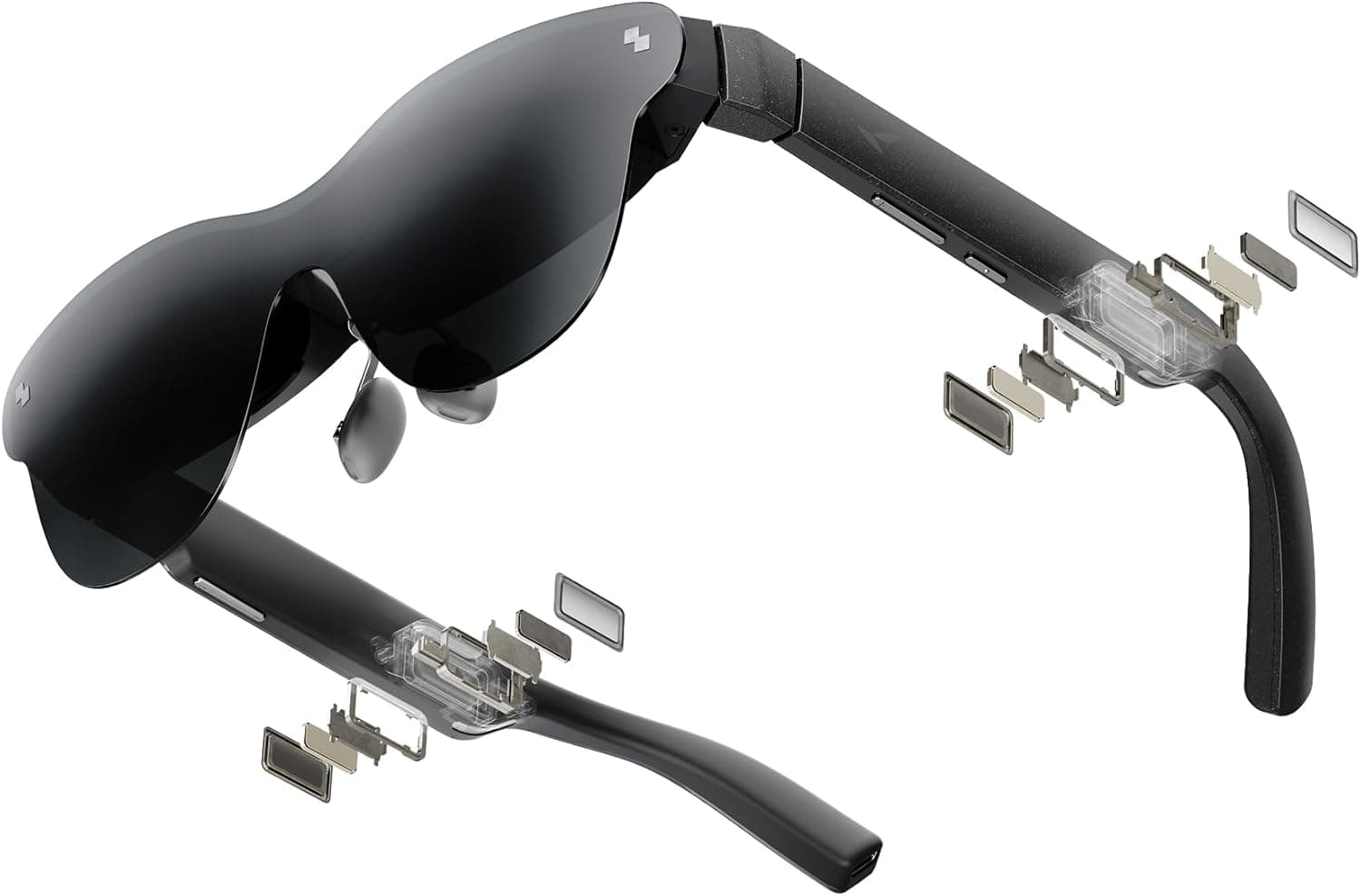
The RayNeo Air 4 Pro AR Smart Glasses represent something genuinely rare in the world of wearable tech: a product that introduces a meaningful first—HDR10 support on AR glasses—while simultaneously undercutting the competition on price. At $299, these aren't just the most affordable AR glasses with HDR capability; they're the only ones, period. After spending significant time with the Air 4 Pro across gaming, media consumption, and productivity use cases, I can confidently say these glasses deliver on their core promise: putting a private, cinema-quality screen on your face without requiring you to take out a second mortgage.
Design and Build Quality
The Air 4 Pro looks like a pair of slightly chunky Wayfarer-style sunglasses, which is exactly the aesthetic these wearable displays have settled on. At 77 grams, they're lightweight enough to wear for extended sessions without noticeable neck fatigue, though they're undeniably heavier than regular sunglasses. The frame is constructed primarily from plastic, which is where you'll notice the first cost-saving measure. The glossy finish attracts fingerprints, and the overall feel doesn't quite match the premium $500+ competition from XREAL or VITURE. That said, the plastic construction contributes to the low weight, and after a week of use, the build quality feels adequate rather than cheap. Nothing has creaked, cracked, or loosened during normal handling.
The temples house the Bang & Olufsen quad-speaker array on one side and the rocker controls on the other. You get dedicated buttons for volume (left temple) and brightness (right temple), plus a menu button that opens an on-screen display for adjusting picture modes, refresh rate, and audio settings. The controls are intuitive enough that you won't need the manual, though the menu button placement takes a day or two to commit to muscle memory. A USB-C cable protrudes from the right temple, which is the only physical connection required. The cable is permanently attached, so you can't swap it for a different length or angle—a minor limitation that becomes noticeable when you're trying to route the cable comfortably during use.
Comfort is where the Air 4 Pro genuinely surprised me. The adjustable nose pads offer three levels of fit, and the temple arms flex outward to accommodate different head sizes. I wore these for two-hour gaming sessions on a Steam Deck without the pressure points or hot spots that plagued earlier-generation AR glasses. The included light blocker snaps onto the front magnetically, which is a welcome inclusion at this price point—competitors often charge extra or rely on electrochromic tinting that adds cost. The trade-off is that you have to physically attach and detach the blocker rather than adjusting a dial, but it takes about two seconds and stays put once attached.
Display and Visual Quality
The display is the Air 4 Pro's party piece, and it delivers. Each eye gets a 0.6-inch SeeYa Micro-OLED panel running at 1920x1080 resolution, creating a virtual image that RayNeo rates at 201 inches viewed from a distance. In practice, the perceived screen size depends on how you wear the glasses and your facial geometry, but it genuinely feels like sitting in the middle rows of a theater. The field of view measures 46 degrees, which is narrower than the 57-degree FOV on the XREAL One Pro or the 58 degrees on the VITURE Beast. You notice this difference—the screen doesn't fill your entire peripheral vision, and there's a black border around the image that reminds you you're looking through optics rather than at a real screen. However, for movie watching and gaming, 46 degrees is still immersive enough to pull you into the content.
Brightness is a strong suit, with the panels hitting a claimed 1,200 nits peak brightness. In practical terms, this means the image remains visible even in moderately lit rooms. You won't want to use these in direct sunlight without the light blocker attached, but in a typical indoor environment—office lighting, a coffee shop, or a dimly lit living room—the display is punchy and vibrant. The contrast ratio of 200,000:1, courtesy of the Micro-OLED technology, delivers the kind of deep blacks you'd expect from an OLED panel. Black scenes in movies like Dune: Part Two look genuinely inky rather than the washed-out gray you get with LCD-based displays.
Color performance is excellent for this category. The Air 4 Pro covers 145 percent of the sRGB gamut and 98 percent of DCI-P3, numbers that would be respectable for a dedicated monitor, let alone a pair of glasses. Colors look saturated without being cartoonish, and skin tones render naturally in the Standard picture mode. The Movie mode warms the color temperature slightly for a more cinematic feel, while the Game mode boosts saturation and sharpness for competitive titles where you need to spot enemies quickly. A Professional mode drops the color temperature to a neutral D65 white point, which is useful for photo editing on the go—though the 1080p resolution means you won't want to rely on these for precision color work.
The 120Hz refresh rate is a meaningful upgrade for gaming. Running Hades II through a Steam Deck at 120Hz is a noticeably smoother experience than the 60Hz you'd get on earlier AR glasses. The motion clarity is excellent, with no visible ghosting or smear in fast-paced scenes. For content consumption, 120Hz makes scrolling through websites or social feeds feel buttery, but the real beneficiary is gaming, where the reduced motion blur gives you a competitive edge.
One caveat: edge clarity. The Air 4 Pro uses a BirdBath optical design, which means the peripheral areas of the image aren't as sharp as the center. If you max out the virtual screen size, you'll notice chromatic aberration and blurring toward the edges, particularly in the corners. The fix is simple—back the screen size down to medium in the settings—but it's a compromise you don't have to make with higher-end competitors that use more sophisticated prism or waveguide optics. For most content, keeping the screen at medium or slightly below eliminates the issue entirely, and the center of the image remains tack-sharp.
HDR10: The Category-Defining Feature
Let's talk about the elephant in the room: HDR10 support. This is genuinely the first AR glasses to support HDR10, and it makes a tangible difference in the viewing experience. Here's why it matters: most streaming services—Netflix, Disney+, Amazon Prime Video, Apple TV+—serve HDR content by default on capable displays. If you try to watch HDR content on SDR-only AR glasses, your device either kicks you out with a "display not supported" error or tones the content down so aggressively that it looks flat and lifeless. The Air 4 Pro eliminates this headache entirely.
Enabling HDR10 is a one-time toggle in the settings menu. Once activated, the display switches to 10-bit color depth and expanded dynamic range, and the difference is immediately visible. Highlights in Blade Runner 2049—the neon signs, the laser beams cutting through the rain—have a punch and dimensionality that SDR simply can't reproduce. Shadow detail improves noticeably, with dark scenes retaining texture and nuance rather than collapsing into a black void. The 1,200-nit peak brightness gives HDR highlights the pop they need to look convincing.
Is HDR10 on AR glasses as impactful as HDR10 on a good OLED TV? No. The 46-degree FOV and the inherent limitations of BirdBath optics mean you're not going to mistake this for a reference-grade monitor. But for a wearable display that fits in your jacket pocket, it's genuinely impressive, and it removes the biggest compatibility headache that plagued earlier generations of AR glasses.
The Vision 4000 chip, co-developed with Pixelworks, handles the image processing duties. Beyond HDR10 decoding, it offers an AI-powered SDR-to-HDR upscaling mode that analyzes standard dynamic range content and expands it in real time. The upscaling works surprisingly well for most content—I tested it with YouTube videos and older TV shows, and the enhancement was visible without looking artificial. The same chip handles the AI 2D-to-3D conversion feature, which attempts to add depth to flat video. This is more of a novelty than a must-have feature. The 3D effect is subtle at best and creates distracting artifacts at worst, particularly in scenes with complex motion or fine details. I'd recommend leaving this feature off for most content.
Audio Performance
Audio is the Air 4 Pro's most divisive feature. The quad-speaker array tuned by Bang & Olufsen produces clear, spatial sound with surprising presence for such a small driver setup. In a quiet room, the audio experience is genuinely impressive—dialogue is crisp, music has reasonable separation, and the spatial audio processing creates a convincing sense of width. The Whisper mode reduces volume leakage to near-zero, letting you watch content in bed next to a sleeping partner without disturbing them.
The problem is volume. Even at maximum, the Air 4 Pro's speakers aren't particularly loud, and they struggle to compete with ambient noise. In a moderately noisy coffee shop, I had to strain to hear dialogue, and in an outdoor setting, the audio was essentially unusable without earbuds. The included Sound Tube accessory—a pair of rubber sleeves that direct sound toward your ear canals—helps a little but not enough to make a meaningful difference in noisy environments. If you plan to use these in anything other than a quiet indoor space, budget for a pair of wireless earbuds to pair alongside them.
Audio leakage is present but manageable. At 50 percent volume, someone sitting next to you can hear faint audio, but it's not intrusive. At 80 percent and above, the leakage becomes noticeable to people within a couple of feet. The Whisper mode helps here, reducing leakage at the cost of overall volume. For private listening on airplanes or in shared workspaces, pairing Bluetooth earbuds with your source device and muting the glasses' speakers is the better approach.
Gaming Experience
This is where the Air 4 Pro truly shines. The combination of 120Hz refresh rate, low latency, and the massive virtual screen makes for an exceptional handheld gaming companion. I tested extensively with a Steam Deck OLED, and the experience was transformative. Instead of hunching over a 7-inch screen, you get what feels like a 100-inch display floating in front of you. The device-side latency is imperceptible—the glasses are essentially a monitor, not a processing unit—so there's no added input lag or stutter.
Ghost of Tsushima at 60fps looks stunning on the 120Hz panel, with the HDR support bringing the vibrant color palette of feudal Japan to life in a way that the Steam Deck's native screen simply can't match. Elden Ring benefits from the expanded field of view, making distant enemies and environmental details easier to spot. Competitive titles like Overwatch 2 at 120Hz feel responsive and fluid, with no visible ghosting or motion artifacts.
The USB-C plug-and-play setup means there's no pairing, no batteries to charge, and no software to install. Plug the glasses into a Steam Deck, ROG Ally, or any USB-C device with DisplayPort Alt Mode support, and they're recognized as an external display within seconds. This simplicity is the Air 4 Pro's killer feature for gaming—you don't need to fiddle with settings or carry additional hardware beyond the glasses themselves.
For console gaming, you'll need the optional HDMI adapter ($59), which adds a minor layer of friction but works reliably once connected. I tested with a PS5, and the combination of a controller in hand and a massive HDR display on my face made for a surprisingly compelling living-room alternative. The Switch 2 JoyDock accessory ($79) adds a 5,000mAh battery for extended sessions, which addresses the main limitation of the glasses themselves—they have no internal battery and draw power from the connected device.
Software and Features
The RayNeo XR Glasses companion app (available on Android and iOS) serves as the primary software interface. It offers a clean layout with quick access to picture adjustments, 3D conversion, and firmware updates. The app is functional rather than polished—it gets the job done without any standout design flourishes. The one-click 3D conversion feature works as advertised for photos but is hit-or-miss with video, as mentioned earlier.
Firmware updates are handled through the app and have been released regularly since launch. An early update improved audio balance, and a subsequent update added additional picture mode presets. The glasses also support a desktop app for Windows and Mac that enables ultrawide display mode, effectively letting you use the Air 4 Pro as a secondary monitor with more screen real estate than the standard 16:9 aspect ratio. The ultrawide mode is surprisingly usable for productivity—I wrote part of this review while connected to a MacBook Air, with the glasses serving as a second display alongside the laptop's built-in screen. The text clarity is good enough for coding and writing, though you'll want to keep the virtual screen at medium size to avoid edge blur.
One notable omission: there's no head tracking or 3DOF support. The screen stays fixed in your field of vision regardless of how you move your head, which means there's no "pinned in space" mode where the screen stays put while you look away. Competitors like the XREAL One Pro offer native 3DOF at a higher price point, and the VITURE Beast supports head tracking through an optional module. Whether this matters depends on your use case. For media consumption and handheld gaming, I never missed it—the screen is always where I'm looking, which is exactly what I want. For productivity, where you might want to glance at a reference document without the main display following your gaze, the lack of head tracking is noticeable.
Compatibility and Connectivity
The Air 4 Pro connects exclusively via USB-C with DisplayPort Alt Mode, which covers a wide range of modern devices. I tested it with an iPhone 16 Pro (USB-C), a Google Pixel 10 Pro, a MacBook Air M5, a Lenovo Yoga 9i, a Steam Deck OLED, and an ASUS ROG Ally X. Every device recognized the glasses as an external display within three seconds of plugging them in, with no driver installation or configuration required.
The compatibility list from RayNeo includes most flagship phones from the last three years—iPhone 15/16/17 series, Samsung Galaxy S21 through S26, Google Pixel 8/9/10, OnePlus 7 through 12, and a long list of others. The one notable gap is iPhones with Lightning connectors (iPhone 14 and earlier), which require a Lightning-to-HDMI adapter and the HDMI accessory for the glasses. It's not elegant, but it works.
For devices without USB-C DisplayPort output—primarily desktop PCs and older laptops—you'll need the HDMI adapter. This adds a powered box between your source and the glasses, which is one more thing to carry but doesn't introduce noticeable latency or quality loss. The adapter supports HDR10 passthrough and 120Hz at 1080p, so you're not sacrificing features for compatibility.
The lack of an internal battery is a design choice that keeps the weight down to 77 grams, but it means the glasses draw power from your source device. Connected to a phone, this drains the phone's battery noticeably faster. Connected to a Steam Deck or laptop with a larger battery, the impact is minimal. The optional USB-C adapter bundle adds a pass-through charging port, letting you charge your phone while using the glasses, which is almost essential for extended sessions on a phone.
How It Stacks Up Against Competitors
The AR glasses market has settled into a clear hierarchy, and the Air 4 Pro occupies a specific and defensible position. At $299, it's the cheapest wearable display from a major brand that offers HDR10, 120Hz, and competent audio. The XREAL One Pro ($599) offers native 3DOF head tracking, a wider 57-degree FOV, and a more premium aluminum build, but costs twice as much and doesn't support HDR10. The VITURE Beast ($549) matches the 120Hz refresh rate and adds electrochromic dimming and a wider 58-degree FOV, but again costs nearly double and requires an optional module for head tracking.
The VITURE Luma Pro ($399) is the Air 4 Pro's closest competitor on price, offering focus dials for nearsighted users and dimmable lenses, but it lacks HDR10 support and maxes out at 60Hz. The recently released X by XReal a01+ also targets the $299 price point with a brighter 1,700-nit panel and interchangeable faceplates, though it launched after the Air 4 Pro and doesn't support HDR10 either.
In context, the Air 4 Pro's value proposition is clear: you're trading build quality, FOV, and head tracking for HDR10 support and a $300 price tag. If you primarily watch SDR content or don't care about HDR compatibility, the X by XReal a01+ is a strong alternative at the same price. If you need the widest possible FOV and head tracking, save up for the XREAL One Pro or VITURE Beast. But if you want a private HDR cinema experience at a price that doesn't hurt, the Air 4 Pro is the only option in its class.
Who Should Buy the RayNeo Air 4 Pro?
The Air 4 Pro is best suited for three specific types of users. First, handheld gaming enthusiasts who travel or play in bed. The Steam Deck, ROG Ally, and Lenovo Legion Go user will find the Air 4 Pro transformative—it eliminates the neck strain of looking down at a small screen and replaces it with a massive, sharp, 120Hz display that follows your head position naturally. Second, frequent flyers and commuters who want a private cinema experience without the bulk of a VR headset. At 77 grams with the light blocker attached, the Air 4 Pro is comfortable enough for a two-hour movie and packs flat into a jacket pocket. Third, privacy-conscious media consumers who share living spaces and want to watch content without disturbing or being disturbed by others. The combination of the physical light blocker and Whisper Mode audio makes for a genuinely private viewing experience. For those looking for a different wearable experience, our Google Fitbit Air review covers the screenless fitness tracker that's redefining wearable health.
The Air 4 Pro is NOT for you if you need the widest field of view or head tracking for a virtual desktop setup. It's not for audiophiles who need rich, room-filling sound from the built-in speakers. And it's not for anyone who wants a true augmented reality experience with overlays, spatial computing, or passthrough video—these are media-consumption glasses, not general-purpose computing devices.
Final Thoughts
The RayNeo Air 4 Pro doesn't try to be all things to all people, and that focus is its greatest strength. By concentrating on display quality, comfort, and value rather than chasing every possible feature, RayNeo has created a wearable display that excels at its core mission: putting a large, high-quality screen on your face without the complexity, bulk, or price tag of the competition. The HDR10 support is a genuine first for the category and removes the single biggest compatibility headache that plagued earlier AR glasses. The 120Hz panel is smooth and responsive. The comfort is good enough for hours of use. And at $299, the price is low enough that you don't need to justify it as a luxury purchase.
The compromises are real—the plasticky build, the narrow FOV, the edge blur at max screen size, the quiet speakers—but they're compromises, not dealbreakers. For the price, the Air 4 Pro delivers about 85 percent of the experience you'd get from $599 glasses, which makes it the smart buy for anyone who wants to dip a toe into wearable displays without committing serious cash. If RayNeo can maintain this price-to-features ratio on the next generation while addressing the build quality and FOV, the competition has real reason to worry. Until then, the Air 4 Pro is the budget king, and it wears that crown proudly.
Pros
- HDR10 support is a category first that eliminates compatibility headaches with streaming services
- Excellent micro-OLED display with 1200 nits brightness, 120Hz refresh rate, and vibrant colors
- Lightweight 77g design is comfortable for extended gaming and movie sessions
- Unbeatable value at $299 — half the price of competitors with similar display quality
- True plug-and-play USB-C connectivity works with Steam Deck, phones, laptops, and more
Cons
- Plasticky build quality feels cheaper than $500+ competitors
- Narrow 46-degree field of view with edge blurring at maximum screen size
- Built-in speakers lack volume and struggle in noisy environments
- No head tracking or 3DOF support unlike higher-priced alternatives
- Requires separate adapters for console gaming and older devices
Final Verdict
The RayNeo Air 4 Pro brings HDR10 support to AR glasses for the first time at an unbeatable $299 price point, delivering a private cinema experience with 120Hz micro-OLED displays, Bang & Olufsen audio, and universal USB-C compatibility.