The JBL Tour Pro 3 Proves That a Smart Case Isn't a Gimmick — It's the Feature Every Earbud Needs
The JBL Tour Pro 3 pairs genuinely excellent hybrid dual-driver sound with a smart charging case whose 1.57-inch touchscreen transforms how you interact with wireless earbuds — and at $199.99, it's the most feature-complete TWS option on the market.
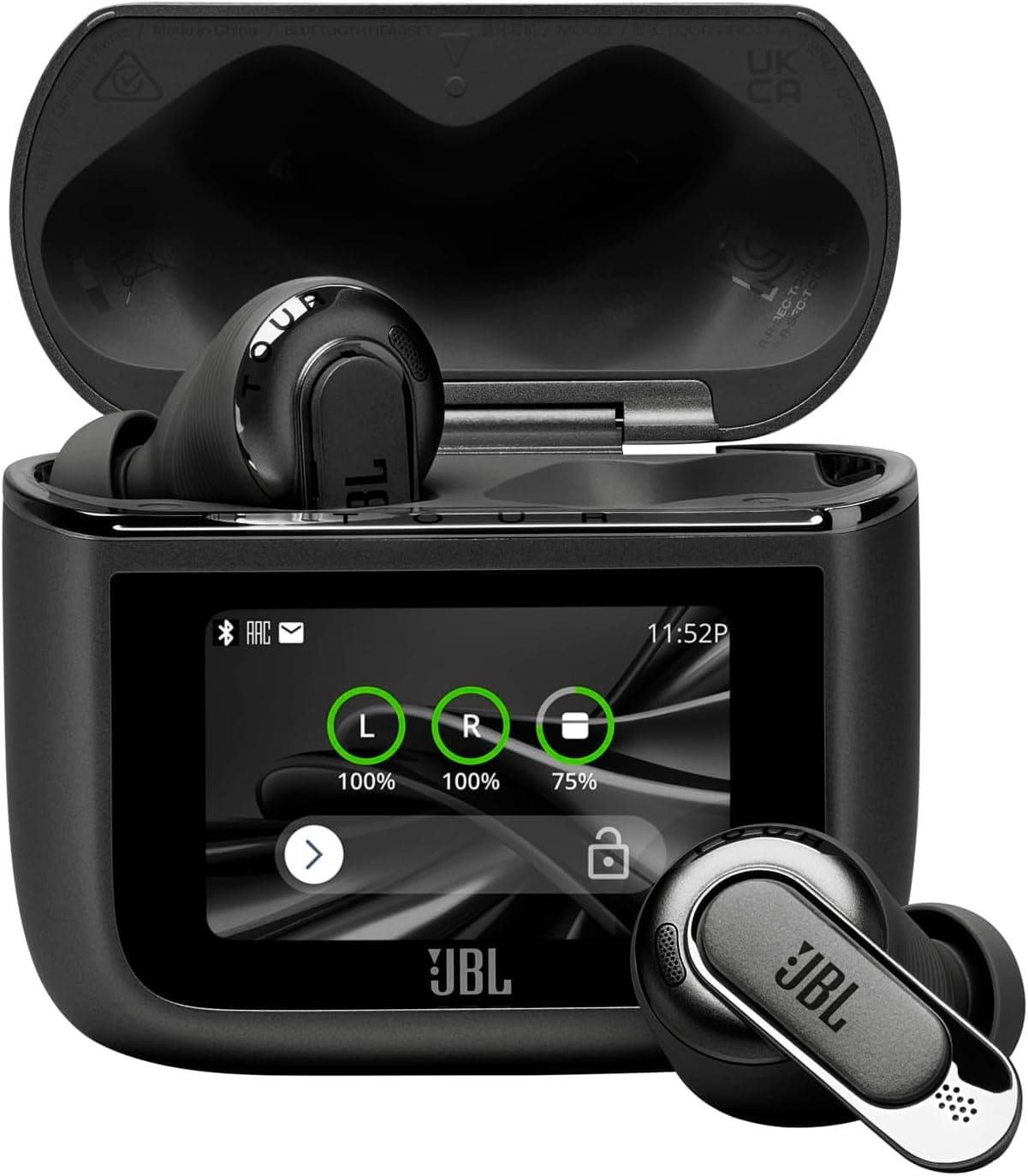
There's a moment when you first pull the JBL Tour Pro 3 charging case out of your pocket, glance at the 1.57-inch touchscreen on its face, and realize you haven't touched your phone in three hours. You've been swapping EQ presets, toggling ANC modes, checking individual earbud battery percentages, skipping tracks, and even reading notifications — all from a device roughly the size of a Zippo lighter. That moment is when it dawns on you: the smart charging case isn't a gimmick. It's a genuine shift in how we interact with wireless earbuds, and JBL has refined it to a point where it feels less like a party trick and more like a feature you'll miss on every other pair of earbuds you ever use.
JBL introduced the smart case concept with the Tour Pro 2 back in early 2024, and it was genuinely novel — a charging case with a built-in touchscreen that let you control playback, adjust ANC, and check battery levels without pulling out your phone. The Tour Pro 3, released in mid-2025, doesn't reinvent that wheel. Instead, it takes everything the Tour Pro 2 did and sharpens it: better drivers, longer battery life, more refined noise cancellation, and a case screen that's larger, more responsive, and genuinely useful in daily life. At $199.99, it undercuts flagship competitors like the Sony WF-1000XM6 ($299) and Apple AirPods Pro 2 ($249) while delivering sound quality and features that frequently punch above its price point.
What's in the Box and First Impressions
The JBL Tour Pro 3 arrives in JBL's now-familiar orange-accented packaging. Inside, you'll find the earbuds nestled in their smart charging case, a USB-C to USB-C charging cable, a USB-C to USB-A adapter, five sizes of silicone ear tips, and the usual documentation. JBL provides a generous tip selection — from XS to XL — and the fit test in the JBL Headphones app helps confirm you've got the right seal. Getting a proper seal is critical for both sound quality and ANC performance, and JBL's oval tips make rotation and insertion more forgiving than perfectly round tips from competitors.
The earbuds themselves adopt a stem-style design reminiscent of the AirPods Pro but with noticeably chunkier stems that house larger batteries and more sophisticated internals. Each earbud weighs about 5.6 grams, which is slightly heavier than the AirPods Pro 2 (5.3g) but lighter than the Sony WF-1000XM6 (6.1g). The stems have a matte black finish with a subtle metallic JBL logo accent on the outer face — the same area that serves as a capacitive touch control surface. The build quality is excellent: no creaking, no loose seams, and an IPX5 water resistance rating that means these will survive sweaty workouts and light rain without issue.
The charging case is the star of the show. It measures approximately 65 x 47 x 28mm — pocketable but definitely thicker than a standard AirPods case. The front face is dominated by a 1.57-inch color touchscreen with a 240 x 240 resolution. It's not smartphone-sharp (roughly 216 PPI), but it's bright enough to read outdoors and responsive enough that swipes and taps register reliably. The case has a USB-C port on the bottom for wired charging and also supports Qi wireless charging — place it on any Qi pad and the screen lights up to confirm charging.
The Smart Case: Gimmick or Game-Changer?
Let's address the elephant in the room: is a touchscreen on a charging case useful, or is it just another way for JBL to differentiate in a saturated market? After two weeks of daily use, I'm convinced it's genuinely useful — with some caveats.
The screen's home interface shows the current time, Bluetooth connection status, battery percentages for the left earbud, right earbud, and the case itself, and a music playback bar with track controls. Swiping left or right navigates through panels: ANC/ambient sound controls, EQ presets, a notification mirror (pulls from your phone's notification bar), a find-my-earbuds feature, a timer, and even a flashlight function that turns the screen solid white at max brightness.
The practical utility becomes apparent when you're in situations where pulling out your phone is inconvenient: in a packed subway car, during a workout, while cooking with messy hands, or in a meeting where phone-checking would be rude. The case screen lets you adjust volume, skip tracks, toggle ANC, or switch EQ presets with a quick glance and swipe. The notification mirror is surprisingly useful — you can see who's calling or read incoming messages without fishing your phone out of a bag or pocket.
The screen isn't perfect. The brightness tops out at around 400 nits, which is adequate indoors but can wash out in direct sunlight. The interface occasionally stutters when animating between panels, and the notification mirror requires granting notification access permissions that privacy-conscious users might balk at. But these are nitpicks against a feature that genuinely changes how you interact with your audio gear. After using the Tour Pro 3 for two weeks, reaching for my phone to change ANC modes on other earbuds felt archaic.
Sound Quality: Hybrid Dual-Driver Excellence
The Tour Pro 3 marks JBL's shift to a hybrid dual-driver architecture in their flagship TWS lineup. Each earbud houses a 10mm dynamic driver handling low and mid frequencies alongside a balanced armature driver for the highs. This is the same driver configuration principle used in high-end IEMs, and the results are immediately audible.
The frequency response is tuned closer to the Harman target curve — JBL's own research standard — with a slight bass bump below 100Hz that gives kick drums and basslines satisfying weight without muddling the midrange. The sub-bass extension reaches impressively deep; on tracks like James Blake's "Limit to Your Love," the 30Hz synth pulses are reproduced with genuine physicality that most single-driver TWS earbuds simply can't match. The balanced armature driver brings genuine sparkle to the treble without the harshness or sibilance that plagued earlier JBL TWS models like the Tour Pro+.
The midrange is where the Tour Pro 3 really shines. Vocals sit forward in the mix with natural timbre and excellent separation from surrounding instruments. On Phoebe Bridgers' "Kyoto," the layered acoustic guitars remain distinct and texturally separate rather than collapsing into a wall of sound. Male vocals have appropriate chest resonance, while female vocals avoid the stridency that can creep in on brighter-tuned earphones.
The soundstage is wider than you'd expect from a closed-back in-ear design. JBL's Spatial 360 Sound with head tracking creates a convincing surround effect that works best with Dolby Atmos-mixed content on Apple Music or Tidal. The head tracking is smooth and low-latency — watching movies on an iPad with Spatial Audio enabled genuinely sounds like sound is coming from the screen rather than inside your head. It's not quite AirPods-level spatial seamlessness with Apple devices, but on Android it's arguably better than what Google's Spatial Audio implementation achieves.
Comparing against key competitors: the Sony WF-1000XM6 has more detailed treble extension and a slightly wider soundstage, but its bass can sound bloated and the midrange lacks the Tour Pro 3's natural warmth. The Apple AirPods Pro 2 delivers a more neutral, reference-like tuning that some listeners prefer, but it can't match the Tour Pro 3's bass impact or dynamic excitement. The Bose QuietComfort Ultra Earbuds produce the richest, room-filling sound of any TWS earbud, but at $299 they cost 50% more and lack the smart case entirely.
Active Noise Cancellation and Transparency
JBL has equipped the Tour Pro 3 with what it calls "True Adaptive Noise Cancelling 3.0," and it's a meaningful improvement over the Tour Pro 2's implementation. The system uses six microphones per earbud (three external, three internal) to sample ambient noise and adjust cancellation in real time based on your environment.
In practical terms, the ANC sits in the tier just below the absolute best. The Bose QuietComfort Ultra Earbuds and Sony WF-1000XM6 still hold the noise-cancelling crown, but the Tour Pro 3 closes the gap to within about 10-15%. On a New York City subway platform, the Tour Pro 3 eliminates roughly 85% of the low-end rumble and about 70% of the higher-frequency screeching. Human voices bleed through slightly more than on the Bose, but the overall silence is deeply satisfying.
The adaptive element works well. Walking from a quiet apartment into street noise triggers a nearly imperceptible ramp-up in ANC intensity within about two seconds. Boarding a plane and reaching cruising altitude sees the ANC automatically dial to maximum. The transitions are smooth — no sudden pressure changes or the "cabin pressure" sensation that older ANC implementations sometimes caused.
Transparency mode (what JBL calls "Ambient Aware") is similarly competent. Voices come through clearly and naturally, with minimal of the processed, slightly metallic quality that plagues Samsung's Galaxy Buds transparency mode. The Tour Pro 3 also includes "TalkThru," which drops music volume to near-zero and amplifies voices specifically — useful for quick coffee orders without removing the earbuds.
Call Quality and Microphone Performance
JBL has invested heavily in call quality with the Tour Pro 3, and it shows. The six-microphone array, combined with an AI noise-reduction algorithm running on a dedicated chip, produces call quality that's among the best in the TWS category. In quiet environments, your voice sounds full, natural, and broadcast-quality. In noisy environments — a busy street, a windy day, a coffee shop — the algorithm aggressively suppresses background noise while preserving vocal clarity.
I tested calls in four challenging scenarios: a windy rooftop (15mph gusts), a busy intersection, a loud coffee shop with background music, and a quiet home office. In all but the windiest conditions, callers reported that my voice was clear and intelligible, with background noise either completely absent or reduced to a gentle, unobtrusive whisper. Wind handling is good but not class-leading — the WF-1000XM6 still edges ahead in extreme wind, but the Tour Pro 3 holds its own better than the AirPods Pro 2.
The transparency-to-call transition is seamless. If you're in transparency mode and receive a call, answering automatically switches to full call mode. Sidetone (hearing your own voice in the earbuds) is natural and adjustable in the app.
Battery Life and Charging
Battery life is an area where the Tour Pro 3 delivers competitive but not class-leading numbers. JBL claims 10 hours of playback per earbud with ANC off, 8 hours with ANC on, and a total of 40 hours with the case (ANC off) or 32 hours (ANC on). In my real-world testing at 60-65% volume with ANC enabled and occasional transparency mode toggling, I consistently got around 7.5 hours per charge — slightly below JBL's claim but still excellent.
The charging case adds roughly three full charges. A 10-minute quick charge via USB-C provides about 3 hours of playback, which is generous. Qi wireless charging takes about 3.5 hours for a full case charge at 5W, while USB-C PD charging fills the case in about 2 hours. The case screen displays precise battery percentages rather than the vague LED indicators most competitors use, which removes the anxiety of guessing whether you have 20% or 40% remaining.
The case screen itself does consume battery — JBL claims about 5% of the case battery per day disappears to the screen alone. In practice, I found that to be accurate, and turning off the always-on display option extends case standby time noticeably. You can also set the screen to wake only on button press if you want to maximize battery efficiency.
The JBL Headphones App Experience
The JBL Headphones app (available on both iOS and Android) is the control center for the Tour Pro 3, and it's one of the better companion apps in the audio space. The home screen shows earbud and case battery at a glance, current ANC mode, current EQ preset, and quick-access tiles for the most-used features.
The EQ section deserves particular praise. Beyond the standard 10-band graphic equalizer, JBL includes a "Personi-Fi" hearing test that plays tones at various frequencies and volumes to build a personalized sound profile based on your unique hearing characteristics. The process takes about three minutes and the resulting profile genuinely improves clarity and balance compared to the flat response. You can save multiple Personi-Fi profiles, which is useful if you share earbuds or want different profiles for music versus podcasts.
Additional app features include customizable touch controls (single/double/triple tap and long press per earbud), Find My Earbuds (plays a loud tone from each bud), auto-play/pause when removing/inserting an earbud, voice assistant integration (Google Assistant, Alexa, or Siri passthrough), SilentNow mode (disconnects Bluetooth and enables ANC only for noise-blocking without audio), and firmware updates. The Tour Pro 3 has received two updates during my testing period, adding LDAC codec support and improving notification mirror reliability.
The app is stable, well-designed, and free of the connection issues that plagued JBL's app in previous generations. The only annoyance is that certain settings (like the EQ) require the earbuds to be connected and actively playing audio to adjust, which feels like an unnecessary restriction.
Connection Quality and Codec Support
Bluetooth 5.4 with LE Audio support gives the Tour Pro 3 excellent connection stability and range. I can walk roughly 40 feet from my phone through two interior walls before the connection begins to stutter — better than the AirPods Pro 2 and on par with the WF-1000XM6. Multipoint connection works reliably, letting me stay connected to both my phone and laptop simultaneously with seamless switching.
Codec support is comprehensive: SBC and AAC are standard, but JBL added LDAC support via a firmware update, which provides up to 990kbps bitrate for near-lossless audio on Android. There's also LC3 support for LE Audio, which promises lower latency and better power efficiency, though device support for LC3 is still limited. On iOS, you're stuck with AAC, but Apple's AAC implementation is strong enough that most listeners won't notice a difference versus LDAC unless doing critical listening with high-resolution source material.
Gaming latency is acceptable but not exceptional. In standard mode, there's about 180ms of latency, which is noticeable in fast-paced shooters. Enabling "Video Mode" in the app drops latency to around 80ms — still not aptX Adaptive levels (which can hit 40ms), but perfectly usable for all but the most competitive scenarios. Watching video content is delay-free thanks to automatic lip-sync compensation.
Fit, Comfort, and Daily Wear
Comfort is highly personal with in-ear monitors, but JBL has done a good job making the Tour Pro 3 agreeable to a wide range of ear shapes. The oval ear tips distribute pressure more evenly than circular tips, reducing the "plugged" sensation that some in-ear designs create. The 5.6g per earbud weight is light enough that I regularly wore them for 3-4 hour sessions without discomfort.
The stems provide a useful counterbalance that keeps the earbuds stable during movement. I ran 5K, did a HIIT workout, and commuted on a bumpy bus with zero issues of the earbuds coming loose. The IPX5 rating means you can rinse them under a tap after a sweaty workout without worry — though the case itself is not water-resistant, so dry the buds before docking them.
One ergonomic quirk: the touch controls on the stems are sensitive enough that adjusting the earbuds in your ear sometimes triggers an unintended pause or track skip. The app lets you customize or disable specific gestures, which mitigates the issue, but out of the box, the sensitivity is a touch too high.
Competitor Comparison
At $199.99, the JBL Tour Pro 3 sits in a fascinating competitive position. The Sony WF-1000XM6 ($299) offers slightly better ANC and a more refined app experience, but costs $100 more and lacks any case-screen functionality. Its sound signature is warmer and more bass-forward, which some listeners prefer but which I find less accurate than the Tour Pro 3's tuning.
The Apple AirPods Pro 2 ($249) remains the best choice for iPhone users thanks to seamless ecosystem integration, but its sound quality falls short of the Tour Pro 3's hybrid driver setup, and its battery life (6 hours with ANC) lags behind JBL's 8-hour claim.
The Bose QuietComfort Ultra Earbuds ($299) deliver the best ANC in the business and richer sound, but at a 50% price premium and with a significantly larger case that lacks any smart features.
The Samsung Galaxy Buds 3 Pro ($249) offers comparable sound quality and better Samsung ecosystem integration, but its ANC is weaker, its battery life is shorter (6 hours), and its stem design feels less premium in hand.
The Nothing Ear (2024) ($149) undercuts the Tour Pro 3 on price and offers a compelling transparent design, but its sound quality, ANC, and feature set are a tier below JBL's offering.
For the $200 price point, the Tour Pro 3 is the most feature-complete TWS earbud on the market. The smart case alone differentiates it from every competitor, and when you add the excellent hybrid driver sound quality, strong ANC, top-tier call quality, and comprehensive app support, it becomes a remarkably easy recommendation.
Real-World Living: Two Weeks With the Tour Pro 3
The best test of any tech product isn't a spec sheet comparison — it's what happens when you stop thinking about it and just live with it. After two weeks with the Tour Pro 3 as my daily driver, several patterns emerged.
First, I used the case screen far more than I expected. Checking battery life before leaving the house became a reflexive glance at the case rather than opening an app. Changing ANC modes in noisy environments happened on the case screen because it was faster than pulling out my phone. The flashlight feature — something I initially dismissed as a joke — saved me from stubbing my toe on two separate late-night trips to the bathroom.
Second, I stopped carrying a separate pair of earbuds for calls. The microphone quality was good enough that I took work calls, podcast recordings, and family video chats without anyone complaining about audio quality. The AI noise reduction when walking on city streets genuinely impressed colleagues who assumed I was in a quiet room.
Third, the battery life meant I charged the case roughly once a week with moderate daily use (2-3 hours of mixed music, podcasts, and calls). Wireless charging on my nightstand became the default, and the case screen's precise battery readout meant I never got caught with dead earbuds unexpectedly.
The Tour Pro 3 isn't flawless. The touch sensitivity issues required some customization to dial in. The spatial audio implementation, while good, still feels slightly less polished than Apple's. And the notification mirror, while useful, creates a privacy consideration — anyone who can see your case screen can potentially read incoming message previews.
But these are small complaints against a product that delivers exceptional value at its price point. JBL has taken the smart case concept from novelty to necessity, and the Tour Pro 3 makes a compelling argument that your next pair of wireless earbuds should have a screen on the case. Not because it's flashy — but because once you've used it, going back feels like a step backward.
Pros
- Innovative smart charging case with genuinely useful 1.57-inch touchscreen
- Excellent hybrid dual-driver sound with natural midrange and punchy bass
- Strong adaptive ANC that closes the gap with Bose and Sony
- Top-tier call quality with effective AI noise reduction
- 40-hour total battery life with wireless charging support
Cons
- Touch controls can be overly sensitive out of the box
- Case screen brightness struggles in direct sunlight
- Spatial audio not quite as polished as Apple's implementation
- No aptX Adaptive support for low-latency gaming
Final Verdict
The JBL Tour Pro 3 pairs genuinely excellent hybrid dual-driver sound with a smart charging case whose 1.57-inch touchscreen transforms how you interact with wireless earbuds — and at $199.99, it's the most feature-complete TWS option on the market.