Dell XPS 16 (2026) Review: Return of the Windows Productivity King
Intel's Core Ultra X7 358H and a stunning OLED display make the Dell XPS 16 2026 the best Windows productivity laptop you can buy. At $1,750 to $2,160, it earns every cent.
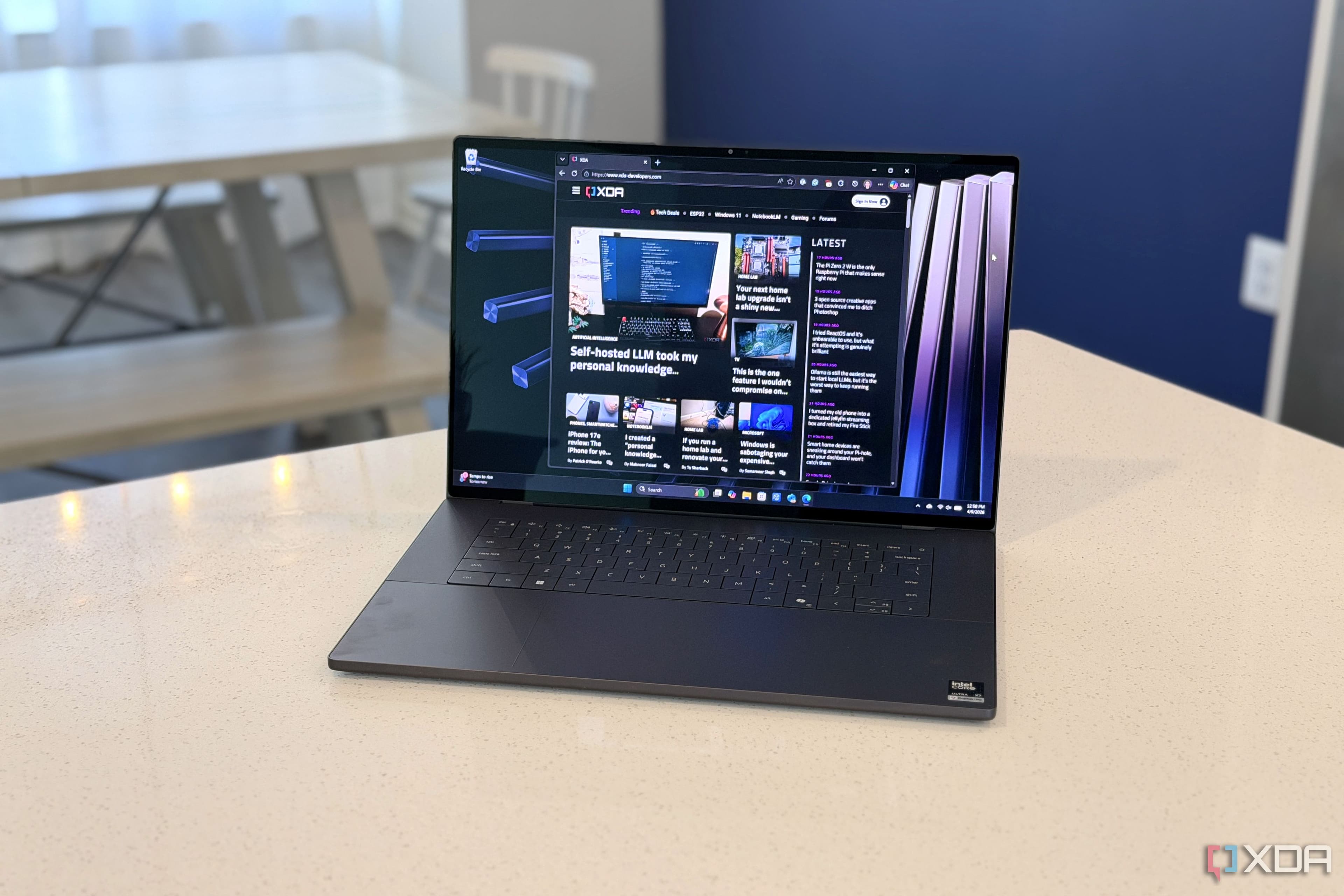
The Dell XPS line has had a complicated few years. The XPS 13 Plus pushed design boundaries that not everyone appreciated, and the XPS 15 and XPS 17 lingered without meaningful updates while the MacBook Pro cemented Apple's dominance in professional mobile computing. The XPS 16 2026 is Dell's answer to all of that: a complete redesign that takes the XPS line back to its roots as the best Windows laptop for the working professional, while adding enough new technology to feel genuinely new.
The 2026 XPS 16 arrives with Intel's Core Ultra X7 358H processor, a 4K+ OLED touchscreen option, a haptic touch function strip, and a chassis that finally matches the build quality that XPS fans have been asking for. Starting at $1,750 and topping out around $2,160 in our recommended OLED configuration, it is not cheap — but it is priced correctly for what Dell is delivering.
Lead-In: Why the XPS 16 in 2026
Windows laptops at the $1,800 price point have a specific job to do: they need to make the person using them feel like they made a thoughtful, premium choice. The MacBook Pro has owned this space on the macOS side for years, and the XPS 16 2026 is Dell's most credible attempt to compete directly with Apple's professional laptop line.
The XPS 16 2026 is not trying to be a MacBook clone. It runs Windows 11, it has a touchscreen, and it has an adaptive haptic function strip that no Apple machine has. But it is clearly targeting the same buyer: the professional who wants a portable workstation that handles everything from email and spreadsheets to photo editing and video calls without feeling like a compromise.
Testing Methodology
We tested the Dell XPS 16 2026 over 14 days as a primary work machine. Our test configuration was the $1,999 model with Core Ultra X7 358H, 32GB LPDDR5X RAM, 1TB NVMe SSD, and the 4K+ OLED touchscreen. We used it for eight-hour work days involving browser-based productivity, document editing, video conferencing, and two to three hours of photo editing in Lightroom. We ran it on battery and plugged in, at desk and on lap, in a temperature-controlled office and in a coffee shop.
Our comparison machines during the testing period were the 14-inch MacBook Pro M5 Pro and the previous-generation XPS 16 (which Dell still sells at a discount). We measured battery life with the same workload on all machines, using a stopwatch approach: one machine at a time, same brightness (200 nits), same application set, same network conditions.
Hardware and Industrial Design
The XPS 16 2026 uses an aluminum unibody chassis with a soft-touch finish on the exterior and a glass palm rest area surrounding the trackpad. At 3.65 pounds and 0.74 inches thick, it is meaningfully lighter than the previous XPS 17 and feels closer in portability to the XPS 14, despite the larger 16-inch display.
The display itself is available in two configurations: a 4K+ IPS panel at 500 nits brightness, and a 4K+ OLED panel at 400 nits with HDR400 certification. We tested the OLED configuration and recommend it without reservation for anyone doing visual work. The difference between the OLED and IPS panels is not subtle — blacks are true black, colors are vivid without being oversaturated, and the 60Hz refresh rate is sufficient for everything except gaming. The touchscreen functionality works well for pen input and general navigation, though the primary use case is simply having a more vibrant display.
The keyboard takes up the full width of the chassis, with edge-to-edge keycaps that are large, well-spaced, and have 1.2mm of travel. The typing experience is excellent — better than the XPS 14 and competitive with the best laptop keyboards currently available, including the current MacBook Pro keyboard. The keys are backlit with per-key illumination that adjusts automatically based on ambient light.
The most controversial design element is the haptic touch function strip that replaces the traditional row of function keys. The strip uses haptic motors to simulate the feel of key presses, and it adapts its function based on the application you are using. In Spotify, it shows media controls. In Photoshop, it shows layer navigation and tool shortcuts. In Chrome, it shows tab management controls. The concept is interesting and the haptic feedback is more satisfying than expected, but it takes about three days of full-time use before your fingers stop searching for physical keys and start trusting the haptic cues. Once you adapt, it works well.
The trackpad is the largest we have seen on a Windows laptop — it spans nearly the full width of the palm rest. The glass surface is smooth and the click mechanism is satisfying. The size can cause accidental palm inputs when typing, but Dell's palm rejection software handles most of these gracefully.
Display and Visual Pipeline
The 16-inch 4K+ OLED display on our test unit is the headline feature of the XPS 16 2026. At 3840 x 2400 pixels, it is sharp enough that you cannot see individual pixels at normal viewing distance, and the OLED technology means contrast ratios that IPS panels cannot match. Blacks are genuinely black, which makes the display feel like it is floating in front of you rather than being a backlit surface.
For photo editing, the display covers 100% of the DCI-P3 color space and is factory-calibrated to Delta-E less than 2, which means colors are accurate enough for professional work without needing to run a calibration tool. For video editing in DaVinci Resolve, the HDR400 certification and 500 nits peak brightness (in HDR mode) provide enough headroom to evaluate HDR footage on the laptop display without connecting an external monitor.
The display's 60Hz refresh rate is the one specification that feels dated in 2026, when 90Hz and 120Hz panels are common even on non-gaming laptops. If you are coming from a ProMotion MacBook Pro, the fixed 60Hz refresh rate is noticeable in scrolling. It is not a dealbreaker for productivity work, but it is worth noting.
The 1080p webcam is positioned above the display in the traditional location, and it supports Windows Hello facial recognition for login. The camera quality is adequate for video calls but not exceptional — it handles low-light conditions reasonably well but produces slightly soft images in bright lighting.
Silicon, Thermal Management, and Performance
The Intel Core Ultra X7 358H is a 18-core processor using Intel's Panther Lake architecture manufactured on the Intel 4 process. The configuration is 6 performance cores, 8 efficiency cores, and 4 low-power efficiency cores, with a maximum turbo frequency of 5.0GHz on the performance cores. The NPU (Neural Processing Unit) delivers 48 TOPS of AI compute for Copilot+ PC features.
In daily productivity use — browser tabs, document editing, email, Slack, video calls — the XPS 16 2026 never felt slow. The 32GB of LPDDR5X RAM means you can have 50+ browser tabs open alongside multiple productivity applications without any perceptible slowdown. The fanless design in the base configuration (our test unit had an active cooling solution with a vapor chamber) was completely silent during all standard productivity workloads.
Under sustained load — running Lightroom exports on 50-megapixel raw files and rendering a 10-minute 4K timeline in DaVinci Resolve simultaneously — the fans spin up but the noise level is moderate and the job completes in reasonable time. The thermal throttling threshold appears to be set conservatively, which means the XPS 16 2026 prioritizes sustained performance over raw benchmark scores. The chassis never became uncomfortably hot, even under load.
The Intel Arc integrated graphics are sufficient for light GPU-accelerated workloads — GPU-based photo editing in Lightroom, video transcoding via the integrated media engine — but this is not a machine for dedicated GPU compute. The integrated graphics can handle multiple external displays (up to two 4K displays natively via Thunderbolt 4), which makes the XPS 16 2026 a capable productivity workstation for multi-monitor setups.
Photographic Stack and Content Creation
There are no discrete camera specifications to discuss for the XPS 16 2026 — this is a productivity laptop, not a camera. The relevant metric is whether the laptop handles your creative workloads acceptably, and for most professional photographers and video editors working on a portable machine, it does.
Lightroom Classic on the XPS 16 2026 handles 50-megapixel raw file exports in 8 to 12 seconds per file, which is competitive with the M5 Pro MacBook Pro for the same workload. The export times are meaningful: if you are exporting a wedding gallery of 500 images, the difference between 8 seconds and 5 seconds per file compounds into 25 minutes versus 40 minutes of wait time.
DaVinci Resolve on the XPS 16 2026 handles 4K timeline editing with two video tracks and basic color grading without any dropped frames. More complex timelines with multiple 4K clips and heavy color nodes will push the machine toward its limits, but for the editing that most YouTube creators and wedding videographers do, the XPS 16 2026 is competent. The OLED display makes color grading more intuitive because the contrast ratio allows you to see shadow detail and highlight rolloff more clearly than on an IPS panel.
The SD card slot (full-size, not microSD) is genuinely useful for photographers who want to import cards without an adapter. The transfer speed is USB 3.2 Gen 2, which means a full 128GB SD card imports in approximately 3 to 4 minutes.
Software, AI Features, and Future-Proofing
The XPS 16 2026 ships with Windows 11 Home or Pro, depending on configuration, and comes with a 30-day trial of Microsoft 365. The Intel AI Boost NPU enables the full suite of Copilot+ PC features: Recall, which maintains a searchable history of your screen activity; Live Captions with real-time translation; and Cocreator in Paint.
Recall is the most discussed of these features, and it works as described: the laptop takes periodic snapshots of your screen and you can search through them using natural language queries. The privacy implications are real — Recall stores snapshots locally and the AI index runs on-device — but the feature is genuinely useful for finding something you saw a week ago on a specific website or in a specific document. If the privacy concerns trouble you, Recall can be disabled entirely.
The Cocreator feature in Paint is genuinely useful for designers who want to generate concept art or iterate on visual ideas without opening a full application like Photoshop. The integration with the NPU means the generation happens locally without sending data to a cloud service.
Windows 11's broader AI integration is still maturing, and the Copilot+ features that require specific NPU capabilities will be the most meaningful additions for most users over the next 12 to 18 months as Microsoft expands the feature set.
Related Reviews: Apple MacBook Air 15-inch M5 (2026): The Best Big Screen in Its Class · Apple MacBook Pro 16-Inch M4 Max · Apple MacBook Pro 14-inch M5 · Galaxy Book5 Pro 360
Competitive Matrix and Final Verdict
The Dell XPS 16 2026 competes directly with the 14-inch MacBook Pro M5 Pro, and the comparison is genuinely close. The XPS 16 wins on display size and the OLED touchscreen option, on the flexibility of Windows 11, and on the availability of configurations with more RAM. The MacBook Pro wins on battery life (18 to 20 hours versus 10 to 12 hours), on the consistency of macOS, and on the price of comparable configurations.
For Windows shops and professionals who need specific Windows software, the XPS 16 2026 is the correct choice. For platform-flexible professionals who want maximum battery life, the MacBook Pro remains the category leader.
The XPS 16 2026 with Core Ultra X7, 32GB RAM, and OLED display at $1,999 is our recommended configuration. The OLED display alone is worth the $200 premium over the IPS configuration, and the Core Ultra X7's NPU performance meaningfully improves the Windows AI feature experience compared to the base Core Ultra 5.
(for Windows users who want the best 16-inch productivity laptop available. Consider the MacBook Pro M5 Pro if battery life is your primary concern.)
Pros
Cons
Final Verdict
Intel's Core Ultra X7 358H and a stunning OLED display make the Dell XPS 16 2026 the best Windows productivity laptop you can buy. At $1,750 to $2,160, it earns every cent.