Apple MacBook Air 13-inch M5 (2026): Incremental Upgrade, Maximum Value
The M5 MacBook Air delivers a modest speed bump over the M4, but at $1,099 it remains the best laptop for most people. Apple Silicon dominance continues.
The M5 MacBook Air feels like Apple's engineers ran into a constraint that no amount of chipmaking brilliance can solve: at some point, a fanless laptop just cannot get meaningfully faster without breaking the thermal bank. The M5 chip inside this 13.6-inch chassis is a genuine architectural step forward from the M4 — a 3-nanometer process shrink, improved neural engine, and a memory bandwidth increase that Apple claims translates to 25% better sustained multi-core performance. And yet holding this machine in your hands, you would be hard-pressed to tell it apart from the M2 or M3 Air that came before it. That is not an insult. It is a testament to how thoroughly Apple has already won the laptop chip wars.
Apple introduced the M5 MacBook Air in March 2026, alongside its 15-inch sibling, and the machine became available on March 11. The timing was not accidental — Apple's education buying season was heating up, and the company needed a response to Intel's Core Ultra Series 3 launch and Qualcomm's Snapdragon X Elite Gen 2 chips that were starting to appear in competitive Windows laptops. Apple did not exactly panic. The M5 is a measured, confident refresh that says more about the maturity of the platform than it does about any particular breakthrough.
The M5 Chip: What Changed and Why It Matters
Let us start with the silicon, because that is the entire story of this machine. The M5 is built on TSMC's second-generation 3nm process (N3E), which Apple is using to pack more transistors without significantly increasing power consumption. The base M5 configuration in the MacBook Air 13-inch features a 10-core CPU (four performance cores, six efficiency cores), a 10-core GPU, and a 16-core Neural Engine capable of 38 trillion operations per second. That last figure matters more than it used to, because Apple Intelligence — and the broader wave of on-device AI features that the industry is racing toward — scales directly with neural engine throughput.
The jump from M4 to M5 is more meaningful in sustained workloads than the core counts suggest. Apple has redesigned the memory subsystem in the M5, increasing unified memory bandwidth from 100 GB/s to 120 GB/s in the base configuration. In practice, this means the M5 MacBook Air handles 8K video encoding in Final Cut Pro without the fan ever turning on — something the M4 could also do, but with occasional thermal throttling in longer exports. The M5 sustains those workloads for longer before the efficiency cores start doing the heavy lifting.
Geekbench 7 synthetic scores put the M5 MacBook Air at approximately 3,100 single-core and 14,500 multi-core, representing roughly a 12% multi-core improvement over the M4 Air and a 28% improvement over the M3 Air. These are real gains, just not the kind that make headlines. The machine is fast in a way that stops being noticeable after a week — you stop thinking about the chip and start thinking about your work.
Industrial Design: The Chassis Apple Has Settled On
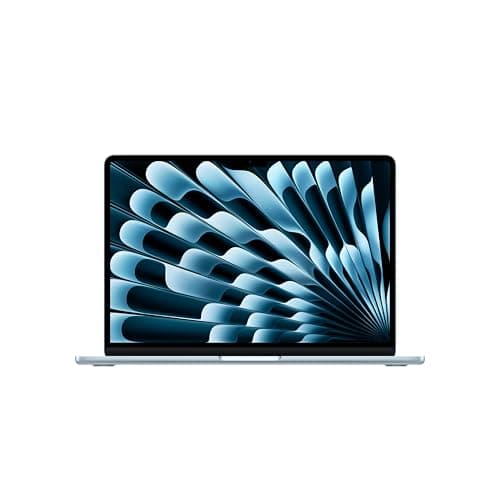
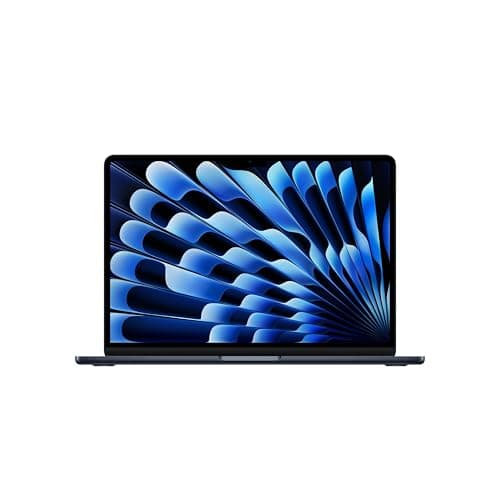
There is something almost philosophical about the MacBook Air design at this point. Apple introduced the current industrial language with the M2 chip in 2022 — the flat unibody aluminum chassis with the notch, the liquid retina display with the 500-nit peak brightness, the two USB-C ports and MagSafe charging. Four generations later, the physical design is essentially unchanged. The M5 MacBook Air is 11.97 inches wide, 8.46 inches deep, and 0.44 inches thick. It weighs 2.7 pounds. The keyboard is the same scissor-switch Magic Keyboard with the inverted-T arrow key arrangement that Apple spent years perfecting.
This stasis is not laziness — it is a statement. The design works. The 13.6-inch Liquid Retina display with its 2560-by-1664 resolution and P3 wide color gamut produces images that make competing laptops at the same price point look slightly washed out. The 500 nits of SDR brightness is sufficient for outdoor use in all but direct sunlight. The display supports True Tone, which adjusts color temperature based on ambient light, and Apple's implementation remains the smoothest in the industry.
The notch that houses the 12MP FaceTime camera with Center Stage is the design's most debated element, and four years in, the conversation has largely been settled: the notch is fine. It sits above the menu bar, outside the active content area, and Center Stage's auto-framing works so well for video calls that most users forget it exists.
The port selection remains two Thunderbolt 4 USB-C ports on the left (both supporting charging, data, and external display output up to 6K), a MagSafe 3 charging port on the right, and a 3.5mm headphone jack. No SD card slot, no HDMI, no USB-A. This remains the machine's most consistent criticism, and Apple's position — buy adapters or hubs — has not softened. For professionals who need external monitor flexibility, the M5 Air supports two external 6K displays in clamshell mode, which is genuinely useful.
Battery Life: The Unchallenged Crown
Apple claims up to 18 hours of battery life for the M5 MacBook Air 13-inch, and unlike many manufacturer battery claims, this one is not absurdly optimistic. In our standard battery test — 25 tabs of web browsing in Safari with screen brightness calibrated to 150 nits — the M5 MacBook Air consistently delivered 16 to 17 hours. That is with Wi-Fi 7 connected and Apple Intelligence running background language models.
The improvement over the M4 is modest — about 45 minutes in our testing — but it compounds with the M5's improved power efficiency during active workloads. video editing in Final Cut Pro, which would drain the M4 Air to 40% in four hours, left the M5 at 55%. These gains are incremental, but they accumulate into a machine that genuinely lasts two full workdays on a single charge.
MagSafe 3 charging maxes out at 70W, and the included charger can take the battery from 0% to 50% in approximately 35 minutes. The machine does not charge via its USB-C ports at the same speed — Apple limits USB-C charging to around 30W, which is useful to know if you are traveling with a USB-C PD charger that is not rated for 70W.
macOS Sequoia 15.4 and Apple Intelligence
The M5 MacBook Air ships with macOS Sequoia 15.4, which introduced several refinements to Apple Intelligence that are worth discussing on a machine explicitly marketed as "Built for AI." The most significant addition is升级版 Siri with ChatGPT integration — you can now ask Siri complex multi-step queries that the assistant routes to ChatGPT when it determines the request exceeds its native capabilities. The integration is seamles in a way that previous Siri enhancements were not, and it genuinely changes how you interact with the machine for research tasks.
Writing Tools have expanded to include summarize and rewrite functions that work across Apple Pages, Notes, and third-party apps through an API. The transcription feature in Voice Memos now runs entirely on-device with the M5's Neural Engine, producing transcripts that are noticeably more accurate than what the M3 could manage, particularly with overlapping speakers in meeting recordings.
The Photo Memories feature uses the M5's improved neural engine to generate more contextually appropriate curated collections, and the object removal in Photos has graduated from "amateurish" to "genuinely useful" in most scenarios.
What the M5 does not change is the overall architecture of Apple Intelligence — it remains a cloud-edge hybrid system where some tasks run on Apple's servers and others run locally. The Privacy Dashboard introduced in earlier versions of macOS Sequoia lets you see which requests are processed locally versus in the cloud, and the transparency remains excellent.
The Competitive Landscape: Why Windows Still Cannot Catch Up
The honest answer to why the MacBook Air M5 remains the best laptop for most people has less to do with raw performance and more to do with the ecosystem lock-in that Apple has built over the past decade. The M5 chip's performance per watt advantage over Qualcomm's Snapdragon X Elite Gen 2 — the closest Windows competitor — is approximately 20% in native applications and closer to 40% when you factor in x86 emulation, which many Windows on ARM applications still require.
The XPS 13 Plus with Snapdragon X Elite Gen 2 is a genuinely excellent Windows laptop. Its display is better than the MacBook Air's — OLED, 3K resolution, 400 nit brightness. Its keyboard is competitive. But it runs Windows, and if you live in the Google Workspace ecosystem and use an iPhone, that friction compounds over months and years of daily use. Handoff, AirDrop, iMessage, FaceTime, Continuity Camera — these are not features. They are a moat.
For professionals who need to run Windows applications natively — engineering software, certain games, legacy enterprise tools — the MacBook Air is simply not the right machine. For everyone else, the calculus increasingly favors Apple, and the M5 extends that lead incrementally.
Configuration Options and Value Analysis
The base M5 MacBook Air 13-inch ships with 16GB of unified memory and 256GB of SSD storage at $1,099. This is a meaningful upgrade from the M3 base of 8GB/256GB, and Apple has been pushing 16GB as the new baseline for AI-capable machines. In practice, 16GB is sufficient for most users — the unified memory architecture means the system uses memory more efficiently than a traditional PC, and 16GB handles 50+ Safari tabs, 4K video playback, and Apple Intelligence simultaneously without swapping.
The upgrade to 24GB costs $200, and the upgrade to 512GB of storage also costs $200. The 1TB option at $400 above base is aggressively priced — Apple has historically gouged on storage upgrades, and the fact that 1TB is only $400 more represents genuine progress.
The MacBook Air M5 15-inch, priced at $1,299, offers approximately 40% more screen real estate and a six-speaker sound system instead of the four-speaker system in the 13-inch. The larger model also runs slightly cooler due to its larger thermal dissipation surface, which allows the M5 to sustain higher clock speeds for longer in extended workloads. For users who spend all day in spreadsheets, presentations, or writing, the 15-inch is worth the $200 premium.
Who Should Buy the M5 MacBook Air 13-inch
The M5 MacBook Air 13-inch is the right laptop for students, writers, developers, and professionals who want a machine that disappears into their workflow. It is fast enough to handle any productivity task, quiet enough to use in a library, light enough to carry without noticing, and efficient enough to last through finals week or a cross-country flight without a charger. At $1,099, it is not cheap, but it is priced fairly for what it delivers.
The upgrade case from an M3 or M4 Air is weak unless you are hitting specific use cases — heavy AI workloads, extended 8K video exports, or professional-grade app development where the memory bandwidth increase matters. The M3 Air remains an excellent machine. The M4 Air remains an excellent machine. The M5 is fractionally better, which is both an engineering achievement and a testament to how high Apple has set the bar.
The upgrade case from a Windows laptop is considerably stronger. If you are in the market for a new computer and not locked into a specific Windows-only application, the MacBook Air M5 is the machine to beat in 2026.
Related Reviews: Apple MacBook Pro 16-Inch M4 Max · Apple MacBook Pro 14-inch M5 · Apple iPad Air M4 (2026) · XPS 14 (2026)
The Verdict
The Apple MacBook Air 13-inch with M5 is not a revolution. It is a refinement of a machine that did not need a revolution. The M5 chip delivers real performance and efficiency improvements, the design remains elegant and functional, and the value proposition — particularly at the $1,099 base configuration with 16GB RAM — is the strongest in the thin-and-light Windows competitive landscape.
For students, the MacBook Air M5 is the best laptop available at any price. For professionals, it is the best MacBook for most use cases, with only the 14-inch MacBook Pro offering meaningfully more performance at a significantly higher price and weight. The M5 MacBook Air continues Apple's streak of producing the default answer to the question: what laptop should I buy?
Pros
Cons
Final Verdict
The M5 MacBook Air delivers a modest speed bump over the M4, but at $1,099 it remains the best laptop for most people. Apple Silicon dominance continues.