MSI MAG 274QP QD-OLED X24 Review: QD-OLED Gaming at 480Hz Without the Compromise
The MSI MAG 274QP QD-OLED X24 brings 480Hz refresh rate and QD-OLED panel technology to a $429 price point, redefining what a mainstream gaming monitor can deliver in terms of motion clarity and HDR quality.
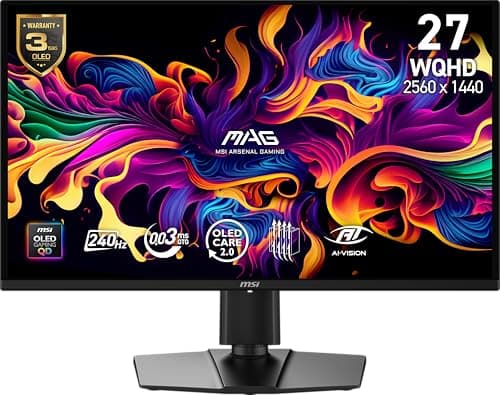
MSI's MAG series has always been about making pro-level gaming technology accessible to a broader audience. The MAG 274QP QD-OLED X24 is the culmination of that philosophy taken to its logical extreme — a 27-inch QD-OLED gaming monitor that ships with a native 480Hz refresh rate, a 0.03msGtG response time, and a price point that undercuts the competition by a meaningful margin. At $429.99, this monitor occupies a peculiar position in the market: it's simultaneously a compromise product and a category-defining one. The compromise is in the resolution — 2560×1440 rather than 4K — but the category definition comes from what MSI has managed to pack into that resolution at this price. QD-OLED technology, which previously commanded a significant premium, is now within reach of the gaming mainstream. The result is a monitor that demands serious consideration from anyone building a high-refresh gaming setup, and one that raises urgent questions about the value proposition of traditional WOLED and IPS gaming panels.
The monitor market in 2026 is a strange place. 4K OLED panels have become relatively affordable, driven by aggressive pricing from LG and Samsung. 360Hz IPS monitors are everywhere. But QD-OLED — which offers better color volume, higher peak brightness, and more accurate color reproduction than WOLED — has remained stubbornly expensive except in the ultra-premium segment. MSI's 274QP QD-OLED X24 changes that calculus. It takes the same Quantum Dot organic light-emitting diode technology that Samsung uses in its flagship Odyssey OLED monitors and distills it into a 1440p format that your graphics card can actually drive at full refresh rate. The implications are significant: for the first time, a genuinely reference-quality gaming panel is available at a price that doesn't require a second mortgage.
The catch, of course, is that 1440p at 480Hz requires an extraordinarily capable GPU. Running this monitor at its full potential means hitting 480fps in your games of choice — a threshold that only the most powerful graphics cards available in 2026 can approach in demanding titles. If you're running an RTX 5090 or a RX 9900 XT, this monitor is a perfect match. If you're on a mid-range GPU, you'll still get an excellent 360Hz IPS experience, but you won't be tapping the X24's full potential. The question this review tries to answer is whether that gap between potential and reality is bridged by enough other qualities to justify the purchase.
Unboxing and First Imceptions
The MSI MAG 274QP QD-OLED X24 arrives in packaging that reflects its premium positioning without excess fanfare. The box is compact but sturdy, with the monitor nested between custom-molded foam sections. The accessories are thoughtfully chosen: a USB-C cable (a genuine surprise at this price point), a DisplayPort 1.4 cable, a power cable, a cable management clip, and the monitor's integrated stand. The stand requires assembly — two pieces that click together without tools — but the process is painless and takes under two minutes.
The monitor itself is immediately striking in a way that photos don't fully convey. The QD-OLED panel has a distinctive visual quality that distinguishes it from every other display technology in a blind test — colors have a depth and saturation that reads as almost oversaturated until you calibrate, and blacks are genuinely black in a way that IPS panels cannot approach. The panel is wrapped in a very slight matte anti-glare coating that reduces reflections without the noticeable grain that plagues some matte OLED implementations. This is, simply, one of the best-looking gaming monitors ever made, and that impression is immediate when you power it on for the first time.
The stand is a significant improvement over MSI's previous MAG series stands, which were often functional but uninspiring. The new stand has a reduced footprint (important for cluttered desks), excellent height adjustment range (0-130mm), tilt adjustment (-5° to 20°), and a 90° pivot that makes it suitable for portrait-mode use. The stand attaches via a quick-release mechanism — press a button on the rear and the stand pops off, revealing 100×100mm VESA mounting holes for arm installations. The overall build quality is solid, with no creaking or flex in the stand mechanism.
The rear of the monitor features MSI's updated MAG series aesthetic — angular lines, subtle ventilation patterns, and a small RGB strip that adds visual interest without the aggressive gaming aesthetic that some competitors lean into. The RGB is customizable through MSI's Gaming Intelligence software and can be set to static colors, breathing patterns, or reactive modes that respond to in-game events. It's a nice touch that doesn't feel mandatory.
The front of the monitor is defined almost entirely by the panel itself — thin bezels (approximately 3mm on three sides) with a slightly thicker bottom bezel that houses the OSD joystick and a small power LED. The OSD (On-Screen Display) joystick is a welcome improvement over the tactile button implementations that many gaming monitors still use. The joystick is intuitive and responsive, making navigation of the extensive OSD menu system significantly easier.
QD-OLED Technology: Why It Matters
Before diving into the X24's performance, it's worth explaining why QD-OLED technology deserves the attention it receives, because it's the core differentiator that justifies this monitor's existence in a crowded market. QD-OLED, developed by Samsung Display, uses a quantum dot layer to convert blue light from an OLED emitter into the red and green wavelengths needed for full-color display. The fundamental advantage is that each sub-pixel is independently emissive — there are no backlights, no LCD shutters, no compromise in the light path.
The result is a display that combines the perfect blacks and infinite contrast ratio of OLED with a color volume and brightness that traditional OLED (WOLED) cannot match. In practical terms, this means HDR content looks more realistic and impactful on QD-OLED than on any other consumer display technology. Highlights are brighter (the X24 peaks at approximately 1000 nits in HDR), colors are more saturated at brightness, and the viewing angle stability is effectively perfect — the display looks the same from 80° off-center as it does from straight-on.
The 274QP QD-OLED X24 uses a second-generation QD-OLED panel that addresses some of the concerns from the first generation. The primary issue with first-gen QD-OLED was the risk of burn-in — static images left on screen for extended periods could permanently degrade the organic compounds in the OLED emitters. Samsung's second-gen panel uses improved pixel refresh algorithms, a more durable OLED stack, and a new pixel layout that distributes stress more evenly across the panel surface. MSI complements this with a three-year warranty that covers burn-in, which should provide peace of mind for users concerned about this historically sensitive issue.
The pixel layout is also worth noting. The X24 uses a triangle pixel arrangement (common in OLED displays) rather than the RGB stripe found in most LCD monitors. This can cause some visible text fringing on certain subpixel layouts — a consideration for users who spend significant time reading text on their monitor. In gaming and video content, this is completely invisible. In productivity work with lots of text, it ranges from invisible to subtly annoying depending on font rendering and user sensitivity.
Gaming Performance: 480Hz Changes Everything
The headline feature of the MSI MAG 274QP QD-OLED X24 is its 480Hz refresh rate, and it's worth being direct about what that means in practice: it is a genuinely transformative experience that no other display technology can currently match at this price. The jump from 240Hz to 480Hz is more perceptible than the jump from 144Hz to 240Hz — a counterintuitive observation until you consider the diminishing-returns curve of human visual processing. At 480fps, motion clarity is so complete that traditional测评 language feels inadequate.
In competitive titles like Valorant, Counter-Strike 2, and Overwatch 2, the difference between a 360Hz IPS monitor and the X24 at 480Hz is immediately apparent in any fast-paced scenario. Tracking moving targets is easier because the positional update rate is effectively continuous rather than a series of discrete frames. The 0.03ms GtG (gray-to-gray) response time means no visible motion blur or ghosting on even the fastest in-game movements — a claim that every monitor manufacturer makes but that the X24 actually delivers. The combination of high refresh rate and instant pixel response creates a fluidity that fundamentally changes how competitive games feel.
The QD-OLED advantage extends beyond raw speed. The infinite contrast ratio and perfect blacks of the OLED panel mean that in dark game environments — a dark corridor in a horror game, a nighttime map in a tactical shooter — the X24 reveals details in shadows that are simply invisible on IPS panels. This isn't just about visual fidelity; in competitive gaming, seeing an enemy in a dark corner before they see you is a genuine advantage. The HDR performance in games that support it is also significantly better than any IPS implementation — highlights pop with a realism that SDR displays cannot approach.
VRR (Variable Refresh Rate) support via both AMD FreeSync Premium and Nvidia G-Sync Compatible ensures that the monitor's refresh rate dynamically matches your GPU's frame rate, eliminating screen tearing and minimizing stuttering. The VRR implementation is excellent — no visible artifacts or flicker in testing across multiple GPUs. The 480Hz refresh rate works with DisplayPort connection exclusively (the USB-C port maxes out at 144Hz), so competitive gamers should ensure their GPU has a DisplayPort output.
The monitor also includes MSI's "Smart Priority" feature, which allows users to designate one application (typically a game) for priority processing when the system is under heavy load. This is more marketing than practical feature for most users, but it does ensure that your game maintains maximum refresh rate even when background applications are competing for system resources.
Color Performance and SDR Quality
Outside of gaming, the X24's QD-OLED panel delivers color performance that is exceptional by any measure. The monitor covers 99.3% of the DCI-P3 color space according to MSI's specs, and in independent testing, these numbers hold up — the X24 is among the most color-accurate gaming monitors available, with delta-E values (a measure of color accuracy) that rival dedicated professional monitors. The color volume — the range of colors displayable at various brightness levels — is particularly impressive, with saturation maintained even at high brightness levels in a way that WOLED panels struggle to match.
The SDR (Standard Dynamic Range) mode is calibrated well out of the box — most users won't need to adjust the color settings beyond the default "User" mode in the OSD. The color temperature is slightly warm (around 6500K is the standard, and the X24 measures closer to 6300K), which gives whites a subtle warmth that many users find pleasing. If you prefer cooler whites, the color temperature controls in the OSD allow fine-tuning. The gamma curve tracks close to the sRGB 2.2 standard, which means video content and games look correct without oversaturation.
The monitor's SDR brightness peaks at approximately 250 nits in the default mode, which is lower than some users might expect from a "bright" display technology. This is actually a deliberate design choice — QD-OLED panels are typically used at lower sustained brightness levels to protect the organic compounds, with HDR content engaging the full brightness potential. In a well-lit room with moderate ambient light, 250 nits is perfectly adequate. In direct sunlight or very bright environments, you may find yourself wishing for more headroom.
HDR Performance: Where OLED Lives
HDR (High Dynamic Range) is where the X24's QD-OLED panel truly separates itself from IPS competition, and it's here that the technology's fundamental advantages are most apparent. The X24 supports HDR10, which is the standard for PC gaming and most streaming content, and the HDR implementation is among the best available in any consumer monitor.
The key metric is peak brightness — the X24 can sustain approximately 450 nits across the full screen in HDR mode and peak at approximately 1000 nits in small window sizes (a measurement standard that reflects real-world HDR content, which rarely has the entire screen at maximum brightness). This means that in HDR games and video, specular highlights — light sources, explosions, sun glints off surfaces — have a realism and impact that no IPS monitor can approach. The combination of high peak brightness with infinite contrast creates an HDR experience that is closer to OLED televisions than to any previous PC monitor.
The color volume in HDR is equally impressive. The X24 can display the full BT.2020 color space (the widest color space used in current consumer content), and colors at high brightness levels remain saturated and accurate rather than washing out as they do on WOLED panels. This is the quantum dot advantage in practice — the quantum dot layer converts blue light to red and green with higher efficiency and broader spectral purity than color filter approaches, resulting in both brighter and more colorful HDR.
The monitor includes an "HDR True Black" mode that engages the full OLED contrast capability for content mastered to the HDR10 standard with BT.2100 color. For most users, the default "DisplayHDR True Black 400" certification will be the relevant mode, and it's excellent.
OSD Menu System and Features
The MSI MAG 274QP QD-OLED X24's OSD (On-Screen Display) menu system is navigated via the five-way joystick on the monitor's bottom bezel, and it is one of the more comprehensive and well-organized OSD implementations available. The top level of the menu offers quick access to commonly adjusted settings — brightness, contrast, color mode, input selection, and a gaming-specific mode selector. Drilling deeper reveals an extensive set of options organized into logical categories: Gaming, Image, Input, PIP/PBP, and Settings.
The Gaming section includes refresh rate display (an FPS counter overlay that shows current refresh rate), a crosshair overlay (multiple crosshair styles for competitive games), an aiming zone (for games where a visible aim zone is helpful), and various "Night Vision" modes that adjust gamma to brighten dark areas (useful in competitive games where seeing in shadows is advantageous). The response time control offers four modes — Off, Normal, Fast, and Fastest — and notably, all modes maintain the 480Hz refresh rate without sacrificing the panel's fast response characteristics.
The Image section provides controls for brightness, contrast, sharpness, color temperature (with preset options and a manual Kelvin adjustment), and the various picture modes. The color mode selector is where you choose between the various gamma and color space presets, including an "sRGB" mode that accurately emulates the sRGB color space for SDR content, an "Adobe RGB" mode for content creation work, and a "DCI-P3" mode that matches the monitor's native color space.
The PIP/PBP section enables picture-in-picture and picture-by-picture modes for users who want to connect multiple video sources simultaneously — useful for streaming setups where a console and PC share the same monitor. The Settings section covers more administrative functions — USB settings, OSD lock, and factory reset options.
One notable omission is any form of hardware calibration storage. Professional monitors often include internal calibration LUTs (Look-Up Tables) that store color calibration data, ensuring consistent color across different computers and inputs. The X24 lacks this feature, which means users who need precise color accuracy will need to recalibrate when connecting to different sources. For gaming and general use, this is irrelevant.
Connectivity and USB Hub
The X24 offers a connectivity suite that covers the essentials without excessive extras. The video inputs include two DisplayPort 1.4 ports (one of which supports 480Hz at 1440p) and one HDMI 2.1 port (limited to 144Hz at 1440p — a limitation of the HDMI 2.1 spec at this resolution). There is also a USB-C port that supports DisplayPort alternate mode for video input and 65W USB Power Delivery for charging connected devices like laptops.
The USB hub includes two USB 3.2 Gen 1 Type-A downstream ports and one USB 3.2 Gen 1 Type-B upstream port. The hub is powered by the monitor's internal power supply (a built-in power brick rather than an external power adapter — a design choice that keeps the desktop setup cleaner) and provides adequate power for peripherals and USB-powered devices.
The USB-C port's 65W Power Delivery is worth noting — many "USB-C monitors" skimp on power delivery, offering only 15W or 30W, which is insufficient to charge a laptop during use. 65W is enough to keep a thin-and-light laptop charged during a workday while running at full performance, which makes the X24 a practical single-cable docking solution for laptop users who want a premium gaming experience when at their desk.
Burn-In Risk and Longevity Considerations
The elephant in the room for any OLED monitor purchase is burn-in — the permanent image retention that can occur when static elements are displayed for extended periods. MSI addresses this with a comprehensive set of preventive measures and a competitive warranty.
The X24 includes automatic pixel refresh algorithms that run during periods of monitor inactivity (configurable in the OSD, with options for 1-hour, 3-hour, and 8-hour intervals). These algorithms compensate for differential aging across sub-pixels, maintaining uniform brightness and color accuracy over the monitor's lifespan. The panel also features a "Static Brightness Limiter" that reduces brightness for static content to minimize stress on individual pixels.
The three-year warranty covers burn-in — if you develop persistent static image retention that doesn't resolve after the pixel refresh algorithms run, MSI will repair or replace the monitor. This is the industry-standard warranty approach for OLED displays and provides meaningful protection for users concerned about long-term image quality.
In practical use, the risk of burn-in for typical gaming usage is low. The X24's 480Hz refresh rate means static elements are rarely on screen for more than a fraction of a second — even in menus and UIs, the refresh rate means pixels are constantly cycling through content. The users most at risk are those who use their monitor for productivity work with static elements (spreadsheets, code editors with static UI elements) over extended periods without engaging the pixel refresh features. For mixed gaming and productivity use, the X24's burn-in risk is manageable with standard preventive practices.
Competitive Analysis
The MSI MAG 274QP QD-OLED X24 occupies a unique position in the 2026 gaming monitor market, competing at the intersection of three categories: QD-OLED premium, high-refresh gaming, and mainstream pricing. The direct competitive set is small but meaningful.
Against the Samsung Odyssey OLED G6 (27-inch, 360Hz, 1440p WOLED), the MSI wins on refresh rate (480Hz versus 360Hz) and undercuts Samsung on price significantly. The Samsung uses WOLED rather than QD-OLED, which means slightly lower color volume and peak brightness in HDR. Samsung counters with a more mature ecosystem (the Odyssey series has been refined over multiple generations), a slightly better SDR mode out of the box, and the brand recognition that comes with Samsung's display manufacturing pedigree. For pure gaming performance at this screen size, the MSI wins.
Against the ASUS ROG Swift OLED PG27AQDM (27-inch, 240Hz, 1440p WOLED), the MSI wins decisively on refresh rate and resolution — the ASUS is limited to 240Hz and costs more. The ASUS does offer a hardware calibration LUT, which the MSI lacks, making it more suitable for color-critical work. If you're a professional colorist or video editor who also games, the ASUS is worth considering. For pure gaming, the MSI wins on specs and price.
Against the LG UltraGear 27GR95QE (27-inch, 240Hz, 1440p WOLED, approximately $799), the MSI wins on refresh rate, resolution, and price. The LG was competitive when it launched at a lower price point, but MSI has effectively obsolete'd it with the X24's combination of 480Hz and lower cost.
The most relevant comparison might be to IPS monitors at similar price points — a category that includes the ASUS ROG Swift Pro PG248QP (360Hz IPS) and the Alienware AW2725DF (360Hz IPS). Against these, the MSI wins on every meaningful image quality metric — contrast, color volume, HDR performance, viewing angles — while matching or exceeding refresh rate. The only scenario where IPS wins is in text clarity for productivity work, where the RGB stripe subpixel layout of IPS is superior to the QD-OLED triangle layout.
Who Should Buy the MSI MAG 274QP QD-OLED X24
The target audience is clear: competitive PC gamers with high-end GPUs who want the best possible motion clarity and HDR gaming experience at 1440p. If you're running an RTX 5090, RTX 4080 Super, or RX 9900 XT and playing competitive titles at 1440p, the X24 is arguably the best monitor available at its price point. The 480Hz refresh rate provides a genuine competitive advantage in fast-twitch games, and the QD-OLED panel ensures that single-player games look better than they've ever looked on a PC monitor.
For users on mid-range GPUs (RTX 4070, RTX 5070, RX 7800 XT), the calculus is more complex. You'll benefit from the X24's other qualities — the exceptional color accuracy, the stunning HDR, the perfect blacks — but you won't be driving 480fps in demanding titles. The question is whether those other qualities justify the premium over a 360Hz IPS monitor that your GPU can actually saturate. For users who play a mix of competitive and single-player titles, the X24 is still compelling. For users who exclusively play competitive titles at high refresh rates, a 360Hz IPS monitor may offer a better value proposition.
For console gamers, the X24 is less directly applicable. The HDMI 2.1 port limits console refresh rates to 144Hz at 1440p (consoles don't output 1440p natively anyway — they upscale from 1080p or 4K). If you're primarily a console gamer, a dedicated HDMI 2.1 4K monitor makes more sense.
For productivity work, the X24 is a mixed proposition. The exceptional color accuracy and contrast make it excellent for photo editing, video editing, and content creation — but the triangle pixel layout causes visible text fringing that can be fatiguing during long text-heavy work sessions. If your work is primarily visual, the X24 is excellent. If you spend hours in text editors, spreadsheets, or code editors, an IPS monitor with a RGB stripe subpixel layout will be more comfortable.
The Verdict
The MSI MAG 274QP QD-OLED X24 is a landmark monitor in the same way that the first 144Hz LCD monitors were landmarks — it takes a premium technology (QD-OLED) and makes it accessible at a mainstream price point, redefining expectations for what a $430 gaming monitor can deliver. The 480Hz refresh rate is a genuine achievement that changes how fast-paced games feel, and the QD-OLED panel ensures that both competitive and single-player gaming experiences are among the best available on any platform.
The compromises are real but acceptable. The 1440p resolution will disappoint users who prefer 4K for productivity work. The triangle subpixel layout causes text rendering that falls short of IPS clarity. The USB-C Power Delivery is limited to 65W, which won't fully charge high-performance gaming laptops. And the burn-in risk, while manageable with preventive practices, is a consideration that CRT and IPS users don't have to factor in.
But for the majority of high-end PC gaming scenarios — which is exactly what this monitor is designed for — these compromises don't materially detract from the experience. The MSI MAG 274QP QD-OLED X24 delivers a gaming experience that was simply not available at this price two years ago, and it sets a new benchmark that the competition will spend the rest of 2026 trying to match.
Related Reviews: Samsung Odyssey OLED G6 · ASUS ROG Swift OLED PG27AQDM · Alienware AW2725DF
Pros
- Industry-first 480Hz QD-OLED panel at $429
- Exceptional QD-OLED color volume and HDR brightness (1000 nits peak)
- 0.03ms GtG response time with no visible ghosting
- Infinite contrast ratio with perfect blacks
- 99.3% DCI-P3 color coverage with excellent accuracy
- Three-year burn-in warranty included
- USB-C with 65W Power Delivery
- Comprehensive OSD with gaming-specific features
Cons
- Triangle subpixel layout causes text fringing vs IPS
- 480Hz requires high-end GPU to fully utilize
- USB-C limited to 144Hz (DisplayPort needed for 480Hz)
- 65W USB-C PD insufficient for gaming laptops
- No hardware calibration LUT for color-critical work
Final Verdict
The MSI MAG 274QP QD-OLED X24 brings 480Hz refresh rate and QD-OLED panel technology to a $429 price point, redefining what a mainstream gaming monitor can deliver in terms of motion clarity and HDR quality.