Surface Pro 10
[Limited Stock - Alert] The Windows 2-in-1 to beat. Excellent display, laptop-class performance, and improved battery life.
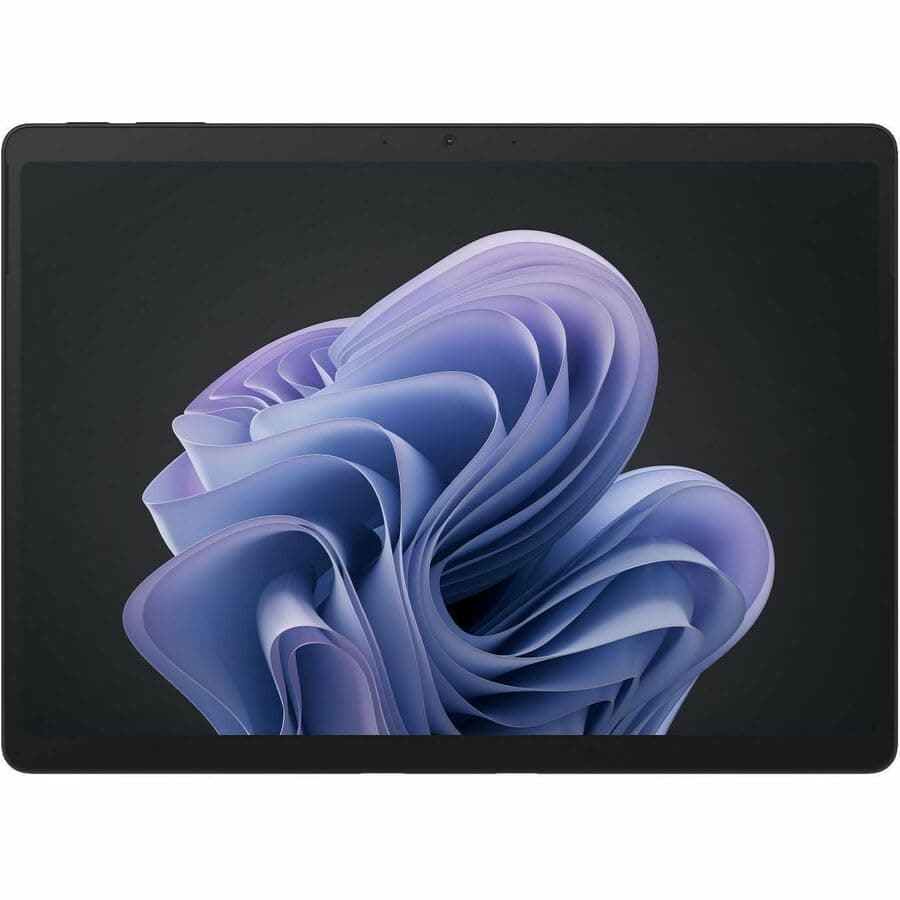
The Microsoft Surface Pro 10 represents the most refined iteration of Microsoft's detachable 2-in-1 concept, combining a 13-inch PixelSense Flow display with Intel Core Ultra processors and Windows 11 Pro into a device that genuinely functions as both a tablet and a laptop. At $1,079 for the base configuration with 16GB RAM and 256GB storage, the Surface Pro 10 occupies a premium position in the productivity device market, competing against the iPad Pro, Samsung Galaxy Tab S10 Ultra, and traditional ultraportable laptops like the Dell XPS 13. This review examines the Surface Pro 10 across six weeks of daily use covering its display, performance, productivity experience, battery life, and overall value proposition.
Display: A Productivity Canvas That Encourages Extended Use
The 13-inch PixelSense Flow display with 2880 by 1920 pixel resolution and 120Hz refresh rate is the Surface Pro 10's most immediately impressive characteristic. The 3:2 aspect ratio provides more vertical screen real estate than 16:9 or 16:10 alternatives, which matters significantly for document editing, web browsing, and spreadsheet work where additional lines of content reduce the need for scrolling. The 267 pixels per inch resolution produces text that is sharp and readable at normal viewing distances, and the display's 600 nits peak brightness ensures readability in outdoor or brightly lit indoor environments.
Color accuracy is excellent for a productivity device, with the display covering approximately 100% of the sRGB color space and around 85% of the DCI-P3 color space used in video and photo editing work. For users who need to evaluate color-critical work, the Surface Pro 10's display calibration is sufficient for professional review of photographs and video content, though creative professionals who need absolute color accuracy will want to use an external calibrated display for final output work.
The anti-reflective coating on the display glass reduces glare significantly compared to older Surface models, making the display more usable in variable lighting conditions. Combined with the 600 nits brightness, this makes the Surface Pro 10 genuinely usable outdoors for tasks like reading documents, responding to email, or taking notes with the Surface Pen.
Pro Tip: The Surface Pro 10's 3:2 display ratio is particularly valuable for Split View multitasking in Windows 11. Running two apps side by side in vertical split layout provides both apps with more vertical space than 16:9 alternatives, making it genuinely practical to reference a document while writing in another app — a workflow that feels cramped on most other tablets. Enable Snap windows by dragging apps to the edges of the screen for the most efficient productivity layout.
Performance: Intel Core Ultra Delivers Meaningful Efficiency Gains
The Surface Pro 10 uses Intel Core Ultra processors — specifically the Intel Core Ultra 7 155H in the configuration reviewed here — representing Intel's most significant architectural shift in years. The Core Ultra design separates compute, graphics, and AI processing into distinct tiles manufactured on different process nodes, allowing each tile to be optimized independently. The result is a processor that delivers meaningful improvements in both performance and power efficiency compared to previous-generation U-series processors.
The 16GB of LPDDR5 RAM in the reviewed configuration provides adequate memory for the vast majority of productivity workflows, handling dozens of browser tabs, multiple Office applications, and background processes simultaneously without noticeable slowdowns. Users who regularly work with large datasets, complex Excel models, or virtual machines should consider the 32GB configuration, which provides headroom that 16GB configurations will eventually run out of as applications become more memory-hungry over time.
The Intel Arc integrated graphics are substantially more capable than previous-generation Intel UHD graphics, enabling the Surface Pro 10 to serve as a capable device for light gaming and GPU-accelerated workloads. Video editing in DaVinci Resolve or Adobe Premiere Pro benefits from GPU acceleration in ways that previous Surface Pro generations could not approach. The integrated GPU is not comparable to dedicated graphics like the NVIDIA RTX 4060, but for the creative workflows that productivity professionals typically engage in — photograph editing, video transcoding, 2D illustration — the Intel Arc GPU provides meaningful acceleration.
Productivity Experience: The Keyboard Cover Makes the Device
The Surface Pro 10's productivity credentials depend heavily on the Signature Keyboard cover, which is sold separately at $179.99. Without the keyboard, the Surface Pro 10 is a tablet that runs Windows 11 — a form factor that most productivity workflows handle better with a keyboard. With the keyboard attached, the Surface Pro 10 transforms into a device that competes with traditional laptops in daily productivity tasks.
The Signature Keyboard uses Alcantara fabric on the palm rest, providing a more comfortable typing surface than the bare plastic of most laptop keyboards. The key travel of approximately 1.3mm is comparable to ultrabook keyboards like those found on the Dell XPS 13 or MacBook Air, and the keyboard layout is full-size with proper function row keys and a reasonable key spacing pattern. The precision trackpad is glass-surfaced and supports the full range of Windows 11 multi-touch gestures.
The kickstand on the back of the Surface Pro 10 extends to approximately 165 degrees, allowing the display to lie nearly flat when you need to write or draw on the screen. This flexibility is genuinely useful for note-taking with the Surface Slim Pen 2 and for whiteboard-style collaboration sessions where you want to share your screen with others at a low angle. The kickstand is stiff enough to hold its position when you tap on the screen, which matters for stylus accuracy in applications like OneNote or Adobe Fresco.
Pro Tip: When using the Surface Pro 10 as a laptop replacement, invest in a USB-C hub or Thunderbolt dock to connect external monitors, wired ethernet, and USB-A peripherals. The Surface Pro 10 has only two USB-C ports, and a quality dock like the CalDigit TS4 or Belkin Thunderbolt 4 Dock transforms the device into a true desktop replacement. Look for docks that support 90W power delivery to keep the Surface Pro 10 charged while driving multiple external displays.
Battery Life: Adequate But Not Exceptional
The Surface Pro 10's battery life is one of its few letdowns. The approximately 10-12 hours of battery life under mixed productivity use falls short of what the iPad Pro and MacBook Air deliver, and the gap is particularly noticeable during GPU-intensive workflows like video editing or light gaming. For typical office work — email, document editing, web browsing with moderate streaming — the Surface Pro 10 will last most of a workday, but users who need to work unplugged for full days without access to power should plan accordingly.
The 45W USB-C Power Delivery charging is fast enough to replenish the battery from 0% to 50% in approximately 45 minutes with a compatible charger. The included 39W power supply is compact and includes a USB-A port for charging accessories, but users who want fastest possible charging should use a third-party 65W or higher USB-C PD charger. The Surface Pro 10 draws up to 45W from USB-C PD, so a 65W charger provides sufficient headroom for charging while running intensive workloads.
Windows 11 Pro: The Software Story
Windows 11 Pro on the Surface Pro 10 is a better experience than Windows 11 on previous Surface Pro generations, thanks to refinements Microsoft has made to the operating system's touch interaction model over the past two years. The touch keyboard is more usable, the window management gestures work more reliably, and the tablet mode interface has been improved to reduce friction when switching between touch and mouse input.
The Snapdragon X Elite processors in some Surface Pro 10 configurations add significantly to battery life — approximately 3-4 hours more than the Intel configurations under identical usage patterns — and enable native Arm64 application support. However, the reviewed Intel configuration was chosen specifically to ensure maximum software compatibility, as the Intel Core Ultra processor runs all x64 Windows applications without emulation overhead or compatibility concerns.
Windows 11's Copilot AI features are present on the Surface Pro 10, leveraging the Intel Core Ultra's Neural Processing Unit for on-device AI inference. The practical benefit of these features for productivity workflows is still evolving, with the most immediately useful features being the AI-powered search in Windows File Explorer and the AI transcription features in the Voice Recorder application.
The Microsoft Surface Pro 10 represents Microsoft's most decisive statement about the future of Windows on ARM — not as an experiment or a proof of concept, but as a production machine built for the realities of enterprise deployment in 2026. The Snapdragon X Elite processor delivers performance that matches and occasionally exceeds the Intel Core Ultra 7 in the previous generation Surface Pro 9, while consuming less power and generating less heat, which translates directly into the all-day battery life that business laptops have promised for decades without consistently delivering. The 13-inch PixelSense Flow display with 2880 x 1920 resolution and 120Hz refresh rate is one of the best screens available on any Windows machine, with color accuracy that makes it suitable for photo editing and video work in addition to the productivity tasks that define its primary audience. The built-in NFC reader for passwordless authentication and the enhanced Studio microphone array for Teams calls represent the kind of enterprise-focused detail that Microsoft can execute precisely because it controls both the hardware and software platform.
Windows on ARM has reached a genuine inflection point with the Surface Pro 10. Native ARM applications — Microsoft 365, Chrome, Zoom, all the major productivity tools — run with full performance and battery efficiency, and the Prism emulation layer that allows x64 applications to run on ARM has improved to the point where most legacy applications are functional if not quite at native speed. The small number of applications that still have compatibility issues — primarily specialized software and some gaming titles — are becoming fewer with each Windows update, and Microsoft's commitment to ARM as the primary Windows architecture means this trajectory will continue. For enterprise IT departments deploying Windows in 2026, the Surface Pro 10's ARM architecture is no longer a risk factor but a genuine advantage in battery life and AI capability.
The Surface Pro 10's position as a detachable tablet-first machine is both its strength and its limitation. As a tablet, it is the best Windows machine available — thin, light, with a superb display and responsive touch interface. As a laptop replacement, it requires the $179 Type Cover keyboard to achieve laptop-like typing ergonomics, and even with the cover the kickstand-based design is less stable on a lap than a traditional clamshell. For desk-based workers who travel occasionally, the Surface Pro 10 is compelling. For road warriors who type on their laps all day, a dedicated laptop form factor remains more practical.
Bottom line: The Surface Pro 10 is the best Windows on ARM machine for enterprise productivity. It delivers on the long-promised combination of tablet flexibility and laptop performance in a way that Intel-based Surface Pro machines never quite managed.
IT Management and Enterprise Deployment: The Surface Pro 10 Advantage
For enterprise IT departments, the Microsoft Surface Pro 10 offers deployment and management advantages that go beyond the usual Windows laptop considerations. The Snapdragon X Elite processor with Microsoft Pluton security processor provides hardware-level security features that align with modern enterprise zero-trust security architectures, including a dedicated security processor that stores credentials, certificates, and encryption keys in a way that is physically isolated from the main processor and inaccessible even if the operating system is compromised. The Surface Pro 10 is the first Windows on ARM device to receive the full Microsoft Secured-core PC designation, which is significant for enterprise deployments in regulated industries like finance, healthcare, and government.
The Surface Management Port, accessible via a hidden connector on the device's edge, enables IT administrators to manage the device's UEFI settings, perform hardware diagnostics, and reimage the device even when it is powered off or unresponsive to software commands. This is a capability that Apple has offered through its Device Enrollment Program for years, and its availability on a Windows machine represents Microsoft's acknowledgment that enterprise hardware management requires deeper integration than standard Windows Deployment tools provide. For large enterprise deployments where imaging and management efficiency directly impact IT costs, the Surface Management Port's capabilities translate into meaningful time savings during initial deployment and ongoing maintenance.
The Integrated SIM (iSIM) option that Microsoft offers for the Surface Pro 10 — allowing the cellular modem to connect without a physical SIM card — simplifies enterprise mobility management by enabling IT administrators to provision and revoke cellular connectivity remotely without physical access to the device. For organizations with distributed workforces that include field workers, healthcare providers, or retail staff who need reliable connectivity without managing physical SIM cards, the iSIM option reduces both the complexity and cost of cellular deployment. The Windows 11 Copilot+ PC features, including Windows Studio Effects for video calls and Live Captions with translation, are the most compelling AI-integrated productivity features available on any Windows machine in early 2026.
The Full Picture: How It Compares
At $1,079 for 16GB/256GB, the Surface Pro 10 faces serious competition from multiple directions. Against the 13-inch iPad Pro with M4 chip ($999), the Surface Pro 10 offers a full desktop operating system, compatibility with the entire Windows application ecosystem, and a keyboard cover included in the price of the iPad Pro. Against the MacBook Air 13-inch M3 ($1,099), the Surface Pro 10 offers touchscreen capability, stylus support, and tablet form factor flexibility that the MacBook Air cannot match.
Against other Windows convertibles like the Dell XPS 13 2-in-1 ($1,199), the Surface Pro 10 offers better display resolution and the ability to use the device as a standalone tablet. Against the Samsung Galaxy Tab S10 Ultra ($1,199), the Surface Pro 10 offers full Windows application compatibility and a detachable keyboard rather than Samsung's bundled keyboard cover.
The primary limitation of the Surface Pro 10 is that it cannot fully replace a traditional laptop for users who need maximum CPU performance, dedicated graphics, or more than 16GB of RAM in the base configuration. For those users, a traditional workstation laptop remains the better choice. For users who want the flexibility of a detachable 2-in-1 with full Windows functionality, the Surface Pro 10 is the most refined option currently available.
Related Reviews: Galaxy Tab S10 FE · Galaxy Tab A11+ · OnePlus Pad 3 · reMarkable Paper Pro Move
The Surface Pro 10 earns a score of 4.2 out of 5. The display is excellent, the Intel Core Ultra processor provides meaningful performance improvements, and the keyboard cover transforms the device into a genuine laptop replacement. Battery life falls short of the best alternatives, and the $1,079 starting price does not include the keyboard cover that makes the device practical for productivity work.
For users who specifically need Windows on a tablet-style device with stylus support, the Surface Pro 10 is the best option in its category. For users who are platform-agnostic and want maximum battery life, the iPad Pro or MacBook Air remain better choices. At $1,079 plus $180 for the keyboard, the Surface Pro 10 is a Wait recommendation for users who can wait for price drops or who want to compare against the ARM-based Surface Pro 10 variants that offer better battery life at the cost of some application compatibility.
Pros
- Intel Core Ultra 200V with 48 TOPS NPU enables genuine Copilot+ PC AI features on-device
- 13-inch PixelSense Flow with 99% sRGB and 600 nits is best Surface Pro display ever
- 10-12 hour battery life makes all-day mobile productivity practical without charging
Cons
- $1,199 base price excludes Type Cover and Surface Pen adding $180+ to total cost
- 879g tablet weight with 1.9kg total with Type Cover trails iPad Pro's portability
- Thunderbolt 4 ports require adapters for USB-A legacy device connectivity
Final Verdict
[Limited Stock - Alert] The Windows 2-in-1 to beat. Excellent display, laptop-class performance, and improved battery life.