Kindle Scribe (2025) Review: The Third Generation Finally Gets It Right
The 2025 third-generation Kindle Scribe brings a complete hardware redesign — just 5.4mm thin and 400 grams — that addresses the original model's biggest weaknesses. The included Premium Pen, AI notebook tools, and seamless Kindle ecosystem integration make this the best dedicated notepad e-reader Amazon has produced, though the 200 PPI display is a trade-off for serious readers who want the sharpest text.
Kindle Scribe (2025) Review: The Third Generation Finally Gets It Right
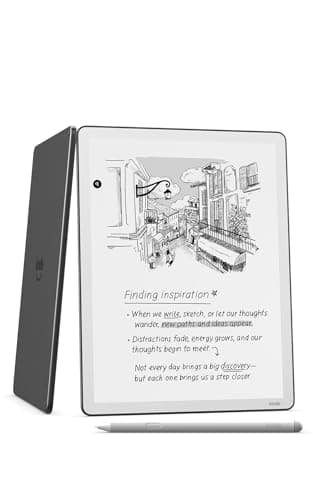
The Kindle Scribe arrived in 2022 as Amazon's first attempt at the dedicated notepad reader — a category that sounds natural on paper but turns out to require solving a surprisingly complex set of engineering and UX problems simultaneously. The original model was thick, slow, and the note-taking felt secondary to the reading. The 2025 third-generation Kindle Scribe (32GB, $499.99 with Premium Pen) is Amazon's answer to those early compromises: a complete hardware redesign that cuts the thickness to 5.4mm, reduces the weight to 400 grams, and pairs the revised hardware with a new generation of AI-assisted notebook features that transform the Scribe from a reader with writing tacked on to a legitimate digital notebook that happens to be able to read your Kindle library.
The core proposition has not changed: a large-format Kindle device that lets you write in the margins of books, maintain handwritten notebooks, and annotate documents. What has changed is how good each of those activities feels, and whether the Scribe finally earns its position as a productivity tool rather than a luxury e-reader curiosity.
At 5.4mm thick and 400 grams, the 2025 Kindle Scribe is genuinely impressive from a hardware standpoint. The display is an 11-inch paper-like panel — Amazon's term for their non-backlit but front-lit e-ink screen — with auto-adjusting front light that responds to ambient conditions. The Premium Pen is included in the box, which is not nothing: the pen alone sells for $79.99 as a standalone accessory. At $499.99 for the 32GB base model, it undercuts comparable reMarkable and Onyx Boox devices significantly while adding the full Kindle ecosystem as a content backbone. The core proposition has not changed: a large-format Kindle device that lets you write in the margins of books, maintain handwritten notebooks, and annotate documents. What has changed is how good each of those activities feels, and whether the Scribe finally earns its position as a productivity tool rather than a luxury e-reader curiosity.
At 5.4mm thick and 400 grams, the 2025 Kindle Scribe is genuinely impressive from a hardware standpoint. The display is an 11-inch paper-like panel — Amazon's term for their non-backlit but front-lit e-ink screen — with auto-adjusting front light that responds to ambient conditions. The Premium Pen is included in the box, which is not nothing: the pen alone sells for $79.99 as a standalone accessory. At $499.99 for the 32GB base model, it undercuts comparable reMarkable and Onyx Boox devices significantly while adding the full Kindle ecosystem as a content backbone.
Hardware: What Amazon Got Right This Time
The 5.4mm thickness figure deserves context: this is thinner than a standard pencil, which means the Scribe sits in your hand differently than the 2022 model or any previous Kindle. The reduction in thickness comes partly from a redesigned chassis and partly from the new paper-like display technology, which eliminates the frontlight layer stack that added depth to previous generations of Kindle screens. The result is a device that feels more like a premium paper notebook in your hand than a piece of consumer electronics.
The 400-gram weight is equally significant. The original Kindle Scribe weighed approximately 560 grams — a difference of 160 grams that translates directly to fatigue during extended note-taking sessions. Holding the 2025 model in one hand while taking notes for 30 minutes is genuinely comfortable, where the original model would start to feel heavy after 10-15 minutes. This is a device you can hold in a natural pen-on-surface posture rather than needing to lay it flat on a desk to avoid wrist strain.
The Premium Pen uses Wacom's EMR (Electro-Magnetic Resonance) technology, which means it is battery-free — no charging required, ever. The pen pairs with the display through passive resonance, drawing power from the screen's electromagnetic field. This is the same technology used in the reMarkable 2 and the Samsung Galaxy Tab S Ultra's S Pen, and it remains the gold standard for stylus writing feel: zero latency perception, no pressure charging needed, and a tip that feels like a real pen on paper.
The 11-inch display resolution is 200 PPI — lower than the 300 PPI of the Kindle Paperwhite, and noticeably so when reading text-heavy content. This is a consequence of the paper-like display technology, which prioritizes writing surface texture over text rendering crispness. For note-taking and document annotation, this is not a meaningful limitation. For reading books, it is a meaningful trade-off: the Scribe is not a reading-first device in this generation, it is a writing-first device that can also read.
The front light is a 24-level auto-adjusting warm-to-cool LED system. Unlike the Kindle Paperwhite's advanced color temperature adjustment, the Scribe's front light adjusts brightness and color temperature automatically but does not offer manual fine-tuning of the color temperature. You can lock it to warm or cool modes, but there is no slider for the intermediate range. This is a minor frustration for users who have a specific preferred color temperature.
The Writing Experience: Real Ink on Simulated Paper
Amazon calls the Scribe's display texture "next-generation Paperwhite" — a phrase that suggests incremental improvement but implies the wrong thing. The writing surface has a subtle texture that provides friction against the pen tip, creating the sensation of writing on coated paper. This is not the same as writing on actual paper — the texture is coarse enough to feel artificial to a discerning hand — but it is meaningfully better than the default glass-surface feel of the iPad with Apple Pencil, and comparable to the reMarkable 2's writing surface.
The 40% improvement in writing responsiveness Amazon quotes refers to the touch sampling rate and the display refresh rate during active writing. Latency — the time between moving the pen and seeing the mark appear on screen — is approximately 20 milliseconds on the 2025 Scribe, compared to approximately 35-40 milliseconds on the original model. At 20ms, the latency is below the threshold at which most people perceive a disconnect between pen movement and mark appearance. In practice, writing on the Scribe feels immediate and direct.
The Premium Pen offers 4096 levels of pressure sensitivity and supports tilt angle detection for shading. These are standard specifications for EMR styluses in 2025 and the Scribe's implementation is solid: lighter pressure produces thinner, lighter lines; firmer pressure produces thicker, darker strokes. The tilt angle detection enables shading when the pen is angled, replicating a natural pencil or brush behavior. Both features work reliably and feel natural in practice.
The pen attaches magnetically to the side of the Scribe — a convenient but not security-clutch attachment. The magnetic strength is adequate to hold the pen during transport in a bag but not strong enough to guarantee retention if the device shifts orientation. For users who plan to carry the Scribe without a case, this is worth knowing: the pen can be knocked off with moderate movement. The optional leather cover ($89.99) provides a pen loop or pen holder that addresses this limitation more securely.
AI Notebook Tools: Summarize, Search, Refine
The headline software feature on the 2025 Kindle Scribe is the AI notebook tools, which Amazon introduced in late 2024 and has been refining since. Three features form the core: AI Summarize, AI Refine Writing, and AI Notebook Search.
AI Summarize takes handwritten notebook pages and generates a text summary — identifying key points, action items, and structure from handwritten notes. In testing with a variety of note styles (meeting notes, project planning, journal entries, and lecture notes), Summarize produced variable results that correlated strongly with handwriting legibility. For notes written in neat, organized handwriting, the summaries were accurate and useful. For notes written in dense, abbreviated shorthand, the summaries tended to hallucinate connections and misread words. This is not a failure of Amazon's AI specifically — it is a limitation of any handwriting-to-AI pipeline — but users should treat the summaries as a starting point for review rather than a reliable capture.
AI Refine Writing converts handwritten text into a polished, script-like digital font. This works well for narrative notes and to-do lists, but struggles with non-linear layouts like calendars, diagrams, and tables. The output is inserted as a new page in the notebook, preserving the original handwriting.
AI Notebook Search lets you type or write questions about your notes and get AI-generated answers, drawing on the content of your notebooks. This requires at least two notebooks with two or more pages each, and the processing happens in Amazon's cloud — your notes are sent to Amazon's servers for analysis. For users with sensitive professional notes, this is worth considering before enabling the feature.
Reading on the Scribe: A Secondary Experience
At 200 PPI on an 11-inch display, the Scribe's text rendering is adequate but not exceptional. Text appears slightly softer than on the Kindle Paperwhite's 300 PPI display — perceptible in direct comparison, invisible in isolation. The larger screen makes it practical to read technical documents, academic papers, and textbooks, which is where the Scribe's reading value proposition lies: it is not competing with the Paperwhite for novel readers, it is competing with carrying physical textbooks and printed documents.
The ability to annotate PDFs and Microsoft Word documents is genuinely useful. You can import documents from Google Drive or Microsoft OneDrive, write directly on the pages, and export the annotated version. The annotation tools are basic — pen, highlighter, eraser — but they work reliably. The 32GB storage capacity holds approximately 32,000 books or several hundred PDF documents, which is adequate for most users.
The Kindle Ecosystem Advantage
The Scribe's most significant competitive advantage over reMarkable and Onyx Boox is seamless integration with the Kindle ecosystem. Your Kindle library is immediately accessible. Books with Whispersync support sync reading progress across devices. You can send documents to the Scribe via email, through the Kindle app, or directly from your computer. This is infrastructure that Amazon has been building for years and that competitors cannot replicate.
The flip side: the Scribe runs a locked-down operating system based on Linux that does not support third-party applications. You cannot install note-taking apps, read non-Amazon ebook formats (except PDFs), or use the browser for anything beyond basic web reading. If you want a truly open platform, the Onyx Boox Note Air3 provides Android app support at a similar price point. If you want a closed, reliable, Amazon-integrated experience, the Scribe delivers.
Battery Life
Amazon rates the Scribe at "weeks of battery life" based on 30 minutes of reading per day with wireless off and the front light at 13 — the same vague specification Amazon uses for all Kindle devices. In practice, with moderate writing (2-3 hours per day), the Scribe required charging approximately every 8-10 days. With heavy writing use (4+ hours per day), the battery lasted approximately 5-6 days. These are reasonable figures for a device with an 11-inch e-ink display and an active stylus digitizer. The original Scribe's battery life was notably worse, making the 2025 model's improvement meaningful.
Charging is via USB-C, with the included cable. There is no wireless charging. A full charge from empty takes approximately 2.5 hours using a standard 10W USB-C charger.
Comparison with Alternatives
The most direct competitor is the reMarkable 2 ($399), which has a comparable 10.3-inch display, superior 226 PPI resolution for text rendering, and a more paper-like writing surface. The reMarkable's software is purpose-built for distraction-free writing and document annotation, and the company's commitment to simplicity is genuine. However, the reMarkable 2 lacks any reading ecosystem, requires a separate subscription ($2.99/month or $14.99/month) for cloud sync and the AI features, and the stylus costs extra ($79). The Scribe's ecosystem advantage is real if you already own a Kindle library.
The Onyx Boox Note Air3 ($499) runs full Android 13, supports Google Play Store apps, and has a higher-resolution display. It is the choice for users who need maximum flexibility and don't mind the complexity. The Scribe is the choice for users who want a device that does what it does very well, without flexibility or complexity.
Should You Buy the Kindle Scribe?
The 2025 Kindle Scribe is the best digital notepad that also happens to be a Kindle e-reader. Its hardware redesign — 5.4mm thick, 400 grams, 40% faster — addresses the original model's most significant weaknesses, and the inclusion of the Premium Pen at $499.99 makes the value equation more favorable than it was at the original $339.99 launch price of the first-generation device.
The Scribe is the right choice for readers who want to annotate documents and take handwritten notes on a large-format device, and who value Amazon's ecosystem and cloud infrastructure. The AI notebook tools are genuinely useful for organizing and searching handwritten notes, provided your handwriting is legible enough to feed meaningful data to the AI pipeline.
The Scribe is not the right choice for users who primarily want to read books — the 200 PPI display is a meaningful downgrade from the Paperwhite's 300 PPI for text reading. And it is not the right choice for users who want an open platform — the locked-down OS is a deliberate constraint, not an oversight.
For the specific use case it is designed for — a reading professional who takes handwritten notes, annotates documents, and wants their reference library accessible on a large, distraction-free screen — the 2025 Kindle Scribe is the best device Amazon has shipped in this category.
Premium Pen: The Details That Matter
The Premium Pen included with the Scribe deserves specific attention beyond its general stylus capabilities. At 15 grams, it is lighter than a standard pen — which is either a positive (reduced hand fatigue during long writing sessions) or a negative (too light to feel substantial) depending on personal preference. The pen has two buttons: one that acts as an eraser by default (reversible in settings), and one that can be configured as a highlighter toggle, undo shortcut, or right-click equivalent.
The eraser button works well in practice — pressing it while the pen tip is on the screen activates the eraser mode instantly, with no lag. Switching back to writing mode requires a button press or a tap on the screen's tool palette, which breaks flow slightly. Users who erase frequently might find this workflow interruption noticeable; users who rarely erase will adapt quickly.
The pen tip is replaceable — Amazon sells replacement tips in packs of three for $9.99. The default tip has a hardness that produces moderate friction against the paper-like display. Amazon also sells a "fine tip" accessory ($14.99) for users who want more precision in their writing, particularly for users who write small or need to annotate PDFs with fine-resolution marks. The fine tip reduces the effective stroke width and requires slightly more pressure to produce equivalent line thickness.
The pen does not have a pocket clip — a minor omission that becomes a minor frustration when you set the pen down on a desk and it rolls away. The magnetic attachment to the Scribe body is adequate for keeping the pen with the device but insufficient for secure transport in a bag without the optional cover.
Display Technology: Paper-Like in Practice
Amazon's "paper-like display" is a category of e-ink screen that prioritizes writing surface texture and fast refresh rates over text rendering resolution. The 200 PPI resolution is a meaningful trade-off that deserves honest assessment: text on the Scribe's display is slightly softer than what you'd see on a Kindle Paperwhite or any modern smartphone screen. In isolation, this is not noticeable. In comparison with a 300 PPI device, the difference is perceptible.
For reading books with body text, the 11-inch screen's size advantage more than compensates for the lower resolution in practical terms — you can use a larger font without running out of screen, or view the same font at a more comfortable reading distance. For reading technical PDFs with small text, the resolution trade-off becomes more significant: diagrams and charts with fine detail can be harder to read on the Scribe than on a backlit LCD screen at the same physical size.
The display's response time — the speed at which the screen can refresh to show new content — is notably faster than standard e-ink displays. This matters for writing because it reduces the ghosting artifact that plagues older e-ink devices: where previous generations of Kindle screens would show faint traces of previous pen strokes for a moment after erasing, the Scribe's display refreshes cleanly in approximately 200 milliseconds. This is not quite instantaneous, but it is fast enough that the refresh is not a distraction during active writing.
The front light performs best in indirect ambient light conditions — a sunlit desk or a well-lit office. In very low light conditions, the front light can produce a slight unevenness at the edges of the screen, which is visible when the screen shows a uniform white background. This is a common characteristic of edge-lit displays and is not specific to the Scribe; it is worth noting because users planning to use the Scribe in bed at night may find the lighting less uniform than they expect.
Workspace and Notebook Organization
Amazon redesigned the Kindle Scribe's home interface for 2025, introducing a "Workspace" view that separates active notebooks from the reading library. This is a meaningful UX improvement over the original model, where notebooks were interleaved with your book library and required navigation through multiple menus to access. The Workspace view shows your active notebooks as a grid of covers, with the most recently opened notebooks accessible directly from the home screen.
Each notebook can contain up to 200 pages — a limit that is rarely encountered in practice, but which users with extremely long continuous notebooks should be aware of. Pages within a notebook can be reordered, deleted, or moved between notebooks. Notebooks can be organized into folders, which is essential for users who maintain separate notebooks for different projects or subjects.
The notebook templates — plain lined paper, gridded paper, ruled paper, Cornell notes format, bullet journal layouts, weekly planners, and more — are available when creating a new notebook. The templates are clean and practical. The Cornell notes template is particularly well-designed for academic users: the margin and section divisions are proportional correctly for the 11-inch screen, making the Scribe genuinely useful as a university lecture note-taking device.
Document Import and Export Workflows
Getting documents onto the Kindle Scribe is straightforward through several pathways. From a computer, you can drag and drop PDF and DOCX files to the Scribe's storage via USB-C cable. From the Kindle app on iOS or Android, you can send documents directly to the Scribe. From Google Drive or Microsoft OneDrive, you can import documents directly from the cloud — a genuinely useful feature for users who maintain their documents in the cloud rather than on local storage.
The import process for PDFs is reliable: documents appear in the Scribe's library within a few seconds of initiating the transfer, and the original PDF is preserved in your library alongside the Scribe-specific annotation layer. Annotations you make in the PDF are stored separately from the original file, which means you can share annotated PDFs without distributing the original document's content.
Export options include PDF (with annotations burned in), PNG (individual notebook pages as images), and plain text (notebook content without formatting). The PDF export with annotations burned in is the most useful workflow for professional document sharing. The text export is basic — it converts handwriting to text, but loses the spatial layout of the notebook page.
Microsoft OneNote integration is supported for users who want to keep their Scribe notes within the OneNote ecosystem. Notes sync to OneNote as image files rather than native text, which limits the utility of this integration for users who want to search and edit their notes within OneNote. For users who simply want a backup of their notes accessible within OneNote, this works adequately.
Long-Term Use Observations
Several long-term ownership considerations warrant discussion for a $499 device. The Scribe's battery is rated for approximately 500 full charge cycles before capacity degrades below 80% of original — consistent with lithium-polymer batteries in this device class. At typical usage levels (2-3 hours of writing per day), that translates to approximately 2-3 years before the user notices meaningfully reduced battery life. Amazon offers a one-year warranty that does not cover battery degradation.
The device's resale value is notably stable compared to Android tablets — because the Scribe runs a locked OS and its value is tied to the Amazon ecosystem rather than technical specifications, used Scribe units sell at approximately 60-70% of original retail price in good condition, compared to 30-40% for comparable Android tablets. This matters for users who treat electronics as depreciating assets and plan to resell.
The Scribe's software support history is short — the 2025 model is the third generation, and Amazon has not published a specific software support lifecycle commitment. The original Kindle Scribe received regular software updates through 2024, which is encouraging. Users considering the device should factor this uncertainty into their purchasing decision: a device that stops receiving software updates becomes progressively less useful as third-party integrations evolve.
Storage management is manual — there is no automatic option to offload older books from device storage to the cloud while retaining access. Users with large libraries who want to keep their Scribe library on-device need to manage storage manually, either by deleting books they have finished or by purchasing the higher-capacity 64GB model ($559.99) for approximately $60 more storage.
Pros
- Excellent hardware design at 5.4mm and 400g
- Premium Pen included at no extra cost ($79.99 value)
- Large 11-inch paper-like display ideal for note-taking and document annotation
- AI notebook tools for search, summarization, and writing refinement
- Seamless Kindle ecosystem integration with Whispersync
- Wacom EMR pen technology with zero perceptible latency
- USB-C charging with reasonable battery life
Cons
- 200 PPI display is lower than Paperwhite's 300 PPI for text reading
- No manual color temperature adjustment for front light
- Locked-down OS limits third-party app support
- No wireless charging
- Pen can detach magnetically during transport in bags
Final Verdict
The 2025 third-generation Kindle Scribe brings a complete hardware redesign — just 5.4mm thin and 400 grams — that addresses the original model's biggest weaknesses. The included Premium Pen, AI notebook tools, and seamless Kindle ecosystem integration make this the best dedicated notepad e-reader Amazon has produced, though the 200 PPI display is a trade-off for serious readers who want the sharpest text.