Keychron K2 HE Review
Keychron delivers the best-value Hall effect keyboard on the market. The K2 HE brings magnetic switch technology with rapid trigger, adjustable actuation, and wireless connectivity to an accessible price point without compromising on typing feel or build quality.
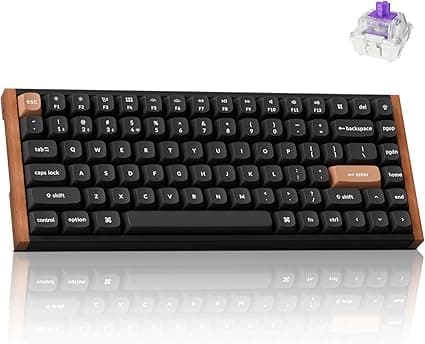
The Keychron K2 HE represents a fascinating evolution in the mechanical keyboard space, blending the beloved compact layout of the classic K2 with cutting-edge Hall Effect switch technology. Having spent the last two weeks with this keyboard as my daily driver across both productivity tasks and gaming sessions, I can confidently say that Keychron has created something genuinely special here. The Special Edition with its real wood side panels is not just a pretty face, and the Gateron Nebula Hall Effect switches bring performance characteristics that traditional mechanical switches simply cannot match.
Unboxing and First Impressions
The Keychron K2 HE arrives in a premium two-piece box that immediately signals this is no ordinary keyboard. Inside, the keyboard is nestled in foam with a braided USB-C cable, a keycap puller, a switch puller, extra replacement keycaps for both Mac and Windows layouts, and a quick start guide. The inclusion of both Mac and Windows keycap sets is a thoughtful touch that Keychron has become known for, and it speaks to their understanding of the cross-platform audience.
My first impression upon lifting the keyboard out of the box was the weight. At just over two pounds, the K2 HE feels substantial without being cumbersome. The Special Edition variant I tested features beautiful real wood side panels that give it a warm, natural aesthetic that stands out against the sea of aluminum and plastic keyboards on the market. The 75% layout strikes that perfect balance between compact desk footprint and having dedicated function keys and navigation cluster.
The build quality is immediately apparent. The aluminum frame provides excellent rigidity, and there is zero flex in the chassis even when I tried to twist it intentionally. The keycaps are OEM profile doubleshot PBT, which feel slightly textured to the touch and resist shine far better than ABS alternatives. The RGB backlighting shines through the legends cleanly, with per-key lighting that is vibrant without being garish. Keychron has included a north-facing LED orientation, which means compatibility with aftermarket cherry-profile keycap sets is excellent — no interference issues here.
Gateron Nebula Hall Effect Switches — The Star of the Show
The Gateron Nebula Hall Effect switches are the defining feature of the K2 HE, and they represent a genuine paradigm shift in how we think about mechanical keyboard switches. Unlike traditional mechanical switches that rely on physical metal contacts to register a keystroke, Hall Effect switches use magnets and sensors to detect actuation. This means there is no physical contact during the actuation process, which brings several transformative benefits.
The most immediately noticeable benefit is smoothness. These switches have absolutely zero scratchiness from the moment you start typing. Traditional linear switches, even factory-lubed ones, often have some level of metallic ping or scratchiness that only breaks in after weeks of use. The Nebula switches are pre-lubed from the factory with remarkable consistency, and because the actuation mechanism is contactless, there is no metal-on-metal rubbing to create scratchiness in the first place.
Durability is another headline feature. Traditional mechanical switches are typically rated for 50 to 100 million keystrokes. Hall Effect switches are rated for over 100 million keystrokes and realistically will last far longer because there are no physical contacts to wear out or oxidize over time. For a keyboard in this price range, that kind of longevity is exceptional value.
But the real magic is in the adjustable actuation. Traditional mechanical switches have a fixed actuation point — typically around 2mm for most linear switches. The Gateron Nebula switches in the K2 HE allow you to adjust the actuation point as low as 0.1mm and as high as 3.8mm. This is done through Keychron's software or on-the-fly through the keyboard itself, and it completely changes how you interact with the keyboard depending on the task at hand.
For gaming, setting the actuation to 0.1mm with rapid trigger enabled effectively eliminates the reset distance. This means that as soon as you start to release a key, it's ready to be pressed again. In fast-paced competitive games like Valorant or Overwatch, this translated to noticeably faster movement response. Strafe-canceling in Valorant felt snappier, and bhop sequences in CS2 were easier to execute consistently. The rapid trigger functionality is not just marketing hype — it genuinely provides a competitive advantage in games where milliseconds matter.
For typing, I found a 1.5mm actuation point to be the sweet spot. It is sensitive enough that typing feels effortless and light, but not so sensitive that I was accidentally triggering keys. The 0.1mm setting is genuinely too sensitive for typing in my experience — resting your fingers on the home row will register keystrokes. But having the flexibility to adjust per-key or per-profile means you can have your WASD keys set to 0.1mm for gaming while keeping your alphanumeric keys at a more comfortable 1.5mm for typing.
Build Quality and Design
The K2 HE Special Edition is a beautiful keyboard. The aluminum frame is available in a dark gray finish that matches the wood side panels perfectly. The wood panels themselves are real wood veneer, not a printed pattern, and they give the keyboard a distinctive look that I have not seen from any other keyboard manufacturer at this price point. Each unit will have slightly different wood grain patterns, which adds a nice element of uniqueness.
The 75% layout is my personal favorite for both productivity and gaming. It maintains the F-row which is essential for many productivity applications and games, while still having a significantly smaller footprint than a full-size keyboard. The navigation cluster (Home, End, Page Up, Page Down) is retained, which is crucial for document editing and coding. The arrow keys are in a standard inverted-T layout and are easily reachable without looking.
The keycaps are doubleshot PBT in OEM profile. They are thick and have a pleasant texture that resists fingerprints and oils. The legends are crisp and clean, and because they are doubleshot rather than pad-printed, they will never fade or wear off. The color scheme is a restrained dark gray with white legends, accented by a few orange escape and enter keys on the Special Edition. It looks professional enough for an office environment while still having enough personality to stand out on a gaming desk.
The keyboard has a function layer accessed via the Fn key that provides media controls, screen brightness, RGB controls, and keyboard shortcuts. The media controls are conveniently mapped to F7-F9 by default, and they work flawlessly on both Mac and Windows. The RGB lighting offers dozens of effects and color customization options, all adjustable through either the onboard controls or the software.
Connectivity and Wireless Performance
One area where the K2 HE excels is connectivity options. It supports wired USB-C, Bluetooth 5.1, and 2.4GHz wireless, giving you three distinct ways to connect depending on your needs. The Bluetooth connection supports up to three paired devices, and switching between them is as simple as pressing a key combination.
I tested the Bluetooth connection with both a MacBook Pro M5 and a Windows desktop, and the pairing process was straightforward on both platforms. The keyboard remembers paired devices even after power cycling, which is a nice convenience. Latency over Bluetooth was perfectly acceptable for typing and productivity work — I noticed no perceptible delay in my keystrokes appearing on screen.
For gaming, however, I strongly recommend using either the 2.4GHz dongle or wired USB-C. The 2.4GHz connection is stored in a magnetic compartment on the back of the keyboard, and it provides a latency experience indistinguishable from wired. I could not tell any difference between 2.4GHz and USB-C in terms of responsiveness during gaming sessions. The Bluetooth connection, while perfectly usable for typing, introduces just enough latency for competitive gaming that most players will prefer the faster options.
The battery life is excellent thanks to the 4,000mAh capacity. With RGB lighting set to a moderate brightness level of about 50 percent, I got roughly two weeks of mixed gaming and typing use between charges. With RGB turned off entirely, you can expect a month or more of regular use. Charging via USB-C takes about three hours to go from empty to full. The keyboard can be used while charging, which is a nice quality-of-life feature.
Gaming Performance
I put the K2 HE through its paces across a variety of gaming genres to get a comprehensive picture of its gaming capabilities. The adjustable actuation and rapid trigger features make this keyboard ideally suited for competitive first-person shooters, but it also performs admirably in other genres.
First-Person Shooters: In Valorant and CS2, the rapid trigger functionality truly shines. Being able to cancel a counter-strafe by barely lifting my finger was a revelation. The 0.1mm minimum actuation allowed me to jiggle-peek corners with minimal finger movement, and I felt genuinely more responsive than with my previous mechanical keyboard. The linear switches provide a consistent feel for flick shots, and the fast actuation made tapping in CS2 feel crisp and immediate.
MOBAs and RTS: In League of Legends and StarCraft II, the adjustable actuation is less critical but still beneficial. I set the actuation to around 1.2mm for ability keys, which allowed for rapid ability rotations without having to bottom out. The 75% layout provides enough keys for all the core controls in both genres, though MOBA players who heavily use F-keys for camera control may want to remap or use a separate numpad.
RPGs and Single-player Games: For games like Cyberpunk 2077 and Baldur's Gate 3, the K2 HE is a joy to use. The typing feel is excellent for dialogue choices and inventory management, and the linear switches are quiet enough that they won't distract from immersion. The RGB lighting adds ambiance without being distracting, and the comfortable key spacing means hours of gaming without finger fatigue.
Fighting Games: Street Fighter 6 and Tekken 8 both benefited from the rapid trigger functionality. Inputs felt crisp and clean, and I had no issues with missed inputs or double-registrations. The linear switches are well-suited to fighting games where quick, precise inputs are essential.
Typing Experience and Productivity
Despite its gaming-focused features, the K2 HE is an excellent typing keyboard. The Gateron Nebula linear switches have a smooth, consistent feel that is a pleasure to type on for extended periods. The pre-lubed switches have a subtle, pleasant sound profile — deeper and fuller than many stock linear switches, though not quite as rich as a well-lubed set of Cherry MX Blacks.
I typed approximately 8,000 words across various documents during my testing period, and the K2 HE was comfortable throughout. The OEM profile keycaps have a gentle sculpt that guides your fingers naturally to the correct keys, and the 75% layout means your mouse hand doesn't have to reach as far as it would with a full-size keyboard.
One area where the K2 HE falls slightly short for typing is the lack of a wrist rest included in the box. The keyboard is tall enough that most users will want a wrist rest for extended typing sessions. The good news is that Keychron sells a wooden wrist rest that matches the Special Edition's aesthetic, and any standard mechanical keyboard wrist rest will work fine.
For productivity work, the adjustable actuation is genuinely useful. I set my actuation to 2mm for typing — slightly deeper than my gaming profile — which gave me a more deliberate, confident typing feel. The ability to switch profiles on the fly means I can have one profile for typing, one for gaming, and one for general productivity, each with different actuation points and RGB settings.
Software and Customization
The Keychron K2 HE is supported by the VIA open-source configuration software, which is available for Windows, Mac, and Linux. VIA allows you to remap every key on the keyboard, create macros, adjust RGB lighting, and configure actuation points. The software detected the K2 HE immediately and loaded the default keymap without any issues.
Actuation point adjustment in VIA is straightforward. You can set the actuation point for individual keys, groups of keys, or the entire keyboard. The range from 0.1mm to 3.8mm is represented as a slider, and changes take effect immediately with no flashing or restart required. You can also set separate actuation points for the press and release of each key, which opens up creative possibilities for dual-function keys.
The rapid trigger feature is toggled globally in VIA. When enabled, the keyboard ignores the actuation point on key release and instead registers a release as soon as the key starts moving upward. This dramatically reduces the reset distance and is the primary reason the K2 HE feels so responsive in competitive gaming.
RGB customization in VIA is comprehensive, with per-key lighting, dozens of built-in effects, and the ability to create custom lighting patterns. The effects library includes everything from simple static colors to complex reactive animations. The per-key brightness is excellent, and the north-facing LEDs ensure compatibility with virtually all aftermarket keycap sets.
For users who prefer not to use software, the K2 HE has extensive onboard controls. A combination of the Fn key and various function row keys allows you to adjust actuation points, switch between up to three profiles, change RGB effects, and control media playback. The onboard controls are intuitive enough that I rarely needed to open VIA after my initial setup.
Competition and Alternatives
The K2 HE enters a crowded segment of the mechanical keyboard market, but its combination of Hall Effect switches, wireless connectivity, and compact layout makes it a unique offering. Let's compare it to some key competitors.
Keychron K2 Pro: The K2 Pro uses traditional Gateron mechanical switches and lacks Hall Effect technology. It is about $30 cheaper than the K2 HE. If you do not need adjustable actuation or rapid trigger, the K2 Pro is an excellent keyboard that is more affordable. However, once you experience the smoothness and responsiveness of Hall Effect switches, it is hard to go back.
Wooting 60HE: The Wooting 60HE is the gold standard for competitive gaming keyboards with Hall Effect switches. It offers even more granular actuation adjustment (0.1mm steps) and has a more extensive software suite. However, the Wooting is a 60% layout (no function row, no arrow keys), and it has no wireless connectivity. The K2 HE's 75% layout and triple connectivity make it a more versatile option for users who need both productivity and gaming capabilities.
Razer Huntsman Mini Analog: Razer's analog optical switches offer similar adjustable actuation but lack the smoothness of Hall Effect switches. The Huntsman Mini is a 60% layout and costs around the same as the K2 HE. Razer's software ecosystem is more polished but also more resource-intensive than VIA.
DrunkDeer G60: A budget-friendly Hall Effect option that offers many of the same features at a lower price point. However, the build quality and software experience are not on the same level as the K2 HE. The DrunkDeer is a good option if budget is the primary concern, but the K2 HE justifies its higher price with superior construction and more refined software.
Who Should Buy the Keychron K2 HE?
The Keychron K2 HE is a versatile keyboard that genuinely excels across multiple use cases. It is ideal for:
Competitive gamers who want every millisecond advantage they can get. The rapid trigger functionality and 0.1mm adjustable actuation provide measurable benefits in fast-paced games. The 75% layout gives you all the keys you need without wasting desk space.
Gamers who also work from home and need one keyboard that does everything well. The K2 HE's excellent typing experience and professional aesthetic make it appropriate for an office environment, while its gaming features are always ready when you clock out.
Mechanical keyboard enthusiasts who want to experience Hall Effect switch technology without committing to a 60% layout or a wired-only keyboard. The K2 HE offers basically all the benefits of Hall Effect switches in a familiar, practical form factor.
Users who frequently switch between Mac and Windows will appreciate that Keychron includes keycaps and default layouts for both platforms. The toggle switch on the side of the keyboard changes the function row behavior between OS layouts seamlessly.
Final Verdict
The Keychron K2 HE is an impressive achievement. It takes the beloved K2 formula — compact 75% layout, excellent build quality, cross-platform compatibility — and supercharges it with Hall Effect switch technology that genuinely improves both gaming and typing experiences. The Gateron Nebula switches are among the smoothest linear switches I have used in any keyboard at any price point, and the adjustable actuation and rapid trigger features are not gimmicks — they provide real, noticeable benefits.
The real wood side panels of the Special Edition give the keyboard a distinctive, premium look that stands out in a market dominated by aluminum unibody designs. The triple connectivity (USB-C, 2.4GHz, Bluetooth 5.1) means this keyboard works with virtually any device you own, and the 4,000mAh battery provides excellent wireless endurance.
There are minor drawbacks. The lack of an included wrist rest is disappointing at this price point. The proprietary Gateron Dual-Rail switch format limits hot-swap options to a smaller ecosystem than standard MX-style switches. The requirement to toggle the mode slider to wake the keyboard from sleep is a minor inconvenience. And the software-based actuation adjustment requiring a wired USB connection for initial setup is a limitation that affects the initial configuration experience.
But these are minor quibbles with a keyboard that otherwise delivers exceptional performance across the board. Whether you are a competitive gamer looking for every edge, a productivity user who wants a premium typing experience, or an enthusiast who simply appreciates well-engineered hardware, the Keychron K2 HE deserves serious consideration. It earns my strong recommendation and will remain on my desk as my daily driver.
Summary: The Keychron K2 HE combines a classic compact layout with cutting-edge Hall Effect switches to deliver a versatile keyboard that excels at both gaming and productivity. The Gateron Nebula switches are exceptionally smooth, the adjustable actuation and rapid trigger features provide genuine competitive advantages, and the build quality meets Keychron's typically high standards. If you are looking for a wireless mechanical keyboard that can handle everything from competitive gaming to extended typing sessions, this is one of the best options available in 2026.
Pros
- Excellent Gateron Nebula Hall effect switches with smooth, consistent feel
- Rapid trigger and adjustable 0.1mm actuation for competitive gaming
- Beautiful Special Edition design with real wood side panels
- Great typing sound with deep, thocky acoustics
- Triple connectivity: wired USB-C, 2.4GHz, Bluetooth 5.1
- Long battery life with 4,000mAh capacity
Cons
- Proprietary Gateron Dual-Rail switch format limits hot-swap options
- No volume knob at this price point
- Keyboard requires mode slider to wake from sleep
- Software changes require wired USB connection
- Only linear switches available, no tactile or clicky options
Final Verdict
Keychron delivers the best-value Hall effect keyboard on the market. The K2 HE brings magnetic switch technology with rapid trigger, adjustable actuation, and wireless connectivity to an accessible price point without compromising on typing feel or build quality.