ASUS ROG Swift OLED PG27UCDM Review: 4K 240Hz QD-OLED Gaming at Its Finest
The ASUS ROG Swift OLED PG27UCDM delivers 4K 240Hz QD-OLED gaming in a sharp 27-inch form factor with DisplayPort 2.1, 90W USB-C charging, and Dolby Vision support. It's the most feature-complete 27-inch gaming monitor available, though price and a finicky proximity sensor hold it back from perfection.
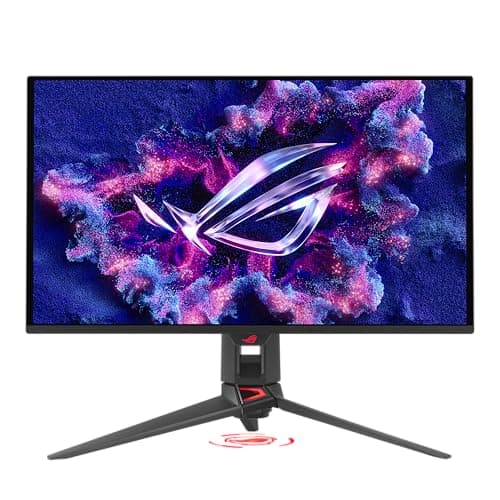
The gaming monitor market has reached an inflection point. For years, enthusiasts had to choose between high resolution and high refresh rates, between OLED's perfect blacks and the brightness needed for competitive play. The ASUS ROG Swift OLED PG27UCDM doesn't just bridge these gaps — it renders them irrelevant. This 27-inch 4K QD-OLED panel running at 240Hz represents the closest thing to a no-compromise gaming monitor we've seen in 2026, and after spending weeks with it across gaming, productivity, and content consumption, I can confidently say it changes the conversation around what a desktop display should be.
What Makes the PG27UCDM Special
The headline feature is immediately obvious from the spec sheet: this is a 27-inch 4K (3840x2160) display with a 240Hz refresh rate and 0.03ms response time, powered by Samsung's fourth-generation QD-OLED panel technology. But the real story here is the pixel density. At 166 pixels per inch, this monitor packs significantly more detail into every inch of screen real estate than the 32-inch 4K OLED alternatives (which sit around 138 PPI). That difference might sound minor on paper, but in practice, it transforms how games, text, and video look on your desk. The pixel density translates directly to perceived sharpness in a way that goes beyond specifications.
The fourth-gen QD-OLED panel brings meaningful improvements over its predecessors in several areas. Text clarity, historically a weak point for OLED monitors due to their triangular subpixel layouts, is dramatically better here. While eagle-eyed users can still spot the characteristic QD-OLED fringing if they really look for it on small white text against black backgrounds, the 166 PPI density masks most of it in everyday use. For the vast majority of buyers, this monitor looks as sharp as any high-end IPS panel for productivity work while delivering the kind of contrast and color that only OLED can produce.
Color performance is frankly exceptional right out of the box. ASUS factory-calibrates each unit to Delta E < 2, and in my testing, the Racing picture mode needed zero adjustments to look natural and accurate. The panel covers 99% of the DCI-P3 color gamut and delivers true 10-bit color depth, which means gradients are smooth without the color banding that plagues cheaper 8-bit+FRC panels. For anyone who does photo editing, design work, or content consumption alongside gaming, this is a monitor that pulls double duty without compromise.
Connectivity That Looks Forward
Where the PG27UCDM truly separates itself from the competition is in its connectivity options. This is one of the first monitors shipping with DisplayPort 2.1a UHBR20, which delivers a full 80Gbps of bandwidth. That matters because it means the monitor can drive 4K at 240Hz with full 10-bit color and HDR without relying on Display Stream Compression. There's no visual compromise, no compression artifacts, no fiddling with settings to hit the full refresh rate — it just works at full bandwidth.
The connectivity suite doesn't stop there. You get two HDMI 2.1 ports (48Gbps each) for consoles or secondary PCs, and a USB-C port that supports DisplayPort Alt Mode and delivers 90 watts of power delivery. That last feature is genuinely transformative for laptop users. I connected a MacBook Pro with a single USB-C cable and got video output, file transfer through the built-in USB hub, and charging all at once. It turns the monitor into a true docking station replacement, reducing cable clutter to a single wire for anyone using a laptop as their primary machine.
The built-in USB 3.2 hub adds three downstream ports and one upstream connection, making it easy to connect peripherals without reaching behind your PC tower. The KVM functionality works well too, letting you share a keyboard and mouse between two connected devices without manual cable swapping. This is the kind of thoughtful design that makes the PG27UCDM feel like a complete workstation solution rather than just another gaming panel with a flashy logo.
My one small complaint about the ports is that the USB-C connector is located on the rear I/O panel next to the DisplayPort rather than on the underside of the monitor. The Alienware AW2725Q places its USB-C port on the bottom edge for easy front access, which makes more sense for a port you'll plug and unplug regularly. On the ASUS, once you've routed your USB-C cable, you probably won't want to disturb it. It's not a dealbreaker by any stretch, but it's worth noting for desk setup planning.
Design and Build Quality
ASUS has gone with a refined, understated aesthetic for the PG27UCDM. The front is clean and minimal, with thin bezels measuring just 7mm on the top and sides. There's no brand logo visible from the front, no garish gamer styling — just an edge-to-edge glass panel that lets the image do the talking. The stand is cast metal and surprisingly heavy, providing a rock-solid foundation with zero wobble even when typing aggressively on a desk-mounted keyboard.
Ergonomics are fully featured: 120mm of height adjustment, 20 degrees of tilt, 30 degrees of swivel, and 90-degree pivot for portrait mode. Everything moves smoothly with firm detents at each stop point. The quick-release mechanism for the display panel makes VESA mounting straightforward, and ASUS includes the adapter plate and screws in the box, which is appreciated when compared to competitors that make you hunt for VESA hardware.
The back of the monitor is where ASUS lets its ROG branding show. A large illuminated ROG logo sits behind the panel in a reflective plastic diffuser, and the stand base includes a projector that casts the ROG emblem onto your desk surface. You can control both through Aura Sync software, though I found myself turning the lighting off after the first few days. It's a nice touch for those who want to show off their setup, but it doesn't detract from the overall clean appearance when disabled.
My one significant design critique is the stand's forked foot configuration. The two prongs extend forward from the base, which means the monitor can't sit flush against a wall or deep on a desk. For competitive gamers who play with low sensitivity and wide mouse swipes, this can be genuinely frustrating as the stand prongs intrude into mousepad space. The monitor does support VESA 100x100 mounts via an included adapter plate, so you can always swap to a monitor arm, but the default stand's footprint is worth factoring into your purchase decision.
Specs at a Glance
Before diving into real-world performance, let's get the technical foundation clear. The PG27UCDM uses a 26.5-inch fourth-generation QD-OLED panel with a native 4K resolution of 3840 by 2160 pixels. It runs at 240Hz with a 0.03ms gray-to-gray response time and supports both NVIDIA G-Sync and AMD FreeSync Premium Pro for variable refresh rate. The panel covers 99 percent of the DCI-P3 color space and achieves a peak HDR brightness of 1,000 nits in small highlights. It weighs 16.8 pounds with the stand attached and measures 24 by 21.6 by 8.6 inches on the desk. ASUS backs it with a three-year warranty that explicitly covers OLED burn-in, which is a meaningful differentiator in a category where long-term panel degradation remains a valid concern for buyers making a four-figure investment. The monitor draws about 48 watts at typical SDR brightness levels, making it reasonably efficient for a 4K OLED panel of this size.
Gaming Performance: Where It Shines
This is where the PG27UCDM justifies its price tag without reservation. The combination of 4K resolution, 240Hz refresh rate, and OLED response times creates a gaming experience that's genuinely hard to go back from. I tested across a wide range of titles including Cyberpunk 2077, Doom Eternal, Call of Duty: Black Ops 6, Baldur's Gate 3, and Valorant, and the monitor handled everything with authority.
Motion clarity is essentially perfect at high frame rates. The 0.03ms gray-to-gray response time means there's zero ghosting or smearing, even in fast-paced scenes where LCD monitors inevitably show some trailing. Combined with the 240Hz refresh rate, the image stays clean and resolved during rapid camera movements. Doom Eternal at 200+ FPS feels almost uncomfortably real — the combination of high pixel density and instant response makes the game world feel tactile in a way I haven't experienced on larger OLED monitors.
The 166 PPI density adds a level of detail that genuinely surprised me. In Cyberpunk 2077, fine textures on character faces, reflective surfaces, and environmental details render with a crispness that makes the game look noticeably sharper than on a 32-inch 4K panel. I went into this expecting the smaller size to feel less immersive for single-player RPGs, but the sharpness advantage more than compensates. For competitive titles like Valorant and Call of Duty, the denser pixel grid means you spot enemies at longer ranges more easily because fine details don't blend into neighboring pixels.
HDR performance is strong with some important caveats. The peak brightness hits 1,000 nits in a 3% window, which is enough for genuinely impactful highlights in games and movies. Explosions, sun glints, and neon signs pop with authority. Full-screen brightness is lower at around 250 nits, which is typical for OLED panels and fine for standard desktop use. What sets the PG27UCDM apart from most gaming monitors is its Dolby Vision support. I tested it with an Apple TV 4K playing Netflix content, and the monitor correctly handled Dolby Vision metadata, delivering noticeably better highlight detail and color grading than standard HDR10. This is a rare feature in the gaming monitor space and genuinely useful if you use the monitor for movies and TV in addition to gaming.
The monitor includes ASUS's Extreme Low Motion Blur (ELMB) technology, which functions as black frame insertion. It works up to 120Hz and can further reduce perceived motion blur, though I found it unnecessary at the high frame rates this panel handles natively. The Anti-Flicker 2.0 technology is more practically useful, as it compensates for luminance variations during VRR fluctuations and reduces flicker by about 20% compared to earlier OLED panels.
OLED Care Suite and the Neo Proximity Sensor
ASUS has implemented the most comprehensive OLED burn-in prevention system I've seen on any monitor, and they deserve recognition for taking longevity seriously. The suite includes automatic pixel cleaning triggered during standby, logo brightness adjustment that detects static elements, screen orbiter that shifts the image slightly on a periodic basis, boundary dimming for ultrawide or letterboxed content, and taskbar detection that dims the Windows taskbar area. All of these work in the background without any user intervention required.
The marquee feature is the Neo Proximity Sensor, an infrared sensor embedded in the rear ROG logo that detects when you leave your desk and automatically switches the display to a black screen. The idea is brilliant: instead of interrupting your gaming session with a pixel refresh popup, the monitor uses your absence to perform maintenance tasks. In practice, however, the implementation needs significant refinement. The sensor proved too aggressive during testing — it triggered mid-game when I sat particularly still during an intense multiplayer match, causing the screen to go black at a critical moment. Even after setting the timeout to its maximum option, the system remained unreliable enough that I disabled it completely after the second incident.
This is frustrating because the concept is exactly what the OLED monitor market needs. Every OLED owner knows the mild anxiety of seeing the pixel refresh prompt appear during an immersive gaming session. ASUS deserves credit for attempting a hardware-based solution, but the current implementation needs user-configurable sensitivity settings and better algorithms before it becomes genuinely useful rather than a novelty you turn off.
How It Stacks Up Against the Competition
The PG27UCDM uses Samsung's fourth-generation QD-OLED panel, which means it shares its core display characteristics with the Alienware AW2725Q and the MSI MPG 272URX QD-OLED X50. Raw image quality between these three monitors is essentially identical — they use the same Samsung panel, and the differences come down to features, build quality, firmware, and price.
The Alienware AW2725Q is the value king at $899, offering the same panel performance for $200 less than the ASUS. It has a cleaner design with the USB-C port on the underside for easier access, and its stand takes up less desk space without the forked prongs. For the majority of buyers who don't need 90W USB-C charging or Dolby Vision, this is the smarter purchase.
The MSI 272URX matches the ASUS at $1,099 but lacks the 90W USB-C power delivery and Dolby Vision support. Its OSD software is less polished, and the build quality doesn't feel as premium. The MSI has a slight edge in firmware stability, as users have reported fewer issues with its OLED care features compared to ASUS's initial firmware releases.
The PG27UCDM justifies its price premium through the 90W USB-C port with DP Alt Mode, Dolby Vision support, the (flawed but innovative) Neo Proximity Sensor, and ASUS's excellent DisplayWidget Center software. The 3-year warranty explicitly covers burn-in, which adds peace of mind that's hard to quantify but genuinely valuable for a purchase at this price point.
If you need the USB-C power delivery for a laptop workflow, or if Dolby Vision matters for your movie and TV consumption, the PG27UCDM earns the extra $200. If you just want the best 27-inch 4K OLED panel at the lowest price, the Alienware delivers the same core experience for significantly less.
Productivity and Daily Usability
This isn't just a gaming monitor — it's a genuinely excellent all-around display. The 166 PPI density makes text rendering exceptionally sharp, eliminating the subpixel fringing concerns that plagued earlier QD-OLED panels. I worked on this monitor for several days doing writing, coding, and photo editing, and I never once felt the need to switch to a secondary IPS panel for text-heavy work.
The DisplayWidget Center software is a genuine differentiator that deserves more attention. It mirrors the entire OSD in a desktop application, letting you adjust brightness, contrast, input selection, and picture modes with a mouse instead of fumbling with the rear joystick. More useful is the App Sync feature, which automatically switches picture modes when specific applications launch. I set it to switch to sRGB mode when opening Photoshop and back to Racing mode when launching Steam, and it worked seamlessly without any intervention.
The USB-C hub functionality with 90W charging is hard to overstate for laptop users. A single cable handles video, data, and charging, and the built-in KVM switch means I can toggle between my desktop PC and laptop with a button press on the monitor's joystick. This alone makes the PG27UCDM a strong contender for anyone building a multi-device desk setup, especially given how rare 90W USB-C PD is in gaming monitors at this price tier.
The Competition Deep Dive
The 27-inch 4K 240Hz QD-OLED category is the most competitive segment in high-end gaming monitors right now, so context matters. The Alienware AW2725Q launched at $899 and frequently dips below that during Dell sales events. It wins on price by a wide margin and delivers the exact same panel performance. Dell's build quality is excellent, the stand is more desk-friendly, and the underside USB-C port is better positioned for laptop users. If I were spending my own money and did not need 90W charging, I would buy the Alienware without hesitation.
The MSI MPG 272URX QD-OLED X50 matches the ASUS at $1,099 but offers slightly different value. MSI's firmware has been more stable in user reports, and their OLED Care 2.0 system is comparable to ASUS's suite. The lack of Dolby Vision is a real omission at this price level, and MSI's software is less polished. It falls into an awkward middle ground — priced with the ASUS but missing key features.
The LG 27GX790A-B UltraGear is a competing WOLED panel option at a similar price point. It uses LG Display's own OLED panel technology rather than Samsung's QD-OLED, which means better brightness uniformity and slightly different color characteristics. However, it lacks the color volume of QD-OLED and its text clarity is similar. The LG's main advantage is that it is available more frequently at discount prices during sales events.
For buyers considering a larger format, the 32-inch Samsung Odyssey OLED G8 G80SD offers a bigger screen at comparable specs but with lower pixel density (138 PPI) and a wider footprint. The larger size is better for immersive single-player games and movie watching, but the sharpness advantage of the 27-inch 4K panel is immediately visible in side-by-side comparisons, especially for text and UI elements.
Final Verdict and Recommendations
The ASUS ROG Swift OLED PG27UCDM is a genuinely impressive piece of hardware that represents the current peak of what a 27-inch gaming monitor can deliver in 2026. It combines the sharpest 4K QD-OLED panel available at this size with forward-looking connectivity including DisplayPort 2.1 and 90W USB-C, excellent factory color accuracy that rivals dedicated creative monitors, and software features like DisplayWidget Center with App Sync that genuinely improve the daily experience.
The Neo Proximity Sensor is more concept than finished feature and needs firmware refinement before it becomes truly useful. The stand design eats more desk space than ideal, especially for competitive gamers using large mouse pads. And the $1,099 price premium over the Alienware alternative is significant enough that you should have specific reasons for paying it.
But for the right buyer, this monitor delivers a complete, no-compromise experience that few competitors match. If you are a laptop user who needs single-cable 90W charging, a Dolby Vision enthusiast who wants the monitor to double as a TV replacement, or someone who values ASUS's software ecosystem for productivity and gaming, the PG27UCDM justifies its premium. For everyone else, the Alienware AW2725Q delivers essentially the same panel experience for $200 less. Either way, the 27-inch 4K 240Hz QD-OLED category is the sweet spot for desktop gaming in 2026, and having this level of choice between excellent options is a win for every gamer shopping for their next display.
For more gaming monitor options, read our reviews of the LG 45GX950A-B UltraGear for an ultra-wide OLED experience, and the LG UltraGear GX7 for a 4K OLED alternative.
Pros
- Stunning 4K QD-OLED picture quality with 166 PPI pixel density
- Industry-leading connectivity with DP 2.1 and 90W USB-C PD
- Dolby Vision support rare for gaming monitors
- Excellent out-of-box color accuracy with Delta E < 2
- Comprehensive OLED burn-in prevention suite with 3-year warranty
Cons
- Neo Proximity Sensor is overly aggressive and needs refinement
- No built-in speakers at this price point
- Forked stand design not ideal for competitive gaming setups
Final Verdict
The ASUS ROG Swift OLED PG27UCDM delivers 4K 240Hz QD-OLED gaming in a sharp 27-inch form factor with DisplayPort 2.1, 90W USB-C charging, and Dolby Vision support. It's the most feature-complete 27-inch gaming monitor available, though price and a finicky proximity sensor hold it back from perfection.